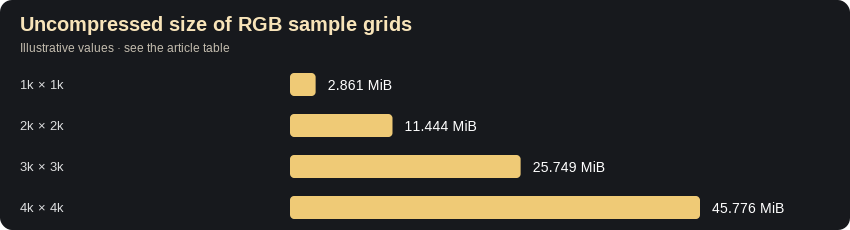
| Category | Value (MiB) |
|---|---|
| 1k × 1k | 2.861 |
| 2k × 2k | 11.444 |
| 3k × 3k | 25.749 |
| 4k × 4k | 45.776 |
Illustrative calculation, not observations from the linked source. Compute width × height × 3 / 1,048,576, excluding container overhead and compression.
The photograph arrives as a link in a message. It is a view of a woman at a portable table, pressing a label onto a wildflower specimen. On the phone you can see the flower, the fingers, the edge of a paper envelope. A caption gives a year. Several months later a researcher asks what the label says, and that is when the distinction between seeing the photograph and having it becomes unavoidable. The link serves a little image. In the little image there are eight blurry marks where there should be a handwritten collection number. The marks persist as the researcher zooms. What they do not do is turn back into the number.
Imagine instead that the archivist can call up both the small copy and a larger file made under a documented preservation workflow. The larger file still has the envelope and the photographer's imperfect framing. A crop reveals part of the number; the rest is genuinely undecipherable. The archive can state exactly that. It can also supply a new detail view, distinguish the original frame from the crop, and note that the year in the public caption came from an envelope rather than from the camera. None of this requires the public to wait for a giant scan every time the thumbnail is displayed.
There are three roles in that story, though there need not always be three different bitstreams. The native original is the file received from a camera, artist, or donor, or the physical object from which a capture starts. A preservation master is a designated long-term representation, not a promise that anything was improved. The access copy is an image built to be found, viewed, downloaded, printed at a specified size, or otherwise used without putting the retained material at risk. If a photographer donates a well-documented full-resolution TIFF and that exact TIFF satisfies the collecting policy, one retained file can be both the native digital original and the designated master. If a donor brings a negative and a thumb drive containing a crop, it may take a new capture before an independent master exists. The names are job descriptions, not extensions.
Start with what arrived, not with what opens fastest
At intake, the archive has an unusually good chance to record what it will otherwise spend decades guessing. A card reader might show a camera RAW file, an in-camera JPEG, and a text-like sidecar used by an editing application. Those items are not automatically interchangeable because they depict the same exposure. The raw file might carry sensor samples and camera-specific tags; the camera JPEG records a baked interpretation with a particular contrast profile, color treatment, and crop; the sidecar may say what someone did later. A screenshot of all three listed in a file manager is not a substitute for retaining the files, but a transfer inventory that associates them with the same work makes the collection intelligible.
Suppose a neighborhood museum receives twelve digitized prints from a family. One image has the source name DSC0041.JPG; another donor may send a different DSC0041.JPG next week. The museum should be able to keep the original naming information without making the filename bear the whole burden of identity. It can give the object an archive identifier, associate every version with that identifier, and record the name that each version had at delivery. To the researcher, those facts make possible a simple request: retrieve the source received for this particular photograph, not any one of the several images that inherited a camera counter.
Do not edit the only received copy even to fix something innocent. Rotating the file, changing its embedded date, or saving what appears to be the same picture from a viewer can change its bytes. That is why a copying workflow begins with an inventory, a digest of the received file, and a place where the preserved source will not be updated by a routine editing application. If timestamps are of interest, note which timestamps mean what. A computer's creation timestamp can be the date the image was copied onto that volume. It is not necessarily the day an exposure happened, and a camera timestamp can itself be wrong. Treat time from a donor, time from software metadata, and time from archive events as different claims.
Analog originals warrant their own custody and conservation. A color transparency does not become disposable because somebody scanned it well. A future capture may resolve something that the present camera or lighting system cannot. Recording the frame number, object condition, material, dimensions, and how a mount was handled gives a later operator an alternative to reverse engineering the scanner's choices. If a curled print could not be imaged flat safely, the archive should say so instead of digitally straightening it until the rendition seems to represent a measurement that was never made.
A folder from an artist poses a different problem. The creator may consider a particular exported JPEG the finished work, and the layered source the production material rather than the thing being accessioned as the work. The sensible answer is to record both roles where preservation and permission allow, not to decree that the largest file must be the work. A high-bit-depth composite that loses layer masks, fonts, linked objects, and blend choices may be an excellent fallback view of a design, but it will not carry the editable composition on its own. A comprehensive package can include the native project and dependencies allowed for retention as well as a separately identified final rendering.
Decide what the master should let you do
The Library of Congress's Recommended Formats Statement summary separates types of still-image works and gives format preferences in context. Its separate still-image preferences make a distinction that is useful even outside a large collection: look at how the image is encoded, including qualities affecting clarity, as well as the choice of container. This matters because saying “we put it in TIFF” tells a future reader very little about whether it has full native dimensions, whether colors have an interpretable source profile, or whether the TIFF holds a raster already damaged by a prior export. The two published guides are reference points, not substitutes for defining the job your own material needs done.
One workable goal for a master of a printed photograph is to represent the full face of the print, including the edges when meaningful, at a tested sampling rate with a specified tonal encoding. If there is a verso with a caption, that may be a second image with a relationship to the recto rather than metadata typed into the back of the first file. If a print is hinged to a handwritten album page, retaining the page context as a separate view may be as important as the detail of the photograph itself. An archive preserving the evidence of assembly should not use the same rubric as a publisher trying to fill a neat rectangle in a layout.
Picking a format is easier when you can name its required capabilities. A repository may choose a carefully specified TIFF variant for a straightforward raster master, including a policy about permitted compression, bit depth, profiles, and whether multiple pages belong in one file. Do not assume all TIFFs are simple to decode: some encodings, very large file variants, and exotic tags have thinner support in the tools a small collection actually runs. A test matrix that includes an independent reader, sample validation, and the ability to recreate outputs is more useful than an acronym treated as insurance.
PNG may be a plausible lossless container for some simple types of graphics; it is not a way to store a camera mosaic, an entire illustration's edit history, or every artifact of a complex source file. A RAW format needs a different conversation, since even those applications that can open it may not render its pixels identically. The demosaic algorithm, black-level treatment, white balance, lens corrections, and other defaults can change the visual reconstruction. A documented, well-supported rendered master can give you a reasonably consistent accessible baseline without asking you to discard the RAW. The costs of retaining both are tangible, but the two representations often protect different information.
The rule is not to abstain from all decisions at master creation. Capturing a painting involves decisions about lighting and exposure, and rendering a RAW file always requires some interpretation. The rule is to make those choices intelligible and limit irreversible choices to the intended role. A scanning operator may have to set white balance or correct uneven illumination in a documented calibration step. An exhibition designer's decision to warm the same scene for a wall panel is a different kind of action. Put the two in different branches of the photograph's history. When there is a strong reason to keep a master with significant alterations, keep the baseline as a separately retrievable version as well.
There is also a difference between creating a master and acknowledging a last surviving source. If the only remaining copy of an incident photograph is an old JPEG, keeping its exact original bytes is sound preservation. The format may be lossy, but a successor file with lossless compression cannot reconstruct the information discarded by the old encoder. Converting the JPEG to TIFF can still be useful as a working step when another edit is authorized, since it avoids re-encoding with another lossy stage before the edit is made. The inventory should distinguish the unmodified surviving JPEG from the newly created derivative instead of certifying that the latter somehow preserves a richer original.
Put the ruler on the source
Pixel count is the quickest property to measure and one of the easiest to misread. A five-by-seven-inch print sampled nominally at 600 pixels per inch would give approximately 3,000 by 4,200 pixels of print area in a square-pixel capture. That is an expectation to compare with the actual file and the measured area, not an invariant: borders, masks, magnification, rotation, and document curvature can change the dimensions or the effective sampling. With an appropriate ruler or imaging target captured in the same plane, a technician can compare one known physical length against the number of pixels representing it. If the ruler is tilted or on a step above the paper, the calibration is not adequate evidence about a detail in the paper's plane.
A value of 600 written in an image metadata field does not create any picture information. If an export keeps 3,000 pixels across but changes the nominal display or print resolution from 600 to 300 pixels per inch, a printer that reads the value may change the intended printed width from five to ten inches. The grid of samples has not changed. If a resampling operation instead creates 6,000 values across, you did create more samples in the file, but most of those new values were estimated from the original samples. Resampling may be visually useful; it does not double your evidence about the original print. Comparing before and after width, height, and the documented operation distinguishes all three cases.
For an 8-bit RGB image with three channels and no alpha, the uncompressed sample grid takes three bytes per pixel. A square grid of 1,000 pixels on a side contains 3,000,000 bytes, or about 2.861 MiB. At 2,000 pixels on a side it is about 11.444 MiB, at 3,000 it is about 25.749 MiB, and at 4,000 it is about 45.776 MiB. These figures come from width times height times three, divided by 1,048,576; they are not test measurements or figures drawn from the Library of Congress. The important part is the growth: doubling both axes makes four times as many pixels. Doubling sample precision from eight to sixteen bits per channel, with the same channel count and straightforward packing, doubles the grid again. Containers, metadata, extra channels, compression and internal padding make actual file sizes a separate question.
For an archive of small photo prints, this math helps estimate capacity before a digitization contract. It does not settle the minimum acceptable sampling rate. A shiny print shot slightly out of focus can give you the right dimensions and a large TIFF, yet none of those facts rescue the brush strokes or lettering it failed to resolve. Higher sampling can be worth it with a negative rich in small detail; for another object you may simply produce a larger representation of smooth material or film grain. The Federal Agencies Digital Guidelines Initiative's still-image technical guidelines connect capture practice with evaluation targets and software. Their material-specific framework is a better example than a single magic number applied across every medium.
A practical visual check needs a full-frame overview and selected views at actual pixel scale. At overview scale check framing, skew, reflections, wrong side of the object, wrong light, and obvious clipping. At pixel scale look for actual local detail, focus at center and corners where those regions are significant, scratches or dust introduced during capture, and banding or discontinuities. A table copy photographed with the camera slightly out of parallel can look plausible at the center and unreadable near one edge. The single best-looking square in the image does not certify the field.
Colors need a definition, not a guess
The pixels of a digital photograph have numbers. The numbers alone do not tell a display precisely which colors to show. A triplet such as red 130, green 90, blue 36 can mean different things depending on the source encoding. With an embedded color profile, a color-managed viewer can interpret that source encoding and transform the image for the viewing device. The International Color Consortium's description of profile embedding explains that the embedding mechanism is defined by the format carrying the image. A file may have an embedded profile, a format-specific declaration of a standard color space, or no reliable description at all. A responsible inspection records what is actually there, not what seems likely given the file extension.
Two common buttons in image software are close enough in wording to cause a surprising number of mistakes. Assigning a source profile generally changes how existing values are interpreted; it does not have to alter the pixel numbers. Converting from a known source to a destination profile calculates new values in an attempt to retain the colors under the destination encoding, subject to what the destination can express. The ICC's color management FAQ discusses profile-based transformations in practice. Imagine a deposit of flower portraits tagged with a wider RGB encoding and headed for a small web gallery in sRGB. Merely swapping the wider profile for sRGB can change the appearance in some viewers even though a test comparing raw RGB samples reports no change. An intentional conversion sets an entirely different expectation: samples can legitimately change in a comparison, and very saturated petal colors in particular may not fit the smaller gamut.
When preparing a master from a known encoding, retain the correct profile, or document and verify a deliberate transform to a defined master encoding. Do not convert everything to a standard output space and then recover the profile from the original to embed in the output; it would identify the wrong data. When the source is untagged, look for reliable evidence outside the raster, such as documented export settings, a known and consistent capture workflow, or an unambiguous format color declaration. Make no silent assignment just to make a file pass inspection. If interpretation remains provisional, keep the original unchanged and record the assumption used for the rendered copy. An archivist who admits the uncertainty leaves a later archivist a place to begin.
Color viewing and color measurement are separate. A yellowish screen can make a neutral file appear warmer; a badly illuminated capture can look agreeable on a monitor set the opposite way. For material where color matters, a known capture target and stable equipment give you a repeatable check, and a reasonably controlled viewing setup gives you a better basis for judgment. Neither turns a photograph into a spectral measurement. Ink that matches under one illuminant may look different under another, and a textured surface can reflect light differently with viewing angle. Write down what you captured and how; do not claim that a single color rendering reproduces appearance under every light.
A master file also needs consideration of quantization and clipping. Eight bits per channel encode 256 available code values per channel; sixteen bits allow 65,536 before any question of whether the device resolved that much tonal information. More code values can help during transformations, but assigning a larger number of bits to an already quantized image does not recover its missing tones. Check visual gradients and meaningful highlight and shadow regions in addition to the bit-depth report. A specular highlight that clips may be an unavoidable reflection; a clipped patch of important paper texture is a different matter. Decide which category applies from the object and the capture, not from a blanket ban on saturated samples.
Metadata tools can report a color space label from more than one place. If the file is tagged with an embedded profile but another field claims a different space, investigate the actual test render and the workflow before blessing the output. One application may give priority to the authoritative embedded record while another ignores it. A validation script that tests for the presence of any string containing the word color can therefore pass an unusable file. A better policy identifies the profile or encoding expected for that role, extracts evidence using a tool that understands the format, and confirms behavior in more than one relevant viewer.
Let the access copy earn its place
Public delivery wants a different set of compromises. A museum object page may need a small preview inside a search result, a reasonable full-image view on an ordinary phone, and a zoomable detail for someone doing research. Those are not three competing masters. A public-access system can hold several derivatives, each explicitly tied to the same underlying version. If the collection deals with portraits, one especially telling choice is whether a square search thumbnail crops faces, pads the frame, or trusts a curator-approved focal point. None of those policies must change the full reference view. Keeping roles separate makes it possible to improve search without redrawing the archive.
Start from a chosen master or an explicitly approved edited version, not from the smallest derivative you already have on hand. Read image orientation, apply it if the output needs orientation baked into the raster, then set the new orientation metadata consistently. Use an appropriate resampling method and preserve the original aspect ratio unless a particular crop is intended. A wide 6,000 by 4,000 image reduced to 1,500 by 1,000 still has the same ratio; making it 1,500 by 1,500 by stretching gives the appearance of a square composition that did not exist. If a square rendition is required, choose and document a crop or add margins. For before-and-after documentation distinguish raw stored dimensions from display dimensions after orientation; otherwise a legitimate rotation looks like a defect.
Encoding choice depends on the sort of loss users will notice. In a detailed photograph, the cost of a mild JPEG compression setting may be acceptable in a default web view, whereas a scan of a diagram with one-pixel letters can reveal ringing or blocks around edges. A black line viewed against a white field is not the hardest possible test: add tiny colored annotation over a contrasting patch and see whether it remains distinguishable in the served size. A web format that supports transparency may preserve the edges of a cutout without baking them against an assumed white background. If you deliberately flatten to a background, record which background and confirm the result in context; a translucent halo may be invisible on the default viewer and obvious on a dark page.
There is seldom a universal rule that one web format or encoder setting is best. Tune to the route, view and clients that matter, then test actual delivered bytes. Websites and image proxies may negotiate types, rescale files, remove profile data, cache old crops, or standardize dimensions. A publication API can say success while a user sees yesterday's derivative. Validate the URL that the visitor will open, and separately validate the downloadable file if the site offers a print or research copy. If several variants are returned to different clients, compare each supported variant with its declared recipe. In a color-sensitive gallery, do not let the platform convert or strip definitions without verifying the result.
A successful small file is not just a lower byte count. It includes context. Give the viewer a stable object identifier, caption, readable alt text where the interface calls for it, and a label for the rendition if the difference is substantive. An image of the back of a print should have a convincing relationship to the front without pretending it is the same view. When a narrow crop omits a companion figure or a handwritten attribution, naming the crop can prevent a real misunderstanding. Accessibility text belongs in the system that serves the image, and it is worth preserving in the catalog even if no embedded metadata reaches the browser.
Make edits discoverable, including the boring ones
Provenance is not merely an author credit and a date printed at the bottom. It is the record of which input and which procedure produced which output, who or what authorized the work, and whether the intended action succeeded. The PREMIS Data Dictionary gives institutions a structured way to think about digital objects and preservation events. A volunteer archive does not need a full PREMIS implementation before it can write an honest conversion log. It can start with source and output identifiers, timestamp, action and software version, operator or service, settings, an outcome, and a place to record exceptions. The difference between an orderly folder and a reconstructible archive is often that modest extra record.
Consider an image straightened by one and a half degrees, cropped to remove black scanner margins, and adjusted to bring faint handwriting into view. A useful log separates those steps: rotation with resampling, crop with coordinates relative to the rotated frame, tonal adjustment to make a reading derivative, and destination encoding with whatever profile was embedded. If pixels are altered, retain the resulting output as a different version with the process noted. When a researcher later wants to check that a faint mark was already present, the baseline exists. For a routine web export, the log can summarize a reusable service recipe instead of requiring a human to type the same settings for every file.
Be precise about the line between restoration and reconstruction. Removing dust visible only on a scanner platen is not the same as removing a dark spot from the print itself. A tool that fabricates clean content behind a rip can make an exhibition image easier to see, but its invented content is not evidence about what the original looked like. A visibly reconstructed view can be valuable when the alterations are apparent and the preserved baseline is easy to reach. A correction that turns a blurred field number into a plausible-looking number is not additional evidence. Classification of edits belongs in access labels as well as in internal logs when a viewer might otherwise draw the wrong conclusion.
Sometimes the only edit is a metadata edit. Adding a rights note or correcting a creator attribution may leave the pixel array unchanged while changing the bytes and the interpretation of the object. Prefer an external catalog correction where there is a need to keep the original file untouched. If you embed the revised notice into a derivative, version it and log the change. Conversely, deduplication tools should not merge two things merely because they produce the same pixels. A donated exact copy and a later acquisition of the same image can have distinct custody histories. The storage layer can avoid holding byte-identical payloads twice without eliminating either record of receipt.
Public copies also have a place in a privacy review. A beautiful derivative can carry coordinates or contact information its owner never meant to put on the public web. An image of a plant population can leak its precise location through a camera tag even if the location is removed from the caption. Sometimes the sensitive information is visible in the pixels, such as a current address on a photographer's label. Review the actual derivative for both kinds of disclosure. When a public version removes information, keep the protected original according to policy and describe the restriction without republishing the private details through a catalog field or a filename. A copy can be faithfully labeled without being publicly identical.
Descriptions themselves need provenance. If a family member says the flower was picked in 1972, an envelope says 1974, and a later catalog says only “early 1970s,” the system should not quietly promote whichever date looks cleanest. Store uncertain or competing attributions in whatever form the catalog supports, with sources distinguished. Keep the public display useful, but do not force uncertainty out of the record to fit an interface. This is why a new crop and a changed caption should be represented as different events: the caption can improve without implying that the visual source has changed.
Test four different promises
A reliable audit answers distinct questions with distinct checks. The first promise is fixity: is this file still the same series of bytes as the one recorded at ingest or at the release of this version? Compute a cryptographic digest such as SHA-256 close to the transfer, compare it after copying, retain the manifest where it cannot be silently overwritten with the image, and repeat the check at intervals your collection can support. If two replicas disagree, do not overwrite the good one just because the corrupt one is newer. Compare both to the established reference and use a verified replica to repair the other, recording the event. A digest is helpful precisely because it makes that decision independent of the filename and of which thumbnail happens to look right.
The second promise is conformance: does the file meet the technical requirements for its declared role? Record container and encoding, dimensions, channel count, bit depth, compression, frame or page count, orientation and color interpretation as relevant. Try decoding the full image; an intact header is not proof the rest can be read. For a migration expected to leave a conventional raster unchanged, compare decoded sample arrays with explicit channel order and a consistent orientation and precision. Then separately compare metadata of consequence. Identical arrays do not demonstrate equivalent color interpretation if a profile disappeared, and identical byte hashes are not expected when the same raster is packed into a different container. Conversely, a change in the file digest after a documented metadata update is not automatically corruption.
The third promise is faithful capture. No byte comparison between archive copies can show that both are an accurate record of a print. Inspect against the source or the accepted capture reference and review targets and workflow records. If a neutral patch is visibly tinted, reproduce the conditions and examine the capture pipeline before deciding it is a defect in the physical object. If the right edge is absent, establish whether the source was genuinely obscured or whether the camera framing failed. If capture quality can no longer be assessed against the original, say so in the record; a file that passes conformance does not become a ground truth image by default.
The fourth promise is usable delivery. Open what your visitor actually gets, including on the slow or small screen for which the derivative was designed. Verify that the image belongs to the right object, photography is usable at the intended viewing size, the caption is attached to the right component, and rendered orientation and geometry match the policy. Check that viewers can reach any high-resolution rendition that the page advertises. A link labelled full-resolution need not distribute the archive master, but it should deliver the stated authorized dimensions. An integrity audit of the private repository cannot provide these assurance checks for a separate public system.
Most small archives can test all four promises without reading every file manually. Check structural properties and fixity in bulk, then build a visual review sample that includes suspect files as well as routine ones. Include first and last captures of a photographing session, difficult reflective images, extreme aspect ratios, examples with new equipment or unfamiliar encoders, and any cases a validator flagged. Record how the sample was selected; a hand-picked set of your best photographs is not a meaningful release audit. Choose when the failure of one test triggers inspection of every file from the same session. If one batch used the wrong profile, it is usually more informative to look for the shared configuration error than treat the first pink-looking image as an isolated accident.
Rebuild one record before you trust a thousand
Use an ordinary image, not your most photogenic example, for a rehearsal. A postcard with a faded edge, a paper mount, and a detail too small to read in the search list makes an effective trial. Inventory the postcard and receive or capture the source. Make a controlled full view and associate a separate back view with it. Choose a master that retains the cut edge, label any uncertain colors or inscriptions, generate the search thumbnail and a larger full view, and give the website a caption that states when the postcard was described rather than implying that date is the day the original photograph was taken. Do a clean export after deliberately disabling the editing application's automatic enhancement so you have a baseline for comparing what the enhancement would otherwise change.
Now simulate the problem the archive is meant to prevent. Give a second operator the collection identifier, the manifest, the stored source and version records, and the written access recipe. Tell them the old delivery system no longer exists. Can they verify that the master is intact, find the right back view, recreate the expected dimensions and color, and determine whether the currently published crop cuts off a stamp? Do not require byte-identical reproduction of a lossy derivative after an encoder upgrade unless the recipe deliberately fixes the exact build and its behavior. A reasonable acceptance test may establish the correct source, framing, target color encoding, display dimensions and approximate visual effect. If a particular prior rendition matters as a published record, keep that exact rendition too rather than relying exclusively on reconstruction.
Try another failure scenario before considering the job done. Imagine that the primary repository refuses to open one master and an offsite copy is available. Can the item be restored without losing its sidecar, the relationships that associate its views, or the recorded rights state? A backup that restores orphaned images is not a full recovery. A copied catalog that refers to absent assets fares no better. Restoring a small complete package forces the archive to find these mismatches while someone still remembers how the original ingest worked. Make the person doing the exercise write down what was missing, not merely declare the files copied. That list is the next improvement plan.
The result is not a larger pile of images for its own sake. It is a collection in which the small photograph can do its job quickly, and the archive can still tell a researcher what was received, how it was transformed, and where the remaining evidence lives. In the wildflower photograph, the smallest view can show the activity of labeling; a larger master can reveal which marks were there to begin with. Neither tells you what the blurred marks should have said. An archive succeeds when it can make that distinction clear without asking the researcher to inherit the machinery that originally made the picture.
Sources
- Library of Congress: Recommended Formats Statement, summary
- Library of Congress: Preferences in Summary for Still Image Content
- Federal Agencies Digital Guidelines Initiative: Technical Guidelines for Digitizing Cultural Heritage Materials
- International Color Consortium: Embedding ICC Profiles
- International Color Consortium: Frequently Asked Questions
- Library of Congress: PREMIS Data Dictionary, version 3.0