
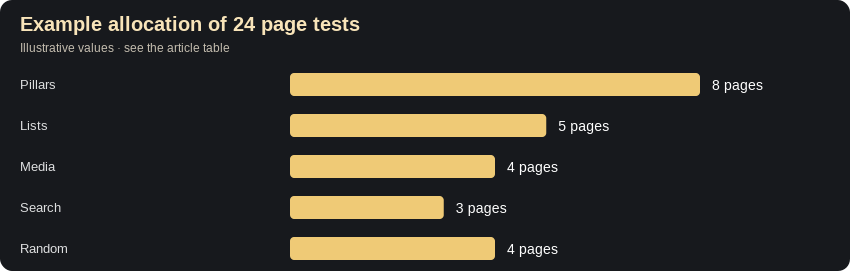
| Category | Value (pages) |
|---|---|
| Pillars | 8 |
| Lists | 5 |
| Media | 4 |
| Search | 3 |
| Random | 4 |
Illustrative calculation (not sourced observations). Illustrative allocation, not required by W3C and not a conformance estimate. Allocation sums to 24.
An editor opens a new feature about a restored creek. The article has clean headings, a legible chart, and a link to the underlying observations. The same reader follows that link and arrives at a filtered archive where the search results update without making the change apparent. They try the map, discover that the only useful control demands a drag, and return to the feature using the browser Back button. The article is still attractive. The publication has nevertheless lost the reader somewhere between three templates. An audit organized as a list of inspected articles would make that loss hard to see.
A useful matrix has more than one axis. It records what was selected from the publication, which behaviors and contexts were checked on that selection, and what evidence supports each outcome. The object of interest is not the spreadsheet. It is the relationship between a claim and the places where somebody actually tried to use the product. Once that relationship is recorded, a reviewer can say where a defect repeats, a developer can rerun the steps, and an editor can tell which parts of the next release still require attention.
The central editorial decision is to separate selection from evaluation. A page may be in the sample because of a particular feature, but that does not mean every other relevant behavior on that page was evaluated. Conversely, checking multiple behaviors on the same page does not add multiple pages to the sample. Making both distinctions explicit will prevent the most plausible looking figures in the report from becoming the least informative.
The two main references serve different purposes. WCAG Evaluation Methodology 2.0 is a W3C Group Note with an informative evaluation process. WCAG 2.2 is a Recommendation that supplies the normative criteria and conformance requirements. This article proposes an internal audit ledger and a fictitious sample. Neither its layout nor the selection numbers are requirements from either document. Keep that distinction on the summary page as well as in the methodological notes.
Put a concrete boundary around the publication
Start with a reader's account of what the product is. The hostname alone will not establish the right boundary. An archive may live on a separate hostname, a chart may load from a vendor, and a downloadable document may contain the only version of a protocol. An asset on another system may be central to finishing a task. At the same time, a linked university catalog is something readers visit after leaving the publication; it need not be counted as one of the publication's templates. Record the boundary based on the task, identify where control of the interface changes, and do not remove a dependency from a test just because another organization owns its code.
Imagine a publisher with three article generations, a collection landing page, a topic index, a search view, a choice of media players, and a small public library of downloadable field sheets. The old articles use a short, fixed masthead. The newer articles use sticky chapter navigation and expandable source notes. The latest essays embed video and figures. All three present the same branding. Counting this as one article template because the URL routes match would hide the very differences the audit is meant to discover.
Write down what was accessible to the team when collecting the evidence. Name the deployed revision or snapshot, any test environment used, and the audit period. State whether the work covered anonymous readers only, or also covered a saved search or subscription flow. Include the published and test domains separately if they differ. Note whether a meaningful interface is conditioned on language selection, consent state, device width, account state, or a feature flag. A test on a preview version can be valuable, but it is not evidence that the same thing was fixed for public readers.
A good scope record leaves room for tensions. Suppose a single route serves two frontend layouts during a gradual rollout. Choose a way to identify the variant in the evidence and test both if both are in scope. If the team can see only one version, note that the other was not examined and state whether it is known to be in use or merely possible. Do not write “all article views” in the result and tuck the uncertainty into an internal ticket. The report should reflect what a future reviewer could reproduce.
Give exclusions a reason and a consequence. “No authenticated publisher console: reader-facing audit only” is better than “admin out.” Likewise, “the linked mapping service was inspected until the public resource began loading; interaction with the provider's stand-alone app was not evaluated” says more than “third-party excluded.” A boundary can hold both statements: the team looked at the handoff, and the end product is outside its authority. If readers cannot complete the task without that end product, state that it was not shown to be completable through the handoff.
Decide what counts as a tested unit before anyone starts collecting. A URL is a useful identifier, but a view is not always identical to a URL. For this example, a counted page is a distinct public page or identified view with a canonical audit record. Reading, filtering, and returning inside that view are recorded as states or journey steps. A distinct search-results view may deserve a separate sample entry; typing three different searches that render the same underlying view does not automatically supply three independent samples. State explicitly how duplicates and variations will be counted, and preserve the underlying cases even when a summary places them on the same line.
Build a selection ledger rather than a directory listing
The first useful worksheet contains the candidate inventory. Give each candidate a stable key, the current path, a template family and variant, and a brief explanation of what a reader can do there. Add tags for shared components, dynamic behaviors, content formats, and known oddities. Keep a route that is still linked but no longer promoted. In a ten-year publication, a legacy layout can be both unpopular relative to the front page and likely to surface first for a very specific search query. Traffic helps the allocation, but it does not define what matters.
An article can be flagged as long-form, media-bearing, and reachable through search at the same time. Those are tags, not three counted page tests. Introduce a primary selection bucket for reporting and as many secondary tags as the evidence justifies. If an article was chosen because its video player represents the only instance of a particular vendor widget, list it in Media while retaining its article tag. A team can then see where articles occur without accidentally reporting a larger sample than it selected.
The inventory should make both common and exceptional patterns easy to find. Record the shared header and footer, but distinguish instances that look alike and behave differently. A navigation control may appear across the publication, while only the article rendition duplicates it inside a side drawer at narrow widths. If the component is technically shared but receives different attributes or IDs from different templates, that difference belongs in the inventory. Otherwise, the component column merely summarizes a design system that the browser does not actually encounter.
For rich articles, classify the source of variation. A multi-level contents list is a template feature. An author's poorly ordered headings are a content variation. A chart loaded late with interactive filters is a runtime feature. Those three can occur on one page, and a single inspection could reveal issues in each of them. The remedy and the possible scope differ: changing the layout, correcting an article, or modifying a chart behavior are not interchangeable actions. These classifications become useful when choosing the next sample after a regression.
Create a second sheet for essential reader journeys. “Read an article” is too broad to produce actionable evidence. “Find the latest field protocol using search, narrow to printable material, open the result, read the accessible instructions, and return to the filtered results” gives the tester a beginning, decisions to make, and a recognizable endpoint. As a complementary journey, start at an outside search result so the visitor skips the landing page and must orient themselves on a deep article. To the editorial team those are both paths through the same publication; to a new reader they expose different navigation assumptions.
Distinguish shared destination pages from journey evidence. If two journeys both visit the same article, keep one candidate entry for the article and two journey steps that refer to it. The entry can supply common observations such as headings and language. The step can supply path-specific observations such as whether focus is restored after returning from a document. This representation lets investigators change the sample without accidentally deleting a complete process from a report.
Read the 24-page example as a budget
The chart shows a made-up allocation of twenty-four page tests: eight editorial pillars, five lists, four media cases, three search views, and four random selections. The first four bars describe the primary reason the team deliberately selected twenty pages. The last describes a selection method, not a fifth kind of editorial template. Add the five figures to get twenty-four. Their meaning does not extend beyond that arithmetic and the example design. They are not W3C quotas, observed results, defect counts, a confidence interval, or evidence of conformance.
An editor might spend the eight pillar slots on a pair of older stories, four recent variants, and two substantial reference pieces. Select cases with genuinely different contents or behaviors: a very long title, an unusually deep hierarchy, an article with multiple footnotes, and a mobile layout uncomfortably dense with controls. If the first eight articles happen to look the same, they are likely to offer less evidence than eight deliberately varied article cases. Do not chase extremes alone. Readers also need the ordinary experience to work, and the regular version is often the basis for later spot checks.
The five list examples could include a topic page, a chronological archive, a grouped index, a page with pagination, and a combined topic-and-date filter. The four media tests might be a captioned recording, a chart with a data alternative, a downloadable field sheet, and a gallery with individual image descriptions. The three search views could be the initial search screen, a populated results view with meaningful filtering, and a no-results view with a next step. That is one credible inventory, not a hidden specification of the pictured publication. The metadata should tell a reader exactly what qualified each case for its own slot.
Select the random cases after fixing the eligible frame. For a reproducible internal design, enumerate in-scope candidates, record the date and exclusions, deduplicate canonical views where the chosen unit demands it, and draw from eligible pages not already selected in the structured group. Record the draw separately from a substitute; if a selected page is unreachable or removed, preserve the original result and explain the replacement. The four random pages could all happen to be lists. They would remain in the Random selection bucket and also receive the Lists tag, which prevents the report from pretending that the random draw introduced four new patterns.
Small random supplements are useful for discovery, not magic protection against sampling bias. In the example, the selected pages might miss a rare or newly introduced layout, and the coverage matrix must say so. A site with multiple languages may need an explicit case for a localized template; hoping that four random pages include it is a poor substitute for intentional exploration. If random cases reveal a feature absent from the structured selection, investigate that mismatch, update the inventory, and explain whether the new case triggered an expansion. Do not silently move it out of Random and give the planned sample retrospective credit for discovering it.
Most importantly, headcount does not take precedence over complete processes. If the protocol journey needs a download confirmation screen not represented by the original three search cases, add the screen or state and report the expanded work. If the useful route spans two variants and a consent screen, record both paths where they affect the task. A tidy number can be useful for planning a small team's first audit. It should not force the team to stop immediately before a reader's task would fail.
Use a second matrix for execution
Assigned cases now need a test plan. In the execution ledger, start with the audit key, target behavior, environment, and outcome. Record actions, expected behavior, observed behavior, evidence, and any criterion for which the evidence is relevant. One unit of work may produce more than one row. For example, tabbing to a chapter link establishes whether it can receive keyboard focus, while comparing that position with a sticky header checks whether a focused element is obscured. Record them separately when the observations differ; a keyboard-accessible link can be obscured at the same time.
A compact team might start with the following columns. Store severe issues and reusable evidence in a case record rather than pasting twelve identical screenshots into cells.
| Field | Why keep it |
|---|---|
| Sample key and state | Connect the result to one known version of one selected case |
| Process and step | Separate failure during navigation from failure in the destination alone |
| Environment | Specify browser, operating system, input, viewport, and assistive technology where used |
| Expected reader outcome | Say what a reader should be able to do without specifying one arbitrary implementation |
| Observed result | Preserve failure, pass, not applicable, not run, blocked, or inconclusive separately |
| Evidence and linked issue | Let a new tester reproduce the issue and trace a fix |
| Criterion or audit goal | Keep a tested accessibility requirement distinct from a recommendation |
Choose expected outcomes in language a reader would recognize. For a paginated archive, “reach a later page and remain oriented to the newly displayed results using the keyboard” is more useful than “pagination focus fixed.” An implementation can accomplish the outcome in different ways. For a media view, “learn who is speaking and what essential action occurs, without relying on a sensory channel that the chosen test withholds” sets a meaningful task. Then use the relevant requirements to distinguish captions, descriptions, or alternatives, rather than assigning a generic “media pass.”
Use enough environment detail to reproduce the result, without pretending the environments constitute all possible experiences. On the worksheet, “desktop” or “screen reader” is insufficient. A useful record might include a digital product revision, browser name and version, desktop operating system version, a named screen-reader pair, and a narrow layout check with a recorded viewport and zoom. A screen reader can announce a partial result differently depending on the browser, the control, and what else is on screen. Variations are evidence to investigate, not results to average into one undifferentiated pass.
Maintain an accessibility support baseline and explain its purpose. The baseline identifies contexts in which this evaluation will examine the technologies the product relies on. It is not a product instruction telling people which tools they are allowed to use. Select environments that represent important ways your readers engage and that meaningfully exercise the product, and consider what is left out. A keyboard-only check cannot establish a touch experience; a screen reader test on desktop cannot stand in for every mobile implementation. It can still provide reproducible evidence within its scope.
Be clear when a test inspects a property and when it inspects behavior. A heading level in a browser accessibility tree tells you how an element is exposed in that environment. It does not show whether the heading makes sense to a reader or gives enough context to choose the right section. Testing a breadcrumb visually does not establish whether a user can use it with the keyboard. The matrix can record both, but the rows should not collapse into a single “heading usable” or “navigation accessible” unless the conclusion is justified.
Follow tasks instead of collecting isolated green cells
Use task runs to find mistakes that only appear after state changes. In the sample protocol journey, begin on the list, enter a query, apply a date filter, and choose a result. On returning, look for the previous query, filter state, and manageable focus. Preserve two records if the browser Back action and an in-page Back to results link behave differently. Either one may be important to actual readers. If the test succeeds only after reloading or traversing the full site header again, write that down rather than saying simply that navigation worked.
The process also exposes intermediate states that would not appear during a directory-based inspection. A filter can idle, load, return results, return none, or report an error. A timed loading indicator, a status message, and focus management are not interchangeable; the right evaluation asks which state occurred, whether the user received useful feedback, and whether the next action could be discovered. Test a slow result scenario as well as a normal result if plausible. If a browser reload masks the failure, distinguish the original observation from the workaround.
When a page embeds a player, record the complete task rather than declaring the feature usable after activating Play. Find and operate the available controls, check the behavior when leaving and returning to the player, and verify whether media alternatives match the information conveyed by that recording. A competent control and a recording missing essential alternatives can coexist. A second recording on the same player may have transcripts or captions of different quality. A selection matrix that tags both player implementation and content-asset types shows why testing only one gives an incomplete picture.
Long-form navigation can also shift when a reader follows a deep fragment. The sticky header may correctly avoid covering the first heading during a normal scroll, yet overlap the heading when a contents link jumps or a page starts at an anchor from an outside search. The result belongs against the specific state and steps that recreate it, not only the route path. Include a keyboard focus observation when appropriate, but do not confuse an overlapped non-focused heading with evidence that a focus-specific criterion failed. It can still be a reader problem that warrants an action.
An archive that presents documents needs a defensible definition of where the process ends. If the field sheet is the publication's own accessible document, test that the reader can find it, open it, and obtain its essential instructions in the format supplied. If the listed file is unreadable in the examined contexts but equivalent instructions exist on an HTML page, examine whether that alternative really conveys the same information and whether it can be reached dependably. The existence of a link named “accessible version” is not evidence that the alternative works. Keep the PDF, the viewer, and the landing navigation distinct in the notes.
Offer useful names for evidence that crosses pages. A run ID ties screenshots, observations, and reported issues to the same starting conditions. A step index indicates where the first unexpected result occurred. If that result prevents later steps, mark those steps as blocked, not as passes or fails that were seen. If an alternate path lets you evaluate later steps independently, log that as a separate run. A report that distinguishes blocked from failed lets a developer know where to start and prevents partial completion from being mistaken for positive evidence.
Make each outcome possible to dispute
Define outcomes before asking people to fill the worksheet. A pass means the specific behavior met the evaluation expectation for the stated case and environment. A fail means the tester saw a concrete result that did not meet it. Not applicable needs a reason: checking the suitability of captions does not apply to an article without time-based media. Not run records an omitted evaluation. Blocked identifies a dependency that prevented reaching a testable state. An inconclusive observation might occur when the result is intermittent or there is not enough evidence to tell which cause is involved. Those last three do not become passes by omission.
Capture enough evidence without requiring every screenshot to make the case. A concise text account describes the triggering actions and the user effect. A screenshot shows appearance in a known state. A recording can establish timing or the sequence of reactions. An accessibility tree excerpt provides context for an exposed name or role. None is the sole proof of every type of finding. A recording with no observable keyboard sequence may show that a view flashed, but not that the flash was caused by a specific focus movement. Pair the artifact with a description of what happened and preserve relevant settings.
Avoid reporting a scanner result as though it were a reproduced reader failure. A rule engine can identify an omitted attribute, highlight likely contrast issues, or flag landmarks for review. A human may need to inspect the item because the scanner cannot distinguish the role of an image in context or hear whether a status sequence gives enough time for comprehension. Classify findings as candidates until enough evidence exists. Conversely, no automated flags does not mean that no audit work remains. Some problems appear only when traversing a real keyboard or touch sequence with meaningful content.
Evidence itself has an audience. A reviewer may need the DOM location or component identifier, but the public report should not expose a private account or an unpublished URL. Use a controlled test account where needed, redact personal details from artifacts, and keep a public description that still explains the actual barrier. Do not write that the evaluation was conducted with people with disabilities unless that happened. Inviting readers who use different access methods improves understanding, but one participant's success or difficulty does not replace evaluation of the applicable criteria. When involving participants, distinguish observations of use from the audit team's judgments.
Consider a navigation defect seen in two article variants. It is worth recording both affected contexts even if a single ticket points to the same shared component. Report one suspected defect with two observed instances, not two unrelated development tasks, and not a blanket assertion about every URL with the masthead. If an old instance turns out to have independent code or a different cause, the linked observations make it possible to split the issue correctly. Variants support scope, but only reproduction or other defensible evidence supports a statement of impact.
A useful report identifies the consequence before the probable cause. “After results update, a keyboard reader cannot find the next available item without navigating from the beginning of the page again” gives the editorial owner a problem they can prioritize. “Fix event handling” assumes a remedy that may be wrong. Attach a minimal reproducible path, expected behavior, actual behavior, manual and automated evidence if any, comparable working contexts, and a known workaround if one was identified. Keep the remedy proposal separate from the evidence so a better fix can still meet the requirement.
Change the scope openly when the product changes
An audit is rarely carried out against a frozen product. Suppose the team starts with four media slots and then learns that twenty recent videos have been moved to a new player service. Those pages have not merely gained different colors; the controls and presentation of alternatives may have changed. Record what was learned, the effective date, the new candidate tags, and the reason for moving or adding sample slots. If the earlier results are tied to the old player, retain them as dated observations rather than quietly editing them to appear current.
A compact scope change log might note the version of the release, the previously assumed and newly observed population, who approved the evaluation change, and which results are affected. The public summary need not expose all planning details, but it should say that two media cases were added after discovery of a second player and distinguish that expansion from the original allocation. If the twenty-four-page chart remains as a teaching illustration, do not reuse it as the count of that real audit. Keep planned counts, executed counts, and reported outcomes in different places.
Characterize scope changes by the evidence they invalidate. A corrected heading on one URL does not necessarily threaten results against the shared glossary filter. Replacing the masthead affects many page families and can require rechecking navigation and focus across representative instances. A new data source powering the search view may change results, pagination, status feedback, and empty states while leaving headers untouched. An audit that tags both shared behaviors and local content makes this impact assessment possible without asking people to redo everything by default.
When assets have independent version histories, capture the version or fingerprint relevant to the test. A video's track selection can change after the article HTML changes, or a file can be regenerated without changing its URL. A content provider could deliver a different asset to a signed-in reader. Note which content actually appeared and how you know. If a replacement cannot be identified beyond the date and path, make that limitation explicit. This is not a reason to delay every observation until an ideal inventory exists; it is a reason to avoid stating greater certainty than you collected.
Choose replacement criteria before selecting favorable results. If a sample article disappears, document the loss, preserve any evidence already captured, and select a replacement from the same intended stratum under the chosen rule. If the article was the only example with a significant behavior, a different route cannot replace that behavior unless it exposes the same conditions. Note the new gap even after adding another page. Similarly, if random pages are missing, resampling can be appropriate but should not erase a visibility problem or a candidate-frame flaw.
Keep numerator and denominator labels attached
Imagine a report summary that reads “twenty-three of twenty-four passed.” Which thing passed? A page selected into the sample? One specific interaction? All applicable criteria for an examined page? A route that ran to its endpoint? If numbers are not labeled, they will be reused with different meanings, often by readers who were not present during the work. Choose metrics that can be reconstructed directly from the ledger and write them in sentences that carry their units.
There are several legitimate quantities here. The structured and random selection counts describe the work's footprint. Counts of evaluated behaviors can show where evidence was gathered. Counts of observed issues and affected cases can explain how often a defect was encountered in the examined contexts, without asserting how often it happens elsewhere. Counts of blocked or not-run checks show remaining work. Those four quantities do not share a single denominator. A leader can read all of them without needing a combined score.
Suppose an internal team scheduled forty-eight check instances and ran forty-two. It found evidence meeting expectations in thirty-five, documented five failures, and marked two inconclusive. Six were not run. A single “thirty-five of forty-eight pass” fraction collapses the untested group and the inconclusive observations. A single “thirty-five of forty-two pass” ratio is not much better if the report gives no explanation of scope and the remaining work. Record the counts and the audit question they address. Ask whether other divisions, such as by template family and input mode, would identify where tasks need retesting.
Do not treat correlated instances as independent draws. Ten articles may share the same exact masthead; a success or failure there can be repeated ten times without supplying ten separate claims about different implementations. The value of metering multiple instances comes from differences in configuration, layout, or journey. If the same component appeared and passed reasonable checks in an ordinary article, a long title, a list template, and a deep link, the evidence supports those four use contexts. It does not quantify the odds that a random reader will encounter a barrier.
Even a clean random supplement does not justify projecting a score to the site. The example draw is tiny, the frame may miss meaningful states or pages, and relevant failures can be concentrated in shared components or rare assets. If a team wants to estimate a prevalence rate for a narrowly defined condition, that is a separate study with a frame, a defined outcome, and a statistical plan. An audit matrix built to discover and localize defects makes a different tradeoff. Do not mix the two purposes simply because both involve selecting pages.
The WCAG 2.2 conformance requirements are not a scoring rubric that a sample percentage can satisfy. Requirements concern whole pages and complete processes where applicable, among other conditions; marking the main article content green cannot by itself establish conformance if the surrounding interface prevents access. The evaluation methodology helps structure and report work but does not turn a private score into a conformance claim. If the report is to make a formal claim, review its basis and requirements separately. A bounded observation such as “the sampled search journey was tested in the documented environments and the listed findings remain open” says exactly what was shown.
Carry the matrix into a release decision
After an audit, consider producing two closely related artifacts. The first is a release-facing report that highlights the most important reader consequences, known gaps, and open verification work. The second is the internal ledger with inventory, selection records, journey runs, evidence, configuration, notes, issues, and retest decisions. Both should use the same identifiers. Keep the summary short enough to read but complete enough that nobody needs to infer a finding's scope from the color of a badge.
Treat retesting as an exercise in relationships. When a sticky control is corrected, revisit not only the issue's original page but also each materially different context where it is likely to behave differently. A narrow article with a chapter menu, a deep media landing page, and an archive with a second sticky banner offer distinct interactions. Keep the comparison purposeful instead of simply testing the longest list possible. Make a note of which instances were rerun and which are only expected to benefit from shared code. The difference is important when a fix reaches staging but the legacy variant is still deployed.
For a content defect, link the evidence to the publishing workflow as well as the corrected piece. When a chart has a meaningful title but its alternative only repeats the title, the fix may involve adding a concise account of the pattern and the underlying values. If the template reliably supports both, the next question is whether future authors can discover and use those fields. A publish-time check can guard against missing fields, but it cannot decide whether the explanation is accurate or whether the supplied table is equivalent. Tag those responsibilities separately so an automated check is not mistaken for all the editorial work.
A release report benefits from a statement of what will trigger another audit. A new template, a player replacement, an additional locale, or a reworked search journey are plausible triggers for representative sampling. An issue found by reader feedback can provide a strong new test case even if it falls outside the last sample. Do not postpone acting on a known barrier until a formal audit returns to that URL. The ledger can record it as newly observed, preserve the distinction from planned sampling, and put it into the next fix and retest cycle.
Finally, leave enough evidence for another editor to continue without inheriting your assumptions. They should be able to find the exact version assessed, the routes and variants that mattered, the reasons for selecting each case, the states nobody reached, the steps that led to a defect, and the proof that a particular fix worked where it was checked. That is a more demanding standard than completing every cell, but it is also more useful. It turns an allocation like eight pillars, five lists, four media views, three search views, and four random pages into a starting design for accountable work, not a promise of what twenty-four pages can prove.
Sources
- W3C Accessibility Guidelines Working Group, WCAG Evaluation Methodology 2.0. Informative Group Note for scoping, representative sampling, evaluation and reporting. The article's page counts and ledger design are original instructional examples.
- W3C, Web Content Accessibility Guidelines 2.2. Normative criteria and conformance requirements; use the text to interpret specific findings rather than turning a sampled pass percentage into a claim.