
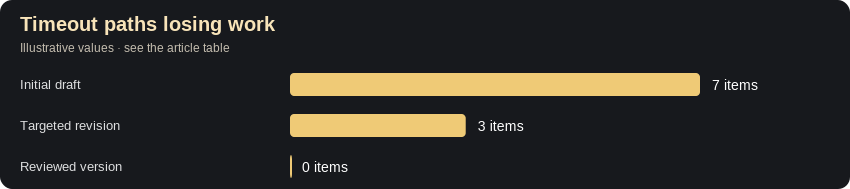
| Category | Value (items) |
|---|---|
| Initial draft | 7 |
| Targeted revision | 3 |
| Reviewed version | 0 |
Constructed audit of 7 fixed, distinct cases. First review resolves 4; second resolves the remaining 3. Not observed performance or a conformance score.
A volunteer documenting a neighborhood photograph spends twenty minutes reading letters on a shop window. She types an uncertain street name, adds a note about where she found it, then leaves the form open while she checks an old map. Returning to the tab, she finds an expired session. The application gives her a sign-in route. She uses it, reaches the annotation form again, and finds everything blank. The service restored access to the form; it did not restore the work. That distinction is the heart of a timeout review.
A warning, an extension control and a recoverable draft are three different services. A warning can help a person act before a limit. An extension can keep an authenticated session available under stated conditions. A saved draft can preserve selected information even when the session ends. Each needs independent evidence. A site that can extend time should not say that it saved a draft, and a site that saves a draft should identify which work it can restore. Good prompts make these boundaries plain before a person has to learn them through loss.
This article treats a fictional community annotation form as a working example. It is not security configuration advice, a guarantee of accessibility, or a rule about storing personal information. The goal is to show how an editorial team can make the timing and recovery experience observable and honest, while leaving actual access controls and retention decisions to the appropriate owners.
Separate the clocks that can end a task
An application can end an authenticated session after a period of inactivity, after a fixed elapsed time, or according to another applicable rule. A separate workflow can reserve a particular item only while it is being reviewed. A third rule can limit how long a draft remains recoverable. These clocks can coexist without ending at the same time. A message saying “expires in two minutes” is ambiguous if the person cannot tell whether the session, reservation or draft is at risk. Tell them what is ending and what choices are still available.
The same activity can mean different things to two parts of a system. A person who reads a long passage, reviews a scan or types in an open field may not be sending a request that affects the session. A web page may remain visible after qualifying access has ended. Conversely, an application can fetch interface data periodically without demonstrating that the contributor is still there. Do not tell the reader that continuing the annotation necessarily keeps the session open unless that behavior is actually supported and appropriate. A long quiet interval may be ordinary concentration, not abandonment.
When a timeout is necessary, determine who sets it and what can change. The WCAG 2.2 Recommendation includes criteria concerned with adjustable timing, re-authentication and timeouts at different conformance levels. W3C's Timing Adjustable explanation describes several ways to address time limits set by content, along with specified exceptions. The extension option described there includes advance warning, time to act and the ability to extend repeatedly under its stated conditions. Consult the actual criterion rather than treating any warning or timeout change as evidence of conformance.
The W3C explanation of Re-authenticating addresses continuation without data loss after re-authentication when an authenticated session expires; it explains a Level AAA criterion. A useful design may aim to preserve work regardless of the conformance target, but do not apply that label to every form or claim the local tests establish it. The distinction also helps prevent a mistaken tradeoff: preserving a permitted draft need not mean weakening the boundary that ends a login session.
The WAI forms tutorial provides guidance on labels, instructions and notifications. Timing messages are part of that ordinary form experience. The person seeing the message should understand the present situation and the next available action without knowing internal terminology. An expired credential, a locked record, and a draft retained through tomorrow can be true together. A clear form describes the consequences rather than listing technical codes with no practical meaning.
Give a warning before a decision becomes impossible
A good warning says what will happen, which work is at risk, and what the person can do. “Your sign-in will expire soon. Extend the session to keep editing. Changes after the last saved version have not been saved” is useful if each sentence reflects actual behavior. If the system cannot establish what was saved, avoid supplying a plausible last-save time. Tell the user the verified state, distinguish an in-progress operation, and offer only supported actions.
Place the warning where a person can encounter it during realistic use. A banner below a long form may not help someone working near the top. A small countdown near an account avatar might be visible but make no sense to a screen-reader user in a data entry field. Make the message clear and ensure the intended interaction works through ordinary navigation. Whether the warning should interrupt focus depends on the form and design; moving focus without a useful return route can itself disrupt work. Test the actual experience instead of arguing solely from a mockup.
Do not make every countdown tick a new interruption. The user needs enough information to act, not a running recitation that obscures the annotation or its controls. A static message with a meaningful remaining interval and an accessible action may work better than a frequently animated counter. Where a clock is displayed, make sure it reflects the actual relevant limit as closely as the service can support. A timer running purely in a sleeping tab can be stale when the contributor returns.
Before offering extension, show what the ordinary action does. If selecting Extend succeeds, confirm the new session state using an appropriate service result. If it fails, say what the reader can do and whether the submitted draft has already been saved. A button changing from disabled to enabled is not evidence that the session was extended. Do not fill the form with reassuring notices while a service request remains unresolved.
A warning near the end cannot carry all necessary disclosure. If timing limits are known and will matter to a task that often outlasts them, give an upfront instruction that allows planning. If the service supports saving before stepping away, show where and tell the person what is preserved. If no save exists, make that clear before asking people to gather sources that take time. A user should not discover for the first time at expiry that leaving an open tab is an unsafe way to pause.
The right options depend on the stage. If a session can continue through a simple extension, make the action understandable. If its maximum duration has been reached and re-authentication is required, do not leave a false extension action in place. The warning can still explain the next step and the status of work. An honest non-extendable limit is more useful than a button that appears to buy time while simulating success.
Verify a saved state beyond the same open tab
“Saved” should identify something the service can subsequently restore. Seeing text in the current form does not prove such a copy exists. Modern pages can keep the draft in memory while they remain open. A storage service can receive the request while its response never reaches the page. A locally stored copy can be recoverable on one device and inaccessible on another. Decide what the product actually promises and test that promise by taking the path a contributor would take after leaving.
For a draft saved to an account, look for a documented acknowledgement associated with the same record and revision. In a test, enter distinctive harmless text, save it using the intended action, then leave the form and reopen it through the supported route. Verify the individual fields rather than checking for a generic “draft exists.” A restored title with a missing source note is a partial recovery. If preservation applies only to some fields, communicate that distinction before contributors rely on it.
Check separately for manual and automatic saving. A manual control can provide a clear milestone, while an automatic process can reduce the burden during a long task. The existence of either does not prove the other works. An automatic routine may not have persisted the most recent change at the moment the connection drops. “Saved at 10:42” has practical meaning only if the state represented then is clear. Show whether changes after that point are pending or unsaved when the distinction matters.
An attachment can have a different lifecycle from text. The annotation's description might have been saved while a scan was still uploading. An expired session can stop an upload without erasing the already confirmed text. A single status that says “everything saved” invites a reader to discard their own copy of the file before the application has accepted it. Indicate pending or incomplete material at the relevant level. At recovery, avoid presenting a restored filename as proof that the associated file is available.
Do not confuse persistence with publication. A contributor may need to keep an unfinished transcription privately until they can verify it. Restoring a draft should not submit it, publish it, or mark a community record verified. An overt Submit action and a draft-save action should remain distinct in both wording and observable result. If the platform's only way to keep text is to submit it, do not call that action Save draft to match a familiar convention.
There are reasons not to retain some work. A community program may collect restricted material or use shared computers. Its owners should decide what may be retained, who can access it, and what devices and durations the design can support. Do not direct every reader to make a copy to a personal device or clipboard when the content may be inappropriate for that use. A permitted export might be a useful option in a specific program; verify that the option is real and explain its limits. Telling the truth about non-persistence is preferable to promising a convenience the program cannot support.
Design re-authentication as a return to the task
After expiry, a sign-in page may initially appear outside the context of the annotation. Where possible, show the user which task they are returning to and avoid dropping them at a generic home page with no route back. Do not prefill sensitive details on a public sign-in screen just to make the context visible. The return should be verified under the correct account and access conditions. An account switch must not expose another person's draft just because both people use the same browser.
Clarify the difference between an expired session and an unavailable item. A user can sign in successfully even if their former claim or reservation is no longer valid, or the work item has changed. If the saved annotation remains available but cannot be applied to the original record unchanged, state that. Offer the supported review or recovery option. Do not tell the person the task is restored if only part of it is available, and don't let a restored draft silently overwrite a newer annotation.
A reader with several tabs open may interact with one tab while another reaches its limit or updates the same draft. The behavior depends on the application. Test which settings and revisions the tabs actually share. One tab's banner can continue reporting an old authentication state after another already renewed it. A second tab can also present an earlier draft as if it is current. A small time and version label can help, but it is not a substitute for preventing an ambiguous overwrite under the product's policies.
Use explicit language when restoration fails. A message might say “Signed in. No saved copy of those edits was found” if the application can establish that fact. If retrieval is temporarily unavailable, say that instead and keep the option to retry where appropriate. No saved draft, inaccessible draft, wrong account and failed retrieval are different explanations. An honest message narrows the user's next action without claiming that the system checked a place it could not reach.
Keep authentication and form-level confirmation distinct throughout. “Sign-in restored” describes access; “loaded draft from 10:42” describes recovered content; “annotation submitted” describes a final state. A reader who sees three distinct messages can make decisions without guessing what a single green status means. The application should avoid implying successful completion at an earlier step just to smooth the transition.
Reproduce the seven-case audit
The illustrative bar chart is titled “Timeout paths losing work.” Its unit is items. Initial draft has 7, Targeted revision has 3, and Reviewed version has 0. The values describe a constructed audit of seven fixed, distinct cases. The first revision resolves four and the second resolves the remaining three. They do not describe observed performance, W3C test outcomes, an accessibility conformance score, or a rate of loss among real contributors.
| Review stage | Timeout paths losing work (items) |
|---|---|
| Initial draft | 7 |
| Targeted revision | 3 |
| Reviewed version | 0 |
In this fictional exercise the seven cases are: no advance warning, a warning unreachable by the ordinary keyboard path, an extension action that falsely indicates success, a session return that does not identify the form, restoration omitting a source-note field, an attachment shown as saved before it is accepted, and inconsistent versions across two editing tabs. Each case is fixed and distinct. More than one failed step inside a case does not create another item in this chart.
The targeted revision addresses advance notice, keyboard reachability, actual extension confirmation and return to the identified form. Three issues still remain even though the route back looks much better. The fictional reviewed version fixes and checks restoration of the source-note field, attachment state, and expected behavior when a second tab has a conflicting revision. Zero describes those seven scoped cases. It is not a statement that the hypothetical design never loses work or that another device or deployment was tested.
A text alternative should state the labels, values and constructed status rather than relying on the decreasing heights of the bars. If the chart is copied for a meeting, keep the definition of a case with it. A defect might expose a much larger loss than another even if both count once. Do not make release decisions from the item total alone; weigh actual consequences and the evidence for repair. A single silent loss of a long annotation can matter more than several small wording defects.
Probe interruptions that an ordinary fast test never reaches
Start with a participant making a realistic long annotation, not merely activating each control. Let them type, consult a separate tab, and return to the task. Verify that they can recognize how much time remains or what happened during the interval. A tester who spends only seconds on each screen may never encounter the actual limit. Build a controlled test fixture with a known short timeline where appropriate, then verify that applicable production settings and interactions have not been assumed from the fixture.
In the warning path, test from several points in the form. Put keyboard focus in a long source note, on an attachment control, and at a later review step. Record where the warning appears, what can be read, how the extension or save action is reached, and where the contributor returns. Make sure the required evidence is visible under a narrow viewport and meaningful zoom. A message that appears only during an ideal desktop screenshot may be obscured by a mobile keyboard or sticky footer.
Test the boundary between extension and expiry. A user can choose to extend just as the server no longer accepts that action. The interface should not falsely indicate success based on the click. Confirm what state the service can report and offer a truthful path after the result. If there is no evidence that a request completed, distinguish an unresolved request from a successful extension. People should be able to tell whether time was actually granted before continuing a long edit.
A second boundary appears between saving and losing connectivity. A service might accept a draft and then lose the response, or it might never receive the changes. From the person's viewpoint both can look like a spinner that stopped. A review can test that the next displayed status reflects verified state rather than the most convenient guess. Depending on the product, readers may be able to retry, check the stored version after re-authentication, or take a permitted recovery action. Do not announce permanent loss solely because one request did not finish.
Plan a test of actual expiry instead of stopping at the warning. Record the last acknowledged version, make an additional distinctive change, and let the session end under a controlled, authorized setup. Then sign in through the intended route and compare the restored content field by field. Know in advance which changes should be recoverable. A page returning to the right visual form is a good result only for navigation; it says nothing yet about recovery. A restored field can also contain an older value than the one that was acknowledged, which merits its own finding.
Check an attachment path with a harmless fixture. Compare an accepted upload with one interrupted before it completed. A current filename and a progress indicator are not proof that the file can be reopened through the supported route. Mark whether the draft holds text, the reference to a successfully stored attachment, or an incomplete upload. If the workflow requires the contributor to attach the file again, say which one and preserve the rest of the draft where appropriate. Do not make the user infer the missing object from a generic error.
Keep accepted work distinct from the latest visible edits
When edits are saved in batches, the application's interface and the stored record can represent different levels of progress. Give the reader a recognizable distinction among editing, saving, and confirmed saved. It does not always require a constantly changing status at every keystroke. It does require that the reader can tell whether it is safe to stop, when that is what the status is meant to answer. If work is only kept while this tab remains open, name that narrow scope. The same terminology should appear at the warning and in ordinary editing instructions.
Consider a fictional transcriber who changes a location spelling and then adds a citation before the last save finishes. A message saying “saved” might refer to the spelling revision only. To test this, reopen the draft and inspect both fields. If the product intentionally batches changes, the status can indicate that newer edits are pending rather than giving one green check that applies to everything. An editor should be cautious about promising fine-grained precision that the service cannot verify. The correct report is the most precise claim supported by the record, not necessarily one line for every input event.
A recovery comparison can also distinguish data from its presentation. The stored value might be present while a new form version does not display it, or the page might show a familiar value from account defaults instead of the person's draft. Test with distinctive harmless content, inspect the actual reopened form, and trace the saved revision where appropriate. If the result is ambiguous, avoid claiming a pass based only on a familiar looking screenshot. This applies particularly to fields with placeholders, defaults, or summaries that hide text until expanded.
There is a useful converse. The form might look empty because the person is opening a new annotation rather than reopening the old one. A draft shelf, recent work link or direct return route may provide the intended path. Verify navigation before concluding that the storage failed. Both navigation and persistence matter. Make the route clear enough that someone recovering from a frustrating interruption need not know internal record identifiers. If no such route exists, test the actual limitations and describe them.
Handle concurrent revisions without silently choosing one
An editing session can expire while another person or another tab works on the same community record. The last stored draft may still belong to the contributor, while the published record has moved on. Give these items different names. A recovered draft is not automatically the current version of the public entry. The service should preserve the distinction long enough to support the appropriate review rather than presenting an apparent success that overwrites another person's newer work.
In a controlled fixture, start with one draft, open the actual supported second-tab path, and make two distinguishable edits. Let one tab reach a stale or expired state according to the planned test. Observe what happens when the person returns to that tab or invokes its save. The desired result depends on the tool's documented collaboration behavior. Test that the older tab does not claim to have synchronized changes that it did not verify. If the design detects a conflict, accessible wording should say which state is being shown and what actions are available.
An unresolved conflict need not mean the system deletes all useful work. The policy might allow separate drafts, restore the older content into a review state, or require a person with responsibility for the record to reconcile them. Do not invent a merge action the service does not support. Distinguish losing access to change a record from losing all copies of a draft. Reporting precise supported outcomes often gives a contributor a better remedy than a generic “start over” button.
The test record should make clear which of these paths are supported and which were exercised. Tests for one account in one browser do not prove cross-device recovery. If cross-device persistence is not a promised service, avoid wording that implies it. A person starting on a library computer and continuing elsewhere needs a truthful statement about the limits before depending on a transfer. If approved account-backed recovery is an important feature, verify it directly through the intended route and applicable access controls.
Respect both the login boundary and the contributor's ability to plan
A warning should not increase the scope of access. Work that should no longer be viewable when a user signs out should not be automatically exposed to another person in the same window. Any cross-account test should use authorized fixtures and the program's access policy. This article does not propose retaining every field in every device or weakening authentication. It asks whether the product's promises about likely loss and supported recovery are accurate.
Some teams can save an approved subset of a draft but must discard other information at session end. If that is the policy, explain the practical consequence before the form is used. The message might distinguish typed notes from a separately managed upload or identify that data added on a shared device are not retained locally. Do not infer that everything in the current view is safe because some fields are. Equally, do not understate recovery if verified persistent work is available. State the exact scope.
An applicable program can provide a sanctioned alternative, such as preparing permitted notes in an approved workspace before beginning an online entry. Check that this fits the policies and the type of contribution; it is not a generic workaround to recommend to every contributor. If no saving or alternate route exists, rethink how much uninterrupted work the form requires. A long required free-text field plus an undisclosed short timeout is a design decision with costs, not simply a training issue for volunteers to solve on their own.
Map the timing path to the words a contributor will read
A team can write the workflow as a small sequence of observable states before working on the visual design. In the ordinary editing state, identify whether recent changes have been acknowledged. In the warning state, say what will expire and which actions are possible. In the pending extension state, distinguish processing from success. Once the session ends, tell the reader whether re-authentication leads back to the draft, whether some work may be lost, or whether the system cannot determine the latest saved state. Review the actual messages against that map. This prevents contradictory statements that arose because separate teams wrote separate screens.
A timeout warning should arrive early enough to use where a time extension is the design option. The formal conditions in the W3C criterion matter, not just whether a tester who already knew what to do succeeded in a single try. A reader might need to orient to a new message, find the control, or finish reading the sentence in progress. If the warning is only visible during an internal transition or if the countdown is already finished when it reaches the user, its text may be accurate and still fail the practical task. Test understanding and execution separately from message appearance.
Consistency does not mean every message needs to use a single phrase. “Your sign-in has ended” and “Sign in again to continue” can work together. “Your work is safe” and “No changes were kept” cannot both describe the same verified state. Use specific nouns where a vague pronoun could refer to the session, the item or the draft. Put the most relevant action near the explanation. If an error offers two different choices, label which one can recover the saved draft and which one starts a separate record.
Put instructions next to the task they inform. A form introduction can tell contributors that consulting a map elsewhere may not count as staying active. A save status can tell them the last confirmed revision. A warning can say whether leaving now puts recent changes at risk. A re-entry page can tell them which version reappeared. These are not redundant messages if they answer different questions at each moment. A single policy page unlikely to be consulted during the task cannot do all of this work by itself.
Include restorative paths in keyboard and screen-reader tests
For a sighted keyboard test, approach the warning from the part of the form where a contributor is likely to be. Observe how it becomes discoverable and whether all meaningful actions are reachable in a coherent order. If a dialogue is part of the design, check both entering it and returning to the relevant editing position after it closes. If the product uses an inline alert, see whether the user can reach it and its actions without traversing a long unrelated form first. Assess the actual interaction and the design requirements; neither pattern is an automatic pass.
For a screen-reader check, listen to the sequence during editing and after expiry. Verify that the warning states the affected action and that repeated notices do not drown out the text the contributor is reviewing. Confirm the button name and what is announced after the extension or sign-in attempt. If retrieval completes asynchronously, the user should have a practical way to learn whether the draft is ready. A generic page loading notice is not a description of which fields returned. Record the observed presentation with the tested platform, not a prediction about all assistive software.
A touch and zoom trial can expose different constraints. An onscreen keyboard can cover the proposed notice or reduce the usable region so that one action falls outside it. A visible warning with a hidden extension control is effectively incomplete for that path. At the same time avoid forcing a layout change that deletes context a contributor needs to finish safely. Invite a reviewer to carry out the sequence with ordinary settings and realistic text length, and capture where they got stuck. Recheck after moving controls because the new placement can affect focus or reading order.
If the route passes through another service to sign in, validate the supported return as a complete journey rather than stopping at the door of the original form. Ask whether the person knows they are still returning to the same task, whether an applicable failure is described, and whether attempting recovery inadvertently completes a submission. Test one verified saved state and one deliberately unsaved change. This gives the contributor and reviewer a concrete distinction between preserved history and unsaved work. A message that merely says welcome back cannot tell them both things.
Choose a repair with a clear acceptance rule
A longer warning may reduce surprise and still leave the draft vulnerable after expiry. A robust draft route can reduce loss while leaving users with no idea how to plan for interruption. Improving only one part may be the right first release when it addresses the specific blocker, but name the work that remains. A trial could verify that the warning can be acted on, then record attachment restoration as unresolved. Avoid declaring a complete solution simply because the most visible symptom disappeared.
One useful acceptance rule states what should survive under named conditions. For example, a permitted draft saved and acknowledged before ordinary expiry remains available when the same authorized user returns through the supported sign-in route. A separate rule identifies what the project does not promise, such as restoration of an upload still in progress. These are claims a team can verify in a fixture and explain to a contributor. They also make it easier to spot when a later redesign changes the meaning of the label saved.
Close the review by asking the person who owns the form to name its reasoning in three lines: what ends, what can be continued, and what can be restored. If the answers require many provisos, put the most action-changing ones near the beginning of the task. The promise of respectful timing does not require making limits disappear. It requires making them visible early and preserving only the work the service says it can safely preserve.
Record what happened rather than grading the person's response
When a test fails, capture the starting state, intended action, expected result and observed result. Include the version of the form and any conditions that influenced the path, such as network availability or tab state. “Warning opened before expiry; keyboard action was reachable; extension request was not accepted, status still said extended” is testable. “Contributor failed to extend” incorrectly assigns responsibility and leaves the engineering issue unclear. Report the evidence in a way the next tester can reproduce.
Use the same precision for passes. “Restored exact title and source note after ordinary re-authentication with the same account” is stronger than “save worked.” If attachment recovery or another device was not checked, state that explicitly. A product description should not outgrow its evidence because the audit was reported as a zero. The methods and limits are part of the result. Retest after changes to authentication, the form or the storage contract because those changes can affect different parts of the route.
A useful handoff can distinguish one preventive change from one corrective change. Moving a clear warning earlier lets a person act before timeout. Preserving an approved saved draft provides a route after timeout. Making re-authentication return to the original task helps the person find the draft without implying one exists. None of the three substitutes for the others. A final note that names their different roles helps the next project choose the right repair rather than copying one feature indiscriminately.
Ultimately a warning should tell the contributor what is about to expire and what action is genuinely possible. An extension should confirm the new state only after support for that claim. A saved indicator should refer to what can be recovered through the stated path. Keeping those promises distinct allows a community form to respect necessary boundaries without treating the contributor's time as disposable.