| Category | Value (items) |
|---|---|
| Embed only | 6 |
| Title and link | 3 |
| Equivalent materials | 0 |
Constructed checklist scenario for this brief, not measurements, ratings, or results from cited sources. Each displayed count represents checked items in the named example.
A teacher opens a short lesson about reading an old map. On a laptop the video plays, but on the phone beside it only a tall blank box appears. Above the box the article says, “Watch this to answer the next question.” Below it there is a quiz. None of the lesson's context is available without the player, and the page does not even say what footage is missing. The teacher cannot tell whether to wait, use another device or skip the quiz. A third-party component failed, but the choice to put the only copy of the instruction inside it was the publisher's.
A stronger lesson makes the video useful without treating it as the only way through the story. Give it a title and a useful summary in the surrounding page. Say how long the clip is and what part of the activity it explains. Provide a direct route to a verified copy if there is one, and a readable alternative that carries the information people actually need. If a key comparison appears only on a map in the frame, describe it accurately outside the player. Treat articles, guides and public exhibits as documents that can stand on their own, not just wrappers for content held elsewhere.
The example in this article uses a fictional short map lesson. It describes workflows and tests, not a live incident or evaluation of a specific media provider. The chart counts lost tasks across three mock presentations of the same lesson. Its zero means only that the six defined tasks are supportable in the final toy presentation under the stated failure. It is not proof that the release meets every accessibility requirement or that no reader will ever need working video.
Find the editorial dependency before asking what broke
The first question is what a reader needed the embed to do. A clip might merely illustrate a setting already described in prose. Another might contain the documented evidence for the main claim. A third might give the only instructions for a later exercise. These are different dependencies. If a page supplies all of the relevant content independently, a missing illustrative video is still a defect but may not derail the article. If the page tells people to decide something based on a diagram that appears only in the inaccessible clip, restoring that missing decision material is an editorial priority.
Write one sentence describing the clip's role. For the map lesson: “This demonstration shows how to distinguish an original river bend from a line added in a later map revision.” Then list what a learner must get from it. They might need the title to identify a citation, the duration to plan class time, a summary to decide relevance, and the two visual clues to answer a practice question. Preparing this inventory before choosing the player prevents the technical component from defining the whole learning experience.
Read the story without playing any media. Look for phrases such as “shown below,” “listen to the example” and “compare these” with no standalone indication of what the reader is meant to see or hear. These phrases can be useful in an integrated lesson but should not hide the only available direction. Replace references to vague position with a name or relevant explanation. A question about the later blue line can say which map is being compared and point to a labeled description. Do not lead the reader into a dependent task without giving them a way to recover the missing premise.
Separate the loss of a medium from the loss of a fact. A captioned performance or spoken interview can have value that is not fully represented by a short summary. An educational clip can similarly show a gesture or a sequence of actions that prose needs to translate carefully. A text alternative cannot promise to recreate everything someone would experience watching a recording. It can carry the information needed to do a defined learning task. Where moving imagery or audio is itself the subject of the lesson, name that requirement and offer a suitable accessible media route where possible rather than calling a short paragraph equivalent.
Put the identification and decision-making information on the page
A practical module begins with a visible title. “Comparing two editions of the Rowan Creek map” says what the video is; “Video” says only what kind of element it is. Place a brief description nearby: “The instructor compares the channel drawn in the earlier survey with an annotation added later, then shows how to verify the distinction in the legend.” The description sets expectations without claiming that a plot or watershed was examined beyond the footage. If the recording is a short excerpt of a longer lesson, label it as an excerpt and identify the relevant scope.
Duration helps someone decide whether to play it. Put a verified runtime in the page copy when it can be maintained, and check it again when the media changes. If the example is two minutes and eighteen seconds, “2 min 18 sec” or “2:18” with an appropriate label can be clear in a compact layout. Do not leave an old value beside a significantly recut version. A short segment selected by a player link may have one duration while the destination recording has another. Label which one is meant. Someone should be able to decide between watching a short demonstration and reading a full transcript without enabling the provider first.
A summary is selective by design. It tells a reader what the recording covers and perhaps the main takeaway. A descriptive transcript or other fuller alternative performs a different task. It may identify exact speech, relevant sounds and visual information in sequence. An article that needs only a small finding can give the finding in the prose, link a fuller version for verification and still preserve the source. A lesson that relies on many details needs more than a preview description. Apply the right artifact to the dependency rather than making the word “summary” stand for every missing medium.
Keeping these elements outside the third-party component matters in practice. If the title, description and link are fetched by the same embed script, they can vanish along with the play control. Put the essential content into the page the publisher can reliably serve. If the site uses custom rendering, test how much information remains when the player script is absent. Do not bury the alternative beneath the blank frame or make it a menu item inside an unavailable player. Availability includes being able to find the option at the moment it is needed.
Give alternatives distinct labels and honest capabilities
An external watch link takes the reader to an alternate destination for the video. A transcript link opens a text representation. A downloadable worksheet supplies exercises or references for offline use. They are not interchangeable links, and “View alternative” does not tell a reader what they will get. “Watch the map lesson on the provider's site” and “Read the descriptive transcript” set different expectations. If the watch link leads to the same provider whose content has been blocked, it may help when embedding is restricted but not when the entire provider is unavailable. Preserve an option that does not share the same failure when the format permits.
The W3C WAI guide to accessible audio and video distinguishes ways of making media information and playback accessible, including captions, transcripts, descriptions and the media player itself. Its transcripts guidance distinguishes basic and descriptive forms. In the map lesson, a basic record of the spoken line “Notice where this goes” does not identify the visible feature. A descriptive transcript or an equivalent written lesson can explain what the instructor points at and why it matters. Use wording that distinguishes received speech from an editor's description.
The WCAG 2.2 time-based media criteria apply differently according to media type and the criteria in question. Captions and audio description are separate from the option of an alternative for time-based media in applicable cases. An independently readable alternative does not turn an inaccessible working player into an accessible one, nor does a direct watch link prove compliance with applicable criteria. The editorial design in this article complements work on the actual media and player; it is not a substitute for testing both the media controls and the appropriate criteria.
Sometimes the only authorized asset is an external link with no reuse permission. Do not rehost a recording just to claim the fallback is independent. Write a truthful account of the available formats, document the actual permission or limitation, and provide authorized context or an independent teaching explanation where appropriate. If full access to the recording is essential and no acceptable route is available, the honest result may be that some task remains blocked. A stable alternative is one the publisher has a basis to maintain, not a copied file that might have to be withdrawn tomorrow.
Six tasks, three mock versions and one fixed failure condition
Freeze a small set of six reader tasks in the fictional map lesson. The first is to identify the exact clip. The second is to judge its subject from a local plain-language summary. The third is to find its runtime before opening a player. The fourth is to locate a verified external watch route, whether or not the reader uses it. The fifth is to establish which line in the illustrated comparison belongs to the later edition. The sixth is to complete the accompanying practice question using the information the lesson provides. These are deliberately distinct checks, with the fourth measuring discovery of the link, not successful playback.
For the comparison the embed fails to load inside the publisher's page in all three mock versions. The external provider's watch destination has been checked in a separate environment, but the audit does not require a learner to play it. Assess whether the presented items support the tasks at their defined points. In particular, the second task requires a readable summary on the article itself, not a promise of a description somewhere else. The fifth and sixth tasks must be possible without relying on the inaccessible embed. This rubric keeps a rescue link from receiving credit for independent teaching material it does not supply.
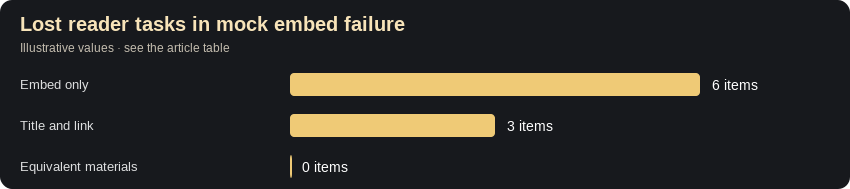
Embed only puts everything inside the failed component, so all six tasks are lost. Title and link gets its name from the main additions; the mock module also shows a verified duration beside the title. It restores three tasks: identification, runtime and discovery of the verified external route. It does not supply the local summary or the two independently usable lesson outcomes. Equivalent materials preserves those three additions and supplies the nearby summary and enough written and illustrated information for the fifth and sixth tasks. With all six named tasks recoverable under the test condition, the final mock version has zero lost tasks.
Illustrative chart data: Lost reader tasks in mock embed failure.
| Prototype | Lost reader tasks | Recoverable tasks out of six |
|---|---|---|
| Embed only | 6 | 0 |
| Title and link | 3 | 3 |
| Equivalent materials | 0 | 6 |
The bars count six, three and zero lost tasks. Six minus the first three recoveries leaves three; resolving the final three leaves zero. The recoverable column equals six minus the lost count for each version. These are repeated reviews of the same constructed tasks, not independent samples. The chart does not count failures of a real player, contents of the cited W3C guidance or formal accessibility results. It does not suggest that a watch link solves an outage. It counts whether a person can locate that link as one of six distinct choices or learning outcomes.
One failed task may still determine whether a lesson is usable. A reader who can identify a clip, read its runtime and find a link has not necessarily been able to complete an exercise. A reader who needs to inspect actual motion may be unable to do so with the independent text version, even though the toy worksheet's decision can be made. Keep the conditions and outcomes attached to the count. The value of the chart is making the remaining tasks visible, not allowing the largest improvement to stand in for a definition of completeness.
Design for multiple failure states rather than one generic apology
A small display might show the video and hide the controls, or show the controls in a box whose aspect ratio cuts off key content. A provider can refuse to embed a video while leaving its own page available. An embedded component can load but not play because a network stalls. A privacy setting or institutional network can block requests. The media might have been removed or replaced. Depending on the embedding environment, an article may not be able to tell one cause from another. Write visible messages based on what the page knows, not a confident guess about the reader's device or choices.
If the player is waiting for an intentional click, say so before the interaction and label the button with what it will load. If the site detects a definite playback failure, say that the clip is unavailable here and give the independent route. “Video unavailable in this player. Read the lesson or open the external video” is more useful than “Something went wrong” if those routes actually exist. If no reliable failure signal is available, keep the alternatives visible for everybody. Do not lock them behind a retry that may never finish or produce any notification.
A third-party choice can also be about privacy. A reader who declines an optional service should not have to reverse the choice to get information the publisher can deliver independently. A consent notice should explain what loading the player does to the extent the publisher has verified and can responsibly say. Do not label the reader's choice an error. Likewise, avoid trying to bypass restrictions merely to present a player as always available. The resilience requirement is that information survives a blocked request, not that the request must succeed despite the person's settings.
Plan a state for complete absence, not just replacement of an empty rectangle. With video off, a phone user still needs to reach the main summary and lesson without scrolling past a large dead frame. A short optional space for a player can collapse or leave a meaningful card, depending on the layout. Do not make the page jump unexpectedly after delayed media appears. Test whether the article remains readable at normal and enlarged type and whether the text choices remain accessible when a third-party panel occupies the full available width.
Compare what the camera showed with what the independent lesson teaches
Suppose the instructor's comparison shows a solid river line in an early map and a dashed survey notation in the later copy. To make the exercise work without the clip, the publisher needs to identify the editions and describe the relevant marks in writing. A still image might help if it is authorized and clear at the delivered size, but it should not be the only way to identify a pattern that matters to the answer. In prose, say what each line represents, how the legend distinguishes them and where the distinguishing details sit on the two maps. Give the reader enough to reason from the evidence rather than simply supplying the answer.
A time-aligned caption can aid people who are watching, without giving non-viewers the meaningful composition of the frame. A description can explain those visuals when appropriate. A transcript that includes descriptive passages should mark what is spoken and what describes the image. If an edited written lesson is being offered instead, label it a written lesson and check which judgments were added or omitted. A learner who needs the exact sequence of the recorder's work may want a fuller transcript even when the independent written lesson is enough to complete the practice question.
Use the actual recording to verify alternative content. A storyboard and narration script are not sufficient if a later edit changed the visual example or reversed the order of two steps. Confirm the terminology and labels against the published version. If a fixed illustration is used, verify that cropping did not remove an edition date, annotation or matching legend key. A reader may receive more precision in the written version than in the video if the editor has verified supporting records; keep that extra context identified as an editorial addition rather than pretending it was said in the clip.
Provide enough of the lesson in ordinary document structure. Headings can distinguish setup, comparison and practice; lists and tables can make the map features easier to compare. An image description can name what the image communicates without relying on ambiguous phrases such as “the thing on the left” when the layout may change. If the worksheet is part of the necessary instruction, place a usable copy outside the player and explain which parts require the media. Test a flow that starts without any access to the clip and reaches the intended educational outcome.
Check the player on its own terms as well
An independent reading route is a safety net for the lesson, not a reason to stop reviewing the working player. The W3C WAI guidance on media players discusses choosing a player that supports accessible operation and the needed media features. Test which controls people can reach, how they learn the playback state and whether the published player actually exposes the caption or description choices the team intended. If a provider's player works in a default desktop configuration but a necessary feature disappears in a narrower one, that is worth fixing even if an alternative is already available.
Check restricted motion, muted playback and keyboard interaction as separate things where relevant to the product. A muted reader may depend on captions in time with the scene. A reader who cannot use a pointer may need to activate play or the caption settings from a keyboard or equivalent supported input. A visible play icon with no meaningful accessible name does not adequately identify its action. Do not assume that the site's own controls are irrelevant just because the iframe belongs to another provider. It may be the site's local “Load player” button that prevents people from reaching the player in the first place.
On a narrow display, look at the exact crop and playback controls after the player has settled. A responsive holder can preserve space, but resizing alone does not prove the map labels and controls remain sensible. Try playback from a different orientation and at enlarged text. Check that the running time posted outside corresponds to the media reached. Then take the same page in a mode where the provider cannot load. The media checks and the failure checks must both pass their own scope; working captions are no consolation if people cannot find the transcript in the absence of the player.
Review focus changes when third-party content appears or disappears. A flow that loads a frame after button activation should not leave the next interaction unintelligible, and a disappearing embedded player should not leave navigation effectively stranded. The right interaction depends on the layout and player. Test it rather than announcing that a particular focus movement is universally correct. When the page supplies a status about failure, keep the message in the visible reading sequence too. No essential option should depend on hearing a transient notification at precisely the right time.
Test a genuinely independent route instead of a duplicate dependency
A direct external link can help if embedding is disallowed while the provider itself still serves the content. It cannot help a reader if the provider is blocked in all modes, the original video has been taken down or both destinations use the same unavailable service. Follow the link from a representative environment where lawful and appropriate. Confirm that it points to the intended recording rather than a channel homepage or a different repost. Verify the title, version and any access restrictions before calling the link usable. If the external edition differs materially from the embedded one, label that difference.
For readability purposes, a text alternative is more independent when it is delivered on the article's own site or through a destination with a different verified availability path. A transcript loaded from the same audio provider through the same blocked script may look like a second button and still be the same failure point. Check whether an “Open transcript” link works without creating a remote player session. If the alternative is a document, inspect that it survives normal viewing and does not require a second unannounced app or account. Do not promise universal offline access if a download or resource is not actually available offline.
Stable access includes naming and maintenance. Prefer links that identify the media or transcript instead of a temporary playback address that might expire. Keep a release or revision note for the written materials, especially when the source video may be recut. An asset can have the same title while containing a different example. Before replacing a clip, determine which transcripts, image descriptions and worksheets reference its original content. Correct versions together where possible and explain anything deliberately retained as historical. Otherwise the fallback can stay accessible while becoming misleading.
A mirrored or owned copy changes what the publisher is responsible for. If the organization has permission to serve the file, it needs to maintain the appropriate media alternatives alongside it and test the actual delivery. If rights or source conditions do not permit reuse, use the alternatives the publisher can legitimately make available. An accurate written lesson tied to public source material can be useful without copying the video image for image. Do not describe an abridged lesson as a full media equivalent unless the required information and applicable criteria really support that description.
Record the failures by task and condition
Start a test log with the reader's entry point, device or viewport, provider state, intended action and evidence of success. The first test might begin at the middle of the article on a small phone, with the video failing to load but the rest of the page responsive. Another might begin in a school setting where a whole host is unavailable. A third might use an ordinary slow connection with playback eventually successful. These conditions need not produce the same message. The log tells the team what was actually exercised rather than turning the absence of a defect on a single screen into comprehensive verification.
Run the six toy tasks or a real project's own checklist with the player absent. Can a reader identify the lesson, assess its relevance, find the duration and locate the labeled external option? Can they identify the relevant markings and complete the exercise from the written content? If two of those answers require information that the article says is “in the player above,” the fallback remains incomplete. Proof order matters too: a useful link hidden several screenfuls below a blank holder is different from the same link available where the reader first notices the issue.
Then test explicit failure transitions. Open the page without allowing a provider request. Begin loading the player but inspect what happens if it never starts. Where possible, reproduce a withdrawn or unavailable asset using a fixture, not by tampering with a real provider or another person's content. A reasonable fallback should remain stable during each case. Avoid using a screenshot taken at one favorable time as final proof. A delayed component might appear after the screenshot and cover or displace the lesson's title or links.
Give a reviewer a concrete task instead of asking whether the page “looks okay.” Ask them to explain how they decided which map line is later, or to tell you which link they would use to watch at the provider. Ask when they first saw the runtime. Their explanation can identify ambiguities that a checkbox on a screenshot cannot. People can guess a correct answer even when the guidance is unhelpful, so ask what content they relied on. A small review cannot establish every visitor's experience. It can establish that a specified route was verified under specified conditions, which is the useful claim.
Build the map comparison into a reusable reading path
For the fictional lesson, imagine a teacher wants to put a link directly into a class plan. A link to “Map comparison” should work for people who have not seen the article's introduction. Give the destination a short identifying sentence and point back to the full lesson if needed. A student can then identify the earlier survey and the later annotated edition without looking for a title hidden in an absent player. Record whether a date refers to original publication, annotation or digitization. Even when the concept seems obvious to the instructor, those distinctions matter to learners who are deciding which line belongs to which version.
Make the comparison a small evidence exercise instead of a replay requirement. The written prompt might say: “In the earlier edition, a solid line labeled River follows the channel. In the later edition, a dashed line crossing the bend is labeled Proposed survey route. Which line is the later addition, and what in the legend supports your answer?” That prompt carries the necessary evidence into the reading path. It asks a learner to connect a mark and its label rather than remember a physical position on a screen. The full lesson can supply fuller context, while the exercise still works without the provider.
An image beside this question can reinforce the comparison, but it should not outrank the text as the only evidence. In the mobile version, the two images might stack rather than appear left and right. Refer to the material by edition and label so the wording remains true. If the optional figure opens in a larger view, the return should preserve the reader's place as much as practical and should not start playing the unrelated embed. Each interactive enhancement should be judged according to how it affects the text-only lesson, not only how it looks when all resources work.
A companion worksheet can carry one additional question asking what cannot be concluded from the comparison. For example, identifying a later survey annotation does not by itself show the river channel moved. The written answer can point learners back to the relevant legend and explain that no independent evidence of physical change was supplied. This gives the teacher a way to check understanding even when the video is unavailable. It also shows why a summary alone would not always be enough. A complete educational path includes the evidence needed for the question and the limits on the answer.
Review an embed block across article, index and excerpts
A module might look resilient on its own page but fail in an index. Imagine a card that displays a title over a third-party thumbnail. When the thumbnail does not load, the text contrast vanishes or the title is not rendered at all. The index no longer tells a reader which lesson they could open. Keep the title and essential format label in the layer the article can serve independently. If a preview uses a decorative image, make sure the absence of that art does not change the name or destination. It is better to use a less dramatic card background than to rely on a picture for the only visible link.
A newsletter excerpt poses a different problem. It may carry the first sentence and a still but not the interactive block or caption. Use a destination labeled with the lesson's subject, rather than a deep playback link that assumes the provider is available. The destination can show the title, running time and independent routes. Avoid promising that a clip will immediately open and play if the click first goes through a loading or consent step. A clear description respects the reader's ability to choose before taking an action involving an outside provider.
In a course or gallery with several videos, an error message should identify which item failed. “A video did not load” is not enough when the reader still sees three titles and several controls. Put the status near the affected media and retain the nearby alternative. If there is a shared service problem, a short overall note can explain it without replacing each lesson's local choices. A teacher preparing an activity wants to know whether the required comparison is still available, not merely that one service somewhere on the page encountered a problem.
Finally compare the claims in every starting location. A current article may have an accurate duration and scope while the discovery page claims that a two-minute excerpt is the full workshop. A companion description may still label the previous recording edition. Proof a route from the index, one from a copied link and one from inside the article. The reader's skippable choices should be recognizable from each route, and the teaching materials should refer to the same version or explain a meaningful difference. A resilient block preserves both discovery and use, rather than saving the video title only after the reader has already found the right page.
Plan for ageing media and truthful publication notes
A third-party embed can outlive its permissions, title, player interface or publication date. An editorial handoff should identify where the verified duration came from, which recording edition the transcript represents, how to find the external source and who can maintain the alternatives. The metadata can live alongside the article without requiring a long provider bibliography in the visible lesson. The reader still needs enough displayed information to recognize a mismatch and choose a different route. Do not ask them to trust that an unlabeled clip is the latest version because it still plays.
If the public source is removed, decide what the remaining article can honestly retain. It may still include an accurate summary, a documented description of a comparison and a valid independent exercise. A label saying “See the original video” should not point to a vanished copy without a clear status. If the actual recording was central evidence that readers now cannot verify, say so and preserve the citation with the appropriate caveat. A description can remain useful without pretending the original record is publicly accessible. Conversely, losing one embed need not require taking down original text and independent sources still in good order.
Report the fix at the level it was verified. “Reviewed direct watch link and independent written lesson with the provider blocked on a narrow display” means more than “video fixed.” It does not claim every combination of device and provider network has working playback. A defect in the provider can remain open even after the article is usable, and a defect in the article's fallback can remain open even after playback recovers. Document those separately so the second is not indefinitely forgotten whenever the first appears normal on the editor's laptop.
One useful final check is to remove the player from a private test view and read what remains. At the spot where the teacher first opened the article, the title should identify the lesson, the runtime should guide their choice and the short summary should explain what the comparison demonstrates. If the quiz expects knowledge of a visual detail, that detail should appear in the independent materials. The reader should not have to understand the network failure to know what comes next. A working embed can enrich a publication; losing it should not make its own text stop making sense.