
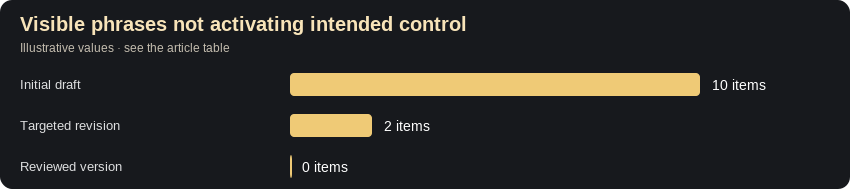
| Category | Value (items) |
|---|---|
| Initial draft | 10 |
| Targeted revision | 2 |
| Reviewed version | 0 |
Constructed audit of 10 fixed, distinct cases. First review resolves 8; second resolves the remaining 2. Not observed performance or a conformance score.
A visitor opens an interactive museum map and sees a control labelled “Ground Floor.” They use software that lets them operate the computer by speaking and try to invoke the control by its displayed words. Nothing happens. Another visitor clicks the same control with a pointer, and the floor changes immediately. The application works for one method of activation and not for the other. A useful next question is not whether the first visitor spoke clearly. It is whether the name the application exposes has anything to do with the words it asks people to read.
In the fictional map, a developer named that control “Select building level zero” for accessibility. The wording might have been intended as extra help. Instead of preserving the visible cue, it replaced it. A visitor who can see “Ground Floor” has no reason to guess that substitute. People using voice interaction should not have to inspect code, ask a staff member for secret wording or switch to a pointer to perform an ordinary action.
This article describes an audit of that relationship. The museum, commands and proof results are invented. It is not a claim that every speech product uses names the same way or that fixing several buttons establishes accessibility conformance. The aim is to test a person following the visible words in one stated environment, then investigate what the interface actually offered when those words failed.
A visible label is not a decorative aid
A label has a practical role even before anyone tries to operate the control. It tells someone what they can do, lets them distinguish the action from a neighbor and provides a reference when speaking to another person. In a museum, a printed orientation sign and its digital counterpart could share terminology. If the control presents one phrase visually but a different name to assistive software, some users receive incompatible directions about one object. Neither description has to be incomprehensible on its own for the pair to cause a problem.
The accessible name is an identification exposed programmatically, not necessarily a separate line of copy the reviewer can see. Built-in control semantics, visible text and author-supplied attributes can all be involved in its computation. A visible icon can coexist with a clear text name. Visible text inside an element can be overridden by another source of the name. To investigate, find the name associated with the actual actionable element, not just a text node displayed somewhere within the same rectangle.
Look carefully at the distinction between a name and a description. A short visible label can remain the name while supporting information explains what the control does. “Ground Floor” might be followed in the interface by a useful note about the accessible entrance. That note needn't replace the words identifying the action. Conversely, putting the visible phrase only in a description is not the same as preserving it in the accessible name. Readers should be able to use the words they see to call for the action rather than saying a whole explanatory paragraph.
The distinction can also apply to speech output as opposed to speech input. A screen reader may tell a user a name, a role and a state; a speech control product may allow the user to target an element by saying something associated with the name. Both can be affected by author choices, but experiencing one successfully does not prove the other works. An audit that listens to a spoken announcement has gathered valuable evidence about output. It has not yet tried speaking a visible label to activate the control.
What the standards say, and what the audit adds
The Web Content Accessibility Guidelines 2.2 recommendation includes Success Criterion 2.5.3, Label in Name. In the criterion's scope, where a user-interface component has a label containing text or an image of text, the accessible name must contain the label's text. The W3C explanation of Label in Name discusses the relevance to speech input and useful alignment between visible and programmatic wording. The understanding document is informative. Do not convert an example from it into a claim about all speech products or all kinds of labels.
The principle does not require that a control with useful disambiguating context have an accessible name restricted to only its visible words. Keeping the visible phrase at the beginning can be a helpful design choice, and the leading words enable a user to recognize the target. Adding information can also make a name unnecessarily long or ambiguous. Test actual interactions instead of assuming that any extension will make operation better. A succinct visible name with any necessary context communicated separately can be the clearest outcome.
The WHATWG HTML Living Standard describes native elements such as buttons and links and the behaviors they represent. The W3C Accessible Name and Description Computation specification describes how name and description computation works across relevant inputs. These are complementary sources: choose an element whose role fits the action, then check how its name is supplied and exposed. Standards vocabulary does not guarantee that a particular map's markup produces the intended name.
Link purpose is not the same question. People may need meaningful link wording to understand where navigation will take them. A floor tab or button can have an understandable on-screen phrase and still fail spoken targeting because of a conflicting name. Likewise, a button with matching visible and accessible wording can perform an unclear or badly described action. Record the two defects separately where both are present. Changing a destination or writing a better introduction to a link does not, by itself, align the names of an interactive map control.
Ten invented targets, not a product score
Illustrative chart: Visible phrases not activating intended control. The bars count failures among the same ten hypothetical spoken-activation cases at three checkpoints. A case fails when the tester following the displayed phrase, using the documented invocation pattern in the fictional environment, cannot activate the intended target as expected. These are not measured user outcomes, standards grades or results from W3C or WHATWG.
| Fictional audit stage | Visible phrases not activating intended control (items) |
|---|---|
| Initial draft | 10 |
| Targeted revision | 2 |
| Reviewed version | 0 |
The ten cases could be Ground Floor, Upper Floor, Lower Level, Show Lifts, Show Restrooms, Quiet Route, Reset Map, Map Help, a second Show Lifts in a comparison panel and the active version of Quiet Route with a changed visible label. The initial draft intentionally contains mismatches across that test set. In the first fictional repair, ordinary controls receive names containing their visible wording, fixing eight cases under the described test. Two still fail: duplicate wording selects the wrong panel, and the changing control continues to expose a stale label. The next revision distinguishes the panels and synchronizes the changing wording. The same ten cases then pass in the imaginary proof.
The bars are not totals to add. They are three views of the same issue set. A real review might uncover another defect in the last round, and should record it without quietly changing the denominator. A zero count says only that the selected paths passed under the recorded conditions. It does not certify keyboard behavior, user comprehension in every language, compatibility across operating systems or site-wide conformance. A proof can be useful because it names exactly what is known.
An editorial picture of a microphone aimed at a mechanical panel is a metaphor for the relationship between words and controls. It is not a photo of this map, a test device or a participant demonstrating a command. Keep the report's actual observations in a written audit. The image makes the problem recognizable without pretending that its surfaces and shapes are evidence about the outcome.
Map a museum visit before listing every control
An ordinary visitor might choose a floor, turn on an amenity layer, select a quiet route, open a detail panel and then reset the map. Use a recognizable task like that to identify the targets important to the audit. Heading text, map annotations and a floor switcher may all show the same location names. Only some are controls. A check should establish which element a user can operate and what result success produces. Hearing a command acknowledged isn't enough if it selected the wrong route or simply highlighted text.
Find the visible label at the moment it is used. On a map, some labels may float on top of a zoomed canvas, while others appear as ordinary buttons outside it. A name written on the building diagram could be a location annotation rather than a separate input. Don't assume every visible word is a command. Where an action is available, visually identify what makes it an action and check that the actual interactive element exposes the intended role and name. The best content edit may be to separate a confusing annotation from the control that operates on it.
A control can show a state alongside its name. The floor switcher may show a selected floor. A layer toggle may indicate whether lifts are already visible. Some patterns preserve a stable action name and expose the state separately. Others genuinely change the labeled action, such as Show Lifts becoming Hide Lifts. Those are different design patterns, not cosmetic variations. Choose a pattern appropriate to the actual interaction and test the words the user currently sees. Avoid exposing two conflicting stories about whether a command represents an action or a current state.
Keep several ways of operating the map available as appropriate to the design. A successful spoken command does not replace useful keyboard behavior, adequate visible controls or an understandable nonvisual route. Likewise, a working keyboard path is not an excuse for clear visible labels no longer usable in the tested speech interaction. The audit's narrow goal can coexist with a broader testing plan. Recording separate outcomes makes it possible to solve the right problem without declaring that another method makes it irrelevant.
Prefer to fix an unnecessary override at its source
Imagine a native button whose child text already says “Ground Floor.” Someone adds an explicit accessible name because they want to clarify that pressing it changes the floor plan. If the override replaces the visible words, the user faces two labels where there should be one. An appropriate repair may simply remove the unneeded override and let the control use its visible text. Retain important explanatory context in a place suited to describing the interaction rather than forcing it into the name.
There are situations where the visible text alone does not identify a specific target in a useful way. Several panels might each contain “Show Lifts.” A control could need some differentiating context, especially when it is presented away from its panel during a navigation or voice interaction. Before adding context only to the programmatic name, ask whether all users would benefit from seeing it as part of the label or grouping. Hidden context can improve one route while leaving someone who can see the page unable to predict which command is unique.
Trace why the override was introduced. A component may use the same configuration field for an internal action identifier and the accessible name. The internal identifier exists so the application knows what handler to use; it need not be announced or spoken. Separate those two jobs. This also protects the next editor who renames a panel from accidentally creating a new hidden label. The fault often appears in translation or responsive design because those channels update only one source of the wording.
Do not assume a single code change handles all components built from the same template. Inspect named variants and those with an icon beside the text. Some variants may supply a different name source or hide a redundant label. A repair that exposes the visible words on one button can accidentally remove the only meaningful name from an icon-only version. Use representative cases and describe the tested scope. A consistent naming policy is useful only if it handles the differences it actually encounters.
Duplicate phrases need their own kind of evidence
The ninth fictional case shares the visible phrase Show Lifts with another panel. There is no guaranteed universal resolution when two controls have the same name. A speech product may present choices, give priority to one context or use a different targeting strategy. Document what the tested environment did rather than treating a particular disambiguation mechanism as an instruction that every visitor already knows. If the wrong panel changes, record that explicitly. A command didn't simply fail to trigger.
The interface may be able to make the names clearer at the source. A comparison layout could present “Show Lifts on Ground Floor” and “Show Lifts on Upper Floor,” if that conveys the actual operations. The larger component frame might instead make it possible to isolate one presented control at a time. Evaluate the option with the product's real tasks and consider whether a change would add too much reading for a common action. Good disambiguation makes the intended selection easier for more than one input mode.
Another situation includes a duplicated phrase in a hidden panel. The view appears to show only one control, but an older layer remains in a state that is still exposed or focusable. An audit can reveal that a command reached something the visitor cannot see. The fix is not to assume all duplicate phrases must be unique under all circumstances; it is to check the visibility and interactivity of the intended current state. Naming and exposure are related but distinct. Test after changing views, not only on initial load when old panels may not yet exist.
A numbering overlay offered by a speech product can be a useful fallback. Its ability to choose one control does not prove the visible-label route succeeded. Conversely, a user might prefer such an overlay even after name-based activation works. Record which route was under test and which alternatives are available. The chart in this article deliberately concerns a command based on the printed words. A successful fallback supplies additional context, not permission to count a known failure as a pass.
Test changes of state and view when the label can change
The tenth case in the chart is not a second test of initial load. It concerns a control whose visible words vary. If Quiet Route becomes Hide Quiet Route when the overlay is active, a hard-coded accessible name left at the old phrase can undermine the very action the current label asks someone to take. Where a stable-name toggle is the actual design, keep the visible name stable and represent the selected or pressed condition as appropriate. Where the label names the next action and changes, keep its programmatic name aligned with that current wording.
Test intermediate states deliberately. A route may be loading, momentarily unavailable or no longer supported on the newly selected floor. Don't report failure to match a label when the control is correctly unavailable and presented as such. Instead record whether the unavailable state is understandable and whether another intended route is still usable. Equally, don't declare a control intentionally unavailable after discovering that a hidden overlay swallowed its input. First verify what the product said about the state and what the actual outcome was.
Responsive layouts can replace a strip of labelled controls with a compact menu. Sometimes the visual words move into a disclosure panel, while an icon-only entry remains on the main map. Check the route that the visitor actually sees at the tested width. An icon-only action still needs an appropriate accessible name, but a name containing a visible phrase is not the same question when there are no visible words on the control. The broader issue then is how the action can be discovered and invoked. Give such variants separate expectations instead of forcing them into an ill-fitting count.
Views can also preserve state across a change of scale or language. After switching the floor, verify that the old control cannot be activated in place of the current version. After switching a locale, check that the displayed term and name changed together according to the product's intended design. A route may be fully usable in one language and misleading in another when only visual strings were translated. A screenshot showing two current phrases doesn't prove that the active controls name them correctly.
When the command fails, diagnose which layer failed
Begin by checking that the input system is functioning with a known target. A microphone or language setting can cause a command to be misunderstood before the web page receives any useful interaction. That possibility should not be an excuse to blame the tester or ignore recurring component failures. It should shape a reproducible investigation. Save the platform, relevant settings and the invocation used, with respect for the participant's privacy. Where audio or other unnecessary personal data need not be retained, don't retain them.
Then inspect which phrase was recognized, if the environment makes that information available. Recognition is distinct from identifying the intended control. A command can be recognized exactly and still choose a different control. It can also identify a control that cannot currently respond because of a modal layer or an application issue. Compare spoken behavior with another legitimate input path and inspect the programmatic name. This gives the team working evidence rather than one general conclusion that “voice is broken.”
A practical issue record has four meaningful parts: displayed wording, exposed name in the tested state, target selected by the command and result of activation. Sometimes the target cannot be determined from the observed display; say that rather than guessing. A mismatch in the first two parts is an author-controlled problem even when a forgiving product still manages to reach the target. A mismatch between target and effect may be a separate problem with the action or application state. The diagnosis helps avoid changing content to solve a bug elsewhere.
Instrumented inspection and hands-on tests answer different questions. Inspecting the accessibility information can reveal a stale name or an override and help verify the underlying mapping. Speaking the label can reveal actual behavior with the chosen setup. Neither is a substitute for the other. If the tested product happens to recognize a phrase through flexible matching despite a structural mismatch, the successful command does not make the names agree. If the names agree but the command fails, the investigation should widen rather than declaring the standard unhelpful.
Write a proof that begins at the visitor's actual entry point
Reset the fictional map or open its documented initial state. Use the same route an ordinary visitor would use, not a developer-only panel or shortcut. Write down a short task, such as showing lifts on the upper floor and switching back to the ground floor. Find the visible phrase, use the ordinary invocation supported by the test product and observe what changes. Record whether the action operated the current map, another panel or nothing apparent. This is more useful than treating the presence of a label as a complete checklist.
Repeat a selection after the view changes. Test a control that is already active, one that switches state and one that opens an auxiliary panel. Where a command names a panel item, check whether the panel needs to be shown first and whether the route is understandable. This kind of sequence is important because naming defects can appear only after a component is recreated, copied into a comparison view or restored with earlier text. A single opening-screen trace can miss all three.
Check the behavior of a duplicate phrase with the intended alternatives available. Then find a nearby uniquely labeled control to make sure the tester's ordinary invocation worked for another element. This doesn't prove why the duplicate failed, but it helps isolate the question. Do not steer the person toward an unseen alternate name before observing whether their visible command succeeded. If they require a fallback, record it separately and continue the investigation of the original route.
Use the same precise expectations when verifying the fix. An initial command that selected the wrong floor only passes once the correct floor is visibly and programmatically active in the tested state. An operation that turns on an intended layer but fails to update its current label may still require a follow-up test. Notice whether a repair has changed the user's task, such as requiring a menu operation that wasn't previously intended. A valid design change should alter the proof contract deliberately, not retroactively redefine a known failure as acceptable.
Keep speech assessment local to the supported test setup
A product can support name-based activation differently across browsers or operating systems. A command phrasing may be specific to a language, product or version. Don't promise that a particular phrase is a universal invocation. Say what was attempted in the environment under review and verify representative cases elsewhere when appropriate. The author can reliably work on exposing names that preserve visible labels. The test determines how those names function in the actual mix of software chosen for the example.
A language change can affect recognition separately from the words the page exposes. The visible labels can remain aligned while the input system is configured for a different language. Record both, especially in a museum likely to serve visitors using different settings. A candidate repair that renames everything into one language can appear to fix one tester's command while making the page less intelligible for others. Keep the design decision about localized content separate from the test conditions used to evaluate it.
Some visits may require secondary input methods because of background noise, access to equipment or preference. A navigation aid that demands speaking publicly is not suitable for everyone. Keep the speech path as an option, not a premise for accessing the map. When the chart counts a speech route, it does not say anything about how often visitors choose it, how comfortable they are using it or how it compares with other routes. That would require different questions and evidence.
The testing workflow can itself be considerate. An operator doesn't need to record a visitor's voice, force disclosure of accessibility needs or stage the check in public to verify the naming relationship. Use an appropriate setup and record only the technical observations necessary to reproduce the issue. A short script can state the intended visible phrase without collecting personal examples. If the test is done solely by staff, say so rather than describing the outcome as observed performance of a visitor population.
Look for mismatches introduced by captions, icons and layouts
Imagine a museum changes the label “Reset View” to “Reset Map” for clarity. The underlying action doesn't change. A native control whose intended name is derived from its visible text can follow the new wording. A separately maintained label might keep the old phrase. The mistake isn't inherently a code defect in how the map resets. It is a failure to update both ends of a user-facing reference. A useful regression checks the renamed control by its new words instead of asking whether the old phrase still does something.
An icon plus text presents another example. A small lift symbol may appear next to “Show Lifts,” and the symbol's alternate treatment can alter the way a name is computed. If the text already identifies the action and the symbol adds no necessary meaning, consider whether duplicating its words makes the name harder to predict or less clear. If the icon carries a separate warning or state, ensure that information is available without replacing the action name. The right choice depends on the role of each visual part and should be tested in the finished control.
A map layer could contain a textual label embedded in an image rather than ordinary page text. When that label functions as part of the control's visible identification, the design cannot assume that the image's appearance alone supplies the required name. Read the actual labeling pattern and the standard's relevant scope. A caption describing the whole layer may be useful context but doesn't identify every actionable region. In the proof, distinguish between an image with textual controls and a single graphic whose labels describe the geography.
A second proof can compare two layouts at the boundary where the control changes identity. For example, a wide layout has a named button and a medium layout shows the button in a grouped menu. The visible text and programmatic name can both be right, but a command might not reasonably target a hidden option before the menu opens. Test the expected sequence in each mode. Do not count a target that isn't yet exposed as a bug simply because it was available in a larger viewport. The accessible and visible routes need coherent expectations, not identical visual arrangement.
Test a repair without introducing a new conflict
Suppose one proposed fix adds both floor names to every lift control. The visible words now occur somewhere in each name, yet those names are nearly identical and no reader can predict the intended target. Passing a structural check is not the whole usability problem. Inspect whether names are short enough to be practical, distinguish related controls and align with visible actions. When hidden information is necessary, use reviewer feedback to see whether the label remains understandable in the normal path and in the tested assistive presentation.
Another fix might change the visible label to match an existing internal name. That can work when the new label is genuinely appropriate, but do not put implementation jargon on the surface purely to pass an automated relationship check. Visitors do not need to learn what “ToggleLayer17” represents. Choose terminology suited to the map and then make the code carry it. The purpose is to align two ways of identifying a sensible control, not to compel everyone to adopt whichever string was easiest to retrieve.
After choosing a fix, inspect neighboring roles and states. A control might open a detail panel rather than toggle a layer, and a renamed label should reflect that result. If group semantics were adjusted, verify the order and availability of controls by other relevant input paths. A narrowly successful spoken action can still coexist with an important problem in the broader interaction. Document what was retested and leave other findings open. A release decision should be based on the needs of the product, not just the curve of one toy chart.
Watch for inherited names when one action becomes several
A map may start with one action for showing amenities and grow into separate controls for types of amenity. During the transition, a developer may copy an old configuration into new components. All of the new controls can display distinct phrases while still exposing one inherited name. A listener who receives that name cannot distinguish their purpose, and a person speaking the displayed phrase may not be able to target any. Check the family as a group instead of correcting only the first example someone reported.
The reverse problem appears when one action moves from several places into a shared control. A name containing “Upper Floor” may have been accurate in a narrowly scoped panel, but misleading in a control now acting on the currently selected floor. If you keep the visible label short, describe which floor is active through appropriate surrounding state. Do not retain a hidden floor name just because it made an earlier set of duplicate controls easier to reach. The new interaction deserves its own explanation and proof.
Keep a small inventory of analyzed cases before mass changes. For each variant record its visible words, intended role, whether its name derives from that text and whether any extra disambiguation is necessary. The inventory is not an instruction to set the name separately for every component. Often the better rule is to reuse the plain visible wording and supply other information through another mechanism. The record simply helps reviewers see where a standard repair would have a different consequence. Rare variants such as an icon-only shortcut should be checked explicitly, rather than being discovered when a public report says a labelled route disappeared.
Preserve the action when presentation changes unexpectedly
A map might temporarily display a different layer while returning from a route detail. The control can move without changing what its words mean. If the route overlay is restored, the map may once again show its original toggle in an active state. Test the action against that state, not against the remembered position of the button. A change of position should not require a visitor to invent a different name for the same visible control. If the role or operation has changed as well, document that distinction for the next test.
Unexpected layout changes can expose stale duplicate targets. For example, one named layer control may remain in a menu that visually closed while another is added to the main panel. Determine whether either should still be available in the resulting state. Simply renaming one target might make it easier to choose the visible one while leaving an inactive older action reachable. A proof needs to confirm what is exposed as well as which words appear to match. This helps prevent a label repair from turning into a workaround for an unrelated state error.
Finally, run the same small task from another supported entry point, such as a map opened from a floor-specific exhibit listing. That link may start with the upper floor selected and the route overlay already visible. A test of labels developed only for the default landing can overlook those states. Confirm the presented control names and do not interpret the difference as a defect if it faithfully reflects the map's current options. The important thing is that a visitor following the current words can operate the current action, rather than silently invoking the control from the editor's usual starting screen.
Make the report a description of what was actually verified
A clear defect note names the page, view, visible phrase, exposed name if known, test environment and observed effect. A clear resolution note checks the same elements after repair. If the user had to invoke a numbered fallback, record that outcome separately. If the expected floor or layer was verified only visually, don't present it as a full structural check. These distinctions make an otherwise narrow proof useful for later work.
An isolated technical recommendation can mention Label in Name where appropriate, but it should not be the only explanation. Explain which words a visitor would see and why those words did not identify the action as intended. If duplicate controls were responsible, name both locations. If the name never updated, identify the interaction that changed the label. This turns a general accessibility finding into a repeatable problem rather than an instruction to “fix ARIA” indiscriminately.
One useful final rehearsal is to let someone find the target with no knowledge of its implementation. They should be able to read the label, use the intended invocation in the tested setup and tell whether the correct floor, panel or layer changed. Confirm the mapping independently when the available tools allow it. If the action still fails, don't claim success just because the exposed name now looks right. Investigate the remaining cause and describe the narrower change that actually passed.
The museum visitor should not need a secret second name for a visible control. Keep the action understandable, put its visible words in the name where the criterion applies, and test the current state in a documented setup. The goal is not to make a control answer every phrase. It is to make the interface's own words a useful way to find the action it offers.
References
- W3C: Web Content Accessibility Guidelines (WCAG) 2.2, including Label in Name, with informative explanation.
- WHATWG HTML Living Standard, primary context on native interactive elements.
- W3C: Accessible Name and Description Computation, technical context for programmatically determined identification. The references do not supply the fictional audit values.