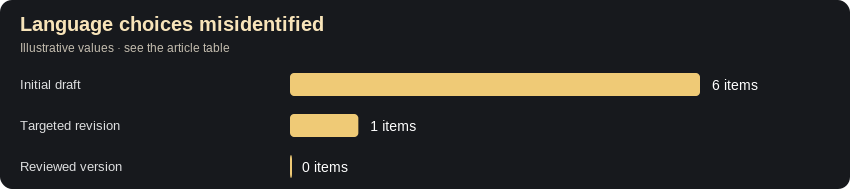
| Category | Value (items) |
|---|---|
| Initial draft | 6 |
| Targeted revision | 1 |
| Reviewed version | 0 |
Constructed audit of 6 fixed, distinct cases. First review resolves 5; second resolves the remaining 1. Not observed performance or a conformance score.
A neighborhood museum publishes a short workshop led in Spanish. A visitor opens the recording with the sound off and sees two choices in the player: “Spanish” and “English.” The first is a translated interface label, but the underlying file is an older dialogue-only draft. The second is a translation of the spoken instructions into English. Neither label answers an important question: which choice will convey what is happening in the Spanish recording, including a relevant sound cue and an off-camera speaker change? The visitor can experiment by pressing Play, but the publication could have told them before they made a choice.
Multilingual track selection has several components: the language a person hears, the language a person reads, the purpose of the track and the choice the player makes at startup. They can agree or vary independently. A Spanish-language menu does not establish that the audio or captions are Spanish. A track called “English” might be a translation, same-language captions for an English dub, or a stale file from another edit. A good publishing workflow describes each option accurately and tests what happens when someone follows the label. The point is to remove surprises rather than make every visitor use the same default.
This article follows a fictional paper-printing workshop with multiple playback tracks. The audit values are invented, not observations of real readers or browsers. The goal is to plan, label and verify choices in and around the player before publication. It is not a general review of transcripts or an assertion that a particular set of labels is sufficient to meet every accessibility criterion. The worked example lets a team check distinct problems with track discovery and delivery without counting every symptom as the same issue.
Give each track three separate descriptions
Begin with a simple inventory of the actual release. Name the source audio, any dubbed audio, each timed text track and each track's purpose. In a basic edition of the fictional workshop, the original audio is Spanish. Spanish captions include the dialogue and meaningful sounds, while English subtitles translate the Spanish speech. In a later edition, an English dub may be added. That dub is an additional audio choice, not an extra subtitle language. If it has its own caption track, the caption track follows the English rendition and should not be confused with the translation made for the original Spanish audio.
For each option, say which language the content uses. That is not necessarily the language in which its name is displayed. An English interface can identify a Spanish text choice with “Español” and enough other wording for the intended browser and audience. A Spanish interface might use “Subtítulos en inglés” to identify translated English text. The visible label should not make someone infer that its spelling reflects the chosen audio. A technical reading of player metadata can verify a content language; a person making a choice needs a useful name, not the internal value from the release manifest.
Next specify purpose. A same-language captions track can represent spoken words and relevant non-speech audio for someone who cannot hear the recording. A translation track may translate the dialogue without conveying all the meaningful sound information. A translated track can also include that information; it is not inherently incapable of providing it. Describe what the delivered track actually covers instead of assuming the language difference determines its quality or purpose. Terms such as captions and subtitles also vary in familiar usage across settings. The crucial distinctions are the language, content and relationship to the audio.
Finally identify the edition and audio basis. “English captions for dubbed audio” says more than “English 2” when two English options exist. The audio dub might have changed sentence lengths or when a question is asked. A caption file prepared for it cannot be assumed to match the timing of the original. Likewise an English translation created for the original may differ from the wording recorded in the dub. Use the inventory to keep labels tied to actual files and audio cuts. A well-translated track for the wrong edition can still fail every important choice the label was supposed to support.
Use a nearby description before the player starts
A concise note above the video can orient the visitor: “The instructor speaks Spanish. Choose Spanish captions or English subtitles in the player.” If those are the only choices, that may be enough. If the museum offers English audio as well, put the audio choice in its own sentence or label. Do not say “Available in English and Spanish” when that leaves people guessing whether both languages are spoken, written or both. A person deciding whether to present the clip to a class needs to know what will actually be heard and what can be read.
The title and introductory copy should not depend on the initial sound state. If a visitor starts with muted playback, they should still know which language and text choices exist. A picture with Spanish text in it is not reliable evidence of the audio language; it could be a title card that remained unchanged in a dubbed version. Use visible page text the publisher maintains, then verify the player's configuration against that text. The lesson's title is not a substitute for a statement about how to access its presentation.
Avoid saying a visitor must begin playback if the actual design does not require that. If generic player controls are only exposed after loading or activating the media, maintain a truthful availability note before activation. Where permitted and supported, expose the selection early enough that the person can decide before hearing speech. If a third-party player does not provide this ability, disclose what choices are available and when they can be reached rather than claiming the page alone changes the active setting. A nearby statement is useful before Play even if the separate settings control still belongs to the player.
Balance brevity and clarity. A two-option menu does not need paragraphs describing familiar terms, but a small amount of structure goes a long way. As a sample, “Audio: Spanish. Text: Español, captions with sound cues; English, translated dialogue” makes the basic edition's choices interpretable with no technical vocabulary beyond the familiar terms. Use sample copy only if it matches the tracks. If the English option does include meaningful sounds, a label that says “dialogue only” would be wrong. The team should have to consult the assets to approve the wording, not merely fill in a template.
Name translated subtitles and captions based on what is in them
The W3C WAI audio and video accessibility guide places captions among several ways to make media accessible. Its captions and subtitles guidance explains the role of synchronized text for speech and relevant non-speech audio and discusses terminology. The WCAG 2.2 Recommendation includes time-based media criteria that apply according to the kind of material and criteria being evaluated. These sources provide the standards and design context. Neither recommends that a publisher simply equate a chosen menu name with a completed review of the asset.
Consider the sound announcing a transition in the printmaking lesson. A small bell marks when the instructor lifts the impression, and the screen cuts from their hand to a close-up. A dialogue-only translation may understandably focus on the spoken lines. A track meant to make the audio information available to people without sound should convey the bell if it matters to the lesson, and identify an off-camera speaker when that information would otherwise be unclear. Labeling a track “captions” will not supply a missing cue. An appropriate label and a relevant content review are separate tasks.
Do not use “closed” as shorthand for language, quality or completeness. A selectable track gives a reader a choice different from text that is burned into the video image, but it still needs the right language and cues. If a workshop uses permanent translated writing in the image and also offers selectable captions, say what happens when both are present. Otherwise a visitor may turn off selectable captions and wonder why the translation remains, or choose another track and find overlapping text. The behavior is part of the delivered access, not a trivial styling issue.
Automatic tracks may deserve a clear status where relevant. A machine-generated or unreviewed file should not be described as though a qualified reviewer confirmed it, and a helpful note should not override an applicable requirement for the delivered content. Verify what the player actually publishes, including any additional default option provided by the host. An “auto” label in one view might disappear in another. If the public page cannot identify the track accurately, fix the delivery route or report the limitation rather than assigning an approval that was never earned.
Make the stored metadata match what the visitor sees
The HTML Living Standard's media section describes separate attributes for the kind of a text track, the language of its data and its user-readable label. Those distinctions are useful even for a publisher using a player that hides most of the markup. A visible label is not the language tag. A file named Spanish does not prove its cues are Spanish. The documented mechanism for displaying or selecting a track should agree with the metadata and content that the publishing team actually verified. Check the player menu, the selected item and the cues after selection.
Use valid language tagging where the product supports it. A tag identifies the track's language for software that may use that information; the visible title helps a person decide which choice to make. If a label appears in its own language, also consider how the interface makes that label understandable and announces it. The HTML specification separates the language of the label from the language of the timed text in relevant markup. An English phrase can name a Spanish track without changing its data language. Likewise a multilingual track may need a policy for representing its main language and meaningful language shifts. Determine what the actual player and format support rather than inventing detailed behavior from a tag alone.
Third-party players can generate labels differently from native players. A publisher may supply a detailed name, but the public menu might show only a language. Another player might add its own word for automatic captions or group text tracks with audio tracks. Test the delivered interface rather than trusting an upload confirmation. If a required distinction is lost in the menu, a visible explanation can help orient users, but it still does not prove two indistinguishable menu items are easy to select. Look for a supported way to expose the distinctions, or reconsider how the options are offered in that player.
Review localizations as first-class versions. A translation could drop the phrase that distinguishes original audio from dubbed audio, leaving a misleading pair of identical English options. A designer might shorten “Español, captions with sounds” to “ES” on a phone without considering a reader who does not recognize the abbreviation. Keep the key distinction available in a narrow version by simplifying elsewhere. Test the control's name, state and surrounding labels using representative interaction methods. A menu can look polished and still misdirect somebody if its choices are not independently identifiable.
Set a default without taking the choice away
A default can make a common route easier, but it is a starting policy, not a universal fact about what will play. The HTML specification describes the default text track as one enabled when more appropriate user preferences do not indicate otherwise and limits how many default subtitle or caption track children the same media element can have. A custom player or embed has its own documented behavior. Verify whether it actually respects supported settings, previously chosen states and available tracks. Reading a markup flag is not a substitute for starting the media on the page where readers encounter it.
Do not infer desired caption language from only the interface or device language and treat that inference as irrevocable. Somebody may watch Spanish-language media while reading English subtitles, or hear an English dub while wanting Spanish text. A classroom may share a device; a browser's previous state may belong to the person who used it earlier. Where an application adopts a preference, keep a clear way to inspect and change the active track. A default can be predictable without being compulsory. If no track is active, name the control that can turn one on.
Test a first run with no prior selection, a run with a supported preference, and a return after someone explicitly changes the text setting. An implementation can work on the first run but revert during a later interaction. The initial choice shown in the control should agree with the text that actually appears. If a chosen caption language is not available on a different clip, do not silently display another language under the original label. Specify the fallback or make the missing option clear. A default language, a retained preference and an active track are separate states.
When adding dubbed audio, decide whether changing it may suggest a corresponding text track. Do not quietly replace the visitor's reading selection merely because two tracks share an audio language. Some combinations may not exist or may not be synchronized to the new audio. Explain which options remain available and let a visitor choose among those the release supports. If the player can select audio and text separately, show both states accurately. An editorial note can say “The English dubbed version has its own captions” without claiming those captions will automatically start for everyone.
Audit six fixed language-choice cases
The fictional check contains six independent cases. First, readers must identify the original spoken language before starting. Second, they must identify same-language Spanish captions that include meaningful sounds. Third, they must distinguish English translated dialogue from captions for the English dub. Fourth, they must see that the file selected under Español actually contains Spanish text. Fifth, if a machine-generated additional track is available and unreviewed, they must be able to distinguish that status from the approved manual track. Sixth, the player must keep an explicit supported choice when the visitor restarts the same lesson within the review's defined session. Each case contributes at most one flagged choice.
In Initial draft, the page confuses all six cases. It does not name the source audio, gives its text choices ambiguous or incorrect names, maps the Español label to an outdated file, gives the automatic option no differentiating status, and resets the chosen state when the visitor restarts. These failures are stipulated for the example and are not claims about a default configuration of any named player. A mouse click that makes some words appear does not pass a test that asks for one particular language and track purpose.
In Targeted revision, editors fix the first five items. The introduction names Spanish audio; labels identify Spanish captions and distinguish the English translation from dub captions; each named option is tied to the correct file; and an additional automatic option is clearly identified as unreviewed rather than being presented as approved. Selection still resets during a restart. In Reviewed version, the state behavior is corrected and all six cases are repeated. No case remains misidentified or unresolved in the constructed test.
Illustrative chart data: Language choices misidentified.
| Prototype | Language choices misidentified | Resolved cases out of six |
|---|---|---|
| Initial draft | 6 | 0 |
| Targeted revision | 1 | 5 |
| Reviewed version | 0 | 6 |
The bars are six, one and zero. The first five resolutions leave one out of six. Fixing that remaining case gives zero. The complementary column is six minus the flagged count. Adding the bars would count some problems across multiple revisions. The example records no measurements, participant preferences or conformance outcomes. No figures were sourced from the W3C materials. A zero means the six named checks passed in the fictional last version, not that the lesson is fully usable in every player or that its translation quality was independently evaluated in every language.
If the release adds a language later, revisit the checklist. A new automatic option can make two formerly distinct names ambiguous again, and a new dub may introduce an independent cue timing question. The fixed six cases can remain useful as regression checks while additional cases reflect what the publisher now offers. Keep the denominator stated when publishing counts. A small audit helps a team locate actual defects without confusing the number of tested situations with a rating of the whole product.
Verify the first moments of playback, not just the settings screen
Open the public page or authorized staging version as a visitor would. Note the introductory description, the current audio choice and the selected text track. Select the Spanish captions and play a portion where a speaker change and a meaningful sound occur. Compare what the control showed with what actually appeared on screen. Checking only the menu makes it possible to miss a mislabeled asset. Checking only one cue makes it possible to miss a language switch, outdated timing or a missing sound somewhere else. Choose proofing moments that distinguish the available options.
Then select English translated dialogue while keeping Spanish audio. Verify that the spoken audio is still the original and that the English version corresponds to the approved translation. It is not enough that English words appear while the video is playing. Check an identifiable moment where the English dub uses a different phrase and the translation's wording can be distinguished. This case isolates a mapping problem that a quick general scan might overlook. A selector with multiple tracks in a single language needs exact proof because a monolingual visual check could misidentify which one was delivered.
If the dubbed edition is offered, switch audio deliberately and verify available text choices thereafter. A loaded caption for one recording can remain displayed at the wrong time if the underlying player changes to another edit. Check the first scene, a middle transition and a later cue after seeking. If the dub was edited to fit different timings, identify that fact in the production inventory and ensure the associated text is delivered with the correct edit. Where alignments intentionally differ, a valid setting should not silently show a track that is unusable under the new timing.
Check the state when the visitor returns. Restarting the clip, replaying it after the ending, refreshing the page and opening another lesson need not share one persistence policy. The fictional audit tests restarting the same clip within a defined session, not permanent cross-device memory. Decide what the real product supports and communicate it where needed. If the current choice is reset intentionally in some contexts, make it easy to inspect and restore. An audio selector that silently changes on use of a control labeled “Replay” is especially confusing when the action implies continuing with the same presentation.
Preserve the relationship between options across a localization
An organization can translate its interface without translating the media. A Spanish version of the article might embed an English interview with Spanish subtitles. The page can truthfully say “Audio en inglés; subtítulos en español” without changing either of those assets. Likewise an English article can explain that the workshop audio is Spanish. Maintain translated labels and their references in a way that a reviewer can compare them to the actual manifest. Page locale is a presentation setting. It is not a shortcut for determining what language will play.
Choose whether to name languages in the interface's language, by their own familiar names or by a combination. A person who cannot understand most of the page may still recognize “Español” quickly. On the other hand, a translated description can help a reader understand whether that option is audio, dialogue translation or captions with sound cues. Neither form helps if the shorter label cannot be associated with its purpose. Test the actual labels with the intended audience when possible. Give people enough to tell which choice fits them without adding language labels nobody needs.
Be careful about variants and accents. If two different versions really distinguish regional usage, explain the distinction accurately and use appropriate metadata in supported formats. Do not add a regional label just to make two otherwise identical choices look different; it may imply a translation or audio basis not in the file. A generic Spanish label may be sufficient when there is only one appropriate option. If a track includes multiple languages, describe the useful scope rather than falsely calling it monolingual. The production team should know whether each switch is translated, retained, identified in the cues or otherwise handled in the approved file.
Coordinate localized updates. One team may shorten the English menu label while another merely copies the previous Spanish translation. A version change can then make the menus disagree about a track's purpose. Store the intended meaning and media reference independently of the text string. Ask a reviewer to confirm that the localized label guides someone to the same option, not whether it mechanically maps to each word in the original name. Then test the menu and cues in the released localized view. A good localization is accurate in context, not just a correct string stored in a translation file.
Plan for small screens and controls that change shape
On a desktop, a player might have separate visible buttons for audio and captions. On a phone, both may move behind a generic settings menu. Take responsibility for the point where visible copy hands the visitor into the player. If the page says “Choose English in the captions menu” but the settings group calls it “Subtitles,” readers may be uncertain whether it is the intended destination. A small adjacent note can use the words people actually see where practical. It should not reproduce an entire menu tree that is likely to change without the article being revised.
Try the player with enlarged text and a narrow viewport. The critical difference between “English subtitles” and “English captions for dubbed audio” should not be truncated to the same visible word. Test whether the menu can scroll and whether a visitor can make a selection without simultaneously activating playback controls by accident. Check meaningful cues in the smallest supported view, especially if the video shows relevant text near the caption region. A correct file can still be difficult to use when captions cover part of an instructional graphic or the control that changes them.
Use keyboard and relevant assistive technology for the initial settings route as well as the visible selection. Determine whether the current language is available through understandable labels and states. Opening a menu is only part of the interaction; choosing the intended track and returning to the video matters too. Check whether a user can turn text off and then turn it back on without losing orientation. If a tooltip identifies an audio option only when a pointer hovers, make the essential description available by another usable route. These are tests of the delivered controls, not guarantees established by a style guide.
A small-screen note should not overpromise playback. If a provider's audio menu cannot be accessed in an embedded version but is available on an independently verified watch page, distinguish that limitation before inviting someone to choose. The page can state which routes have been verified and which alternate features may depend on the provider. Do not tell the reader their phone is at fault when the publisher lacks a basis for that claim. An honest label can point to a useful route without pretending the external player's behavior is under the publisher's full control.
Treat translation review and technical QA as separate gates
Someone fluent in the relevant languages can check wording, names, idioms and instructional details. A technical reviewer can check timing, selection, loading and whether the right file is served. Neither task replaces the other. A beautifully translated line can be assigned to the wrong menu option; a correctly wired track can translate a workshop instruction incorrectly. Record which review was done and which version it applied to. A status such as “manual translation reviewed” should not imply that every device or practice exercise was checked unless those reviews really occurred.
Verify the decisions that matter most to the lesson. If a direction tells a learner when to lift a paper impression, a timing or translation error at that point can undermine the activity. If an off-camera question changes the instructor's response, relevant speaker information should be reviewable in the caption track that promises access to that audio. Use named passages in the QA notes rather than simply approving the first few seconds. A future reviewer seeing a new edit should know which moments merit checking again, especially when the caption and audio files were generated or recorded separately.
Choose a few explicit comparison fixtures for publication control. One example can identify the original spoken language and a relevant non-speech cue. Another can distinguish the words in the translated track from the script for the dubbed recording. A third can test a preferred choice remembered within the same session. Retain enough information to reproduce the tests without logging real users' settings. If a preference cannot be preserved in a supported environment, document that limit and keep the interactive selection obvious. A successful first selection does not count as proof of persistence.
Finally, verify the presentation at the actual destination the organization controls. A preview can expose tracks that are missing from a public embed, or an outdated hosted version may use a previous translation. Open the same route a reader is asked to use and compare the delivered metadata, menu and content. Avoid stating that all options are available because the editing application lists them. Publication is the delivery of one version to someone else. Test that version.
Check what happens when a classroom changes languages mid-lesson
A shared display makes defaults and active settings especially easy to confuse. A teacher might begin with original Spanish audio and leave the English translation off. Later, the group may want to revisit an explanation with English text, then return to Spanish captions for a closer look at a timed sound. The page should identify both the active audio and active text so that changing just one does not leave the teacher guessing what the rest of the class sees. Test the actual switch while stopped and while playing if both are supported. Check that the newly chosen cues correspond to the same moment or that any restart is clearly signaled.
The teacher also benefits from a stable activity link. A URL to the workshop can be shared without imposing the settings of the person who copied it. A link deliberately intended to open a specific language edition can make that purpose clear. These are different product choices. If copying a page address does not preserve the selected track, a note can explain how to choose it instead of describing the link as a saved English-caption view. Verify links in a clean session rather than assuming that the teacher's previous preference shows what a new visitor receives.
If a lesson changes narration language within one recording, prepare a named test moment at that switch. A same-language caption track may preserve each spoken language where appropriate or use a supported convention to identify the shift. A translated text track may render both into a target language. Those approaches serve different purposes, and their labels should not obscure that difference. Do not promise detailed tagging or switching behavior that the file and player cannot provide. Confirm the actual content at the transition and how the reader can understand why the speech and text may not be in the same language.
Close the classroom test by returning to the original choices and looking at the visible state. If the teacher believes the Spanish caption track is on but the control says Off, or if the menu shows a remembered label while no text appears, investigate the discrepancy before release. A successful demonstration requires the right option to be discoverable, to be active and to deliver its promised content. A bilingual audience should not have to diagnose those layers in front of a room.
Make the handoff clear when a track is still pending
A public title might say “Spanish audio with captions; English subtitles forthcoming.” If the translation is not yet available, do not put it in an undifferentiated list of active choices. A note about a planned release should be separate from the selector and should not promise a date that nobody can verify. When the track is approved, update the availability note, add the actual choice and carry out the full selection checks. This avoids a familiar mismatch where a new file exists on the platform but the page still calls it unavailable, or the page advertises an option that was never made public.
If a track is temporarily unavailable because of a problem in distribution, give a truthful account of what the visitor can access now. A translated text option that fails to load is not the same as one that was intentionally removed or never offered. If the team does not know the cause, say what is observed rather than attributing it to a network or setting without evidence. Where a supported alternate destination is offered, verify its track choices and edition independently. This is especially useful for classrooms planning material ahead of time; they can tell whether a specific language presentation is ready without starting a trial run in front of a group.
Maintain a compact inventory that includes the media release identifier, source audio, each audio or timed text option, its purpose and language, whether its production and technical QA are complete, and which default behavior was tested. Also record which contexts are supposed to retain a choice. If a later change adds one subtitle language, the handoff should reveal whether it has any effect on existing captions or default logic. A useful inventory helps preserve stable choices without assuming changes propagate identically to every copy.
Public status can be much shorter than the internal inventory. One line should explain the original audio and the currently supported text choices. If the experience differs between an embed and a watch page, state the part that matters. A reviewer should be able to point to the exact published menu and show which option meets each description. Without that check, even careful translation can end up serving the wrong audience. The point of naming tracks early is to give the visitor control over what they hear and read, not to display confidence that more languages have been added than the publisher actually delivers.
End where the visitor makes a choice
At the workshop page, a visitor should not have to listen to the first line to discover which language the instructor speaks. They should be able to find the appropriate captions or translated subtitles, tell how a dubbed version differs if there is one and inspect the active setting without guessing. The title, menu and actual media should agree. If the player retains a preference, that behavior should help rather than surprise the person using it.
The final toy count means the named checks have clear answers, not that one default suits everybody. The enduring editorial rule is simpler: name the language, identify the form of access and verify what happens after selection. Do that before calling an option ready. The workshop can remain multilingual without making its visitors decipher each track from context or wait for speech they might never hear.