
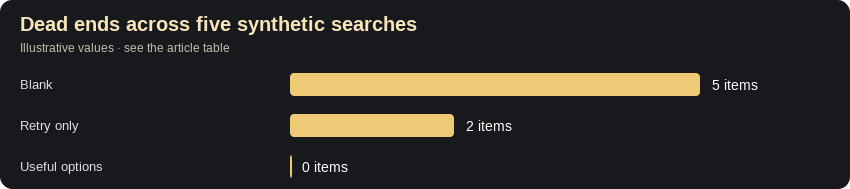
| Category | Value (items) |
|---|---|
| Blank | 5 |
| Retry only | 2 |
| Useful options | 0 |
Constructed checklist scenario for this brief, not measurements, ratings, or results from cited sources. Each displayed count represents checked items in the named example.
A reader searches a local history site for “Union Station roof repairs,” then limits the results to interviews. The site returns a white screen beneath the search bar. There are at least four plausible explanations from the reader's point of view: no interviews matched, search failed, the results have not arrived, or the site did not accept the search at all. The reader cannot respond intelligently without knowing which one happened. Even if the service runs correctly and finds no matches, the page can fail as a piece of writing. It leaves the reader to diagnose an invisible system that the site itself could explain.
A better page starts with what happened and offers a next move within the real capabilities of the collection. “No interviews matched ‘Union Station roof repairs.’ Search all item types” tells the reader which scope was checked and offers a way to change it. The source phrase remains available for editing instead of being erased as part of the error. The message does not promise that changing the scope will uncover a particular record. It simply gives the reader enough context to decide which hypothesis to try next.
This article uses a fictional local history collection and five synthetic searches to make the editorial work testable. It treats a no-match response as a valid outcome, not a defect to be hidden or counted as a failure every time it appears. The failure is a page that cannot be understood or acted on without unnecessary work. Good recovery does not guarantee a find. It helps someone understand where they searched, what the result means and whether there is a reasonable next step.
Distinguish a completed search from an interrupted one
A completed search with no results means the service returned an empty result set under the applicable conditions. The conditions can include the query, collection, access level and active filters. “We found no matches” is an appropriate label if that is what happened. “There is nothing here about the station” goes much further: it suggests that no relevant material exists anywhere in the collection or perhaps beyond it. A search result is evidence about the search, not a census of the entire world.
An interrupted search is different. If the service times out or a part of the search is unavailable, say the search could not finish, preserve the query and provide an appropriate retry route. A progress state is different again. If the page is waiting for a response, the copy should say that it is searching, not display “No results” before the work has finished. A brief familiar label is better than substituting a dramatic error screen that looks like permanent failure. What matters is that the wording describes the state the system actually knows.
Invalid or incomplete input deserves its own explanation when the application requires a particular format or at least one field. “Enter a search term or choose a collection” clarifies an input requirement. “No results” implies that the system already checked the collection. If a filter contains a range that cannot be applied, identify the field and the problem rather than showing a generic empty state. In particular, do not tell the reader to correct a permitted query just because the system found nothing. Unsuccessful retrieval does not prove there was something wrong with their words.
Partial results are another case to plan for. An archive search may show a count from one active collection while a second source fails. A precise message can tell the reader which part was searched and which was not, if the system can establish that. If it cannot, avoid manufacturing a story about why the results are incomplete. There is an important difference between correcting an input, trying again after an interruption and deciding whether to broaden a completed search. Each needs a different action label and explanation.
Preserve the search that actually ran
People often refine a query by changing one phrase or clearing one filter. They should not have to start over whenever they reach zero. Leave the submitted words in a reliably labeled field and leave the active filters visible. If the search uses a special field, such as creator or date, show that alongside the result rather than putting it behind a tab that disappears on mobile. The search's scope is part of what a reader needs to understand. A zero from one selected collection means something different from a zero across all public collections.
Distinguish the submitted query from edits that have not yet been applied. Suppose someone searches for roof repairs, sees the result, then types “train shed” but has not pressed Search. A banner that takes its own text from the edited box can suddenly claim that there were no matches for train shed even though that search never ran. Keep the result description connected to the submitted query. At the moment a new search starts, reflect waiting status or clearly identify retained previous results. When the new response arrives, update the query label and result together.
Be careful about hidden normalization. A service may ignore punctuation, fold certain letter forms, apply a controlled vocabulary or interpret search operators. Not every detail needs a footnote next to every result, but behavior that changes the reader's interpretation should be discoverable. If a no-match suggestion asks the reader to remove quotation marks, it should be because the search actually treats quoted terms differently. If normalizing a hyphen would not change what gets searched, asking visitors to remove it simply burns another attempt.
Preserving the query does not require promoting it into places where it can be unexpectedly seen. What someone searches for can be sensitive. Repeating it in the nearby editable form or result heading may be appropriate for the experience. Adding it to public analytics labels, shared screenshots or visible destinations without a reason is a separate decision. For an unusual or lengthy query, design the layout so that it wraps or remains available in the input without making the message unreadable. The goal is recognition and reuse, not decorating the page with the person's entire search history.
Make suggestions describe actions the system can actually take
Start with the simplest useful experiment. If a collection and a date range are both active, the visitor might want to remove just the date range. “Remove the 1910–1919 date filter” is more useful than “Try again” because it says what will change and lets the visitor predict what remains. A link that claims to search all item types should actually leave that filter behind. A link that instead opens a broader browse page should be labeled Browse all item types. Distinguish editing a search from leaving it to explore a different route.
Spelling suggestions deserve the same care. If the archive really supports a candidate like “Union Depot” and the query was “Uinon Depot,” showing a suggestion can be worthwhile. Do not assert a typo when the term could be a plausible name or a recognized variant. Offer the alternative as a choice rather than silently replacing the query and obscuring the search that came back empty. For a proper noun, identifications from a known authority list may be especially valuable, but an approximate spelling alone does not establish that the two names refer to the same person or place.
Choosing broader words may work when a service searches subject headings or titles rather than arbitrary descriptions. “Try ‘train shed’ instead of ‘east roof repairs’” is useful in an interface that can establish that the broader term is a relevant topic or demonstrates it as an example, not a promise. A less certain instruction can tell the reader to use fewer terms or browse station records by type. The action should not introduce a guaranteed result that nobody checked. State the changed assumption rather than assuring the reader that the item is there.
If no narrower change makes sense, supply a usable alternative. An archive might have a folder guide that is not indexed by the word search, a collection browse list by neighborhood or a help page describing which materials are in scope. An accurately labeled route to those resources is a next step even if it does not find the exact item. When every option requires leaving the search, say so clearly and allow return with the query and selections intact if practical. Unexpected loss of work can make a good suggestion feel like a penalty.
Use feedback and accessibility guidance without calling every empty result an error
The W3C WAI Forms Tutorial is useful for reviewing the search interaction as a form. Its material on labeling, instructions, validation and notifications gives an editor and developer a shared way to talk about what the reader needs. The search box should have an identifiable label, and filters whose purpose is not obvious should not depend on an unexplained icon. Clear messages about submitted actions belong alongside the actual form experience, rather than being left to the empty state illustration.
The WCAG 2.2 Recommendation includes guidance in its success criteria relevant to accessible forms and dynamic updates, including Status Messages. The companion W3C explanation of Status Messages clarifies why someone using assistive technology needs to learn the outcome of an action even if focus does not move there. An inline count or “No results” update can be a status message when it changes content without changing context. A distinct results page reached through navigation is not necessarily the same implementation case; give it useful structure and test navigation and focus separately.
Do not make routine search updates excessively interruptive. If suggestions appear after each letter, continuously announcing results can get in the way of editing the term. If the visitor deliberately submits the search, provide the important outcome without demanding that the person look away from the query or hunt for an unlabeled alert. The result should remain visible after any one-time announcement. Also describe the active filter state in forms and text rather than assuming the result message alone will express every condition. Clipboard, keyboard or screen reader tests are much more informative than simply verifying a component exists.
Error identification applies where an input error actually exists. Someone who enters a permitted search phrase and receives an empty result has not necessarily made an error. An exact title can be absent, an index may not cover part of the site, or a field may search only a narrow kind of information. Write “No matches in interviews” rather than accusing the visitor of invalid input. Separating those cases gives the technical implementation a clearer plan for deciding which notification, if any, should be announced and what the visible text should say.
A fixed audit of five synthetic searches
Imagine that reference staff choose five representative no-match searches and reproduce each in three mock interfaces. The five submitted searches and their collection settings stay fixed. The audit unit is one search journey, not one result or one word in a query. A journey is a dead end when the page does not provide enough context and a practical next action for that example. A practical next action is one the interface can perform, which either responds appropriately to a temporary error or gives the visitor a reasonable new way to explore after a completed search. It need not identify a matching record. This is a small editorial exercise, not a prediction of which option a visitor will select.
The first synthetic search is for a transcript by date, with two filters active. No transcript matches both filters. A sensible next experiment is to clear the date and retain the transcript setting. The second search is an exact artist surname, and the index supplies an alternative spelling from an established name list. The interface can offer that alternative as a choice. The third is a phrase typed in the interview collection; the phrase is found in another index by an example fixture, so an action to search across collections is realistic without claiming the actual result in advance. The fourth is a search whose request was interrupted, and a plain retry preserving the query is suitable. The fifth is a collection that is temporarily unavailable but has a maintained independent browse guide, so the interface can identify the unavailable search and offer the guide.
For this chart, Blank is shorthand for a generic empty panel with a heading but no context or usable recovery. It leaves all five journeys at a dead end. Retry only is a different prototype, not a claim that one common retry button is universally good. It preserves the query and scope and supplies functional recovery for three of the examples: the filter scenario and the cross-collection scenario can be retried through clearly visible, editable controls, and the interrupted request has a genuine Retry search action. It does not disclose the supported alternative spelling in the second example or explain the unavailable collection and route to the maintained guide in the fifth. Under this stated task rubric, those two examples remain dead ends. The Useful options prototype retains the three workable paths and adds the missing two. It also distinguishes service states from completed zero results.
Illustrative chart data: Dead ends across five synthetic searches.
| Prototype | Dead ends | Journeys with a practical next action out of five |
|---|---|---|
| Blank | 5 | 0 |
| Retry only | 2 | 3 |
| Useful options | 0 | 5 |
The chart bars show five, two and zero unresolved journeys in that order. Five minus the three journeys improved by the middle mock interface leaves two, and two minus the remaining two leaves zero in the final mock interface. The additional column is five minus the dead-end count in each row. All three rows examine the same five cases. The bars are not totals to be added, formal accessibility scores or usability results. No live service or group of readers was measured. A real audit might set a stricter rubric, count other issues or find more than two residual problems in a similar interface. The examples show why context and recovery should be checked separately from whether a result happens to exist.
One might object that an inventive reader can press Back, open a different tab or use another search engine. The rubric deliberately avoids giving the prototype credit for outside improvisation. A coherent audit needs to say whether it is checking support in the application or whether it is measuring successes across the reader's entire toolkit. This example focuses on what the site hands the reader at the moment the result becomes empty or unavailable. A true dead end in the example is not an assertion that no route exists anywhere else.
Give individual collections the right vocabulary
The same recovery component can serve different collections without giving each one the same message. An image archive may classify by photographer, subject, place and date. A local newspaper index might search headlines and brief descriptions for older issues but full text only where transcriptions exist. A museum catalogue may have richer object fields than a volunteer inventory attached to it. Describe the relevant limitation when it affects what a visitor can try. “This search checks titles and catalogue descriptions” is more useful than “Search as usual” when someone is expecting the entire contents of every PDF to be indexed.
When a collection is outside the site index, an explanation about scope can be useful enough on its own. If the finding aid has digitized descriptions of boxes but not individual letters, say which level is indexed. A visitor looking for one newspaper phrase might instead need the issue date or title. A route to browse the collection by year can be a realistic alternative if that structure is available. Do not invent individual search coverage to make a portal look comprehensive. An honest gap points to a better research strategy, whereas a false implication of complete coverage may stop the inquiry entirely.
If there are access controls, use language that respects what can actually be disclosed. “No matches in the collections available to this account” can be appropriate if that is the scope. Do not confirm the existence of a hidden record through a suggestion or result count if the application is not meant to reveal it. Guidance for restricted collections can explain ordinary routes to help or access without identifying an item the user cannot see. The line between useful and revealing depends on the collection and the service behavior. The content pattern should be tested with the real authorization boundaries in place, not just with a broad internal account.
Be explicit about terminology that is imposed by the catalog rather than by the reader. A site can say that records use the term “locomotive shed” in a subject index without implying that anyone who searched “train shed” was wrong. Give examples tied to the collection and spell out when a subject list helps. If browsing uses historical terms that differ from everyday language, responsible editorial notes may be necessary to make those terms interpretable. The no-match screen is not the right place for a long taxonomy lecture. A clear link to how items are indexed or a specific term choice does more useful work.
Keep state changes legible on a phone and through navigation
A common compact layout replaces filters with a button labeled Filter. After applying two selections, the controls disappear and the result says “No matches.” That is not enough to understand what happened. Include a concise visible summary, such as “Interviews · 1910–1919,” and keep the control that changes those conditions easy to reach. If a person clears one filter, make clear which one changed. A reset that drops everything should not be presented as removing only a date range. The same rule matters on desktop but is easier to miss when filters remain in a broad sidebar on the editor's monitor.
Check display when a search phrase is unusually long, expressed in a different language or contains punctuation the layout treats unexpectedly. A sentence displaying the entire term may wrap through an action or push the primary button offscreen. The search field or a structured summary can hold the full term without making the entire page a title. Do not truncate it so aggressively that several nearby variants appear indistinguishable. Test long names, quoted phrases and proper nouns that are easy to misread. Those cases reveal whether the user can see what they actually submitted before investing another attempt.
Back, reload and return from browse all need definitions. Some searches are naturally shareable and can be restored by ordinary navigation; others involve private filters or account-scoped results and should not be put into shareable state without careful design. Even when a query is restored, the UI should not claim an old result represents a new run unless it actually does. If the state cannot be restored, tell readers what changed and give a route to reopen or reconstruct the search. Otherwise preserving the phrase on the results page may merely postpone the moment it disappears.
Multiple overlapping searches make the relation between response and visible text especially fragile. A reader can submit one query, quickly modify it and run a second, then receive the earlier response later. If the interface shows “No matches for [latest query]” beneath an earlier empty response, the message is false even if the underlying search ran correctly. Test rapid changes and ensure that results and the label describing them move together. Copy alone cannot fix ordering bugs, but specifying the intended behavior makes the editorial requirement testable.
Test journeys, not just the panel that contains the sentence
Start with a search that is known to find results and change exactly one condition to create a zero. Then verify that the message names the relevant scope and that the action actually changes that condition. Observe whether the edits are reflected in the search form, the result summary and any related filter indicators. If a suggestion leaves the original query behind, check that there is a practical way back. When a results page advertises a broader scope, verify that the broader scope really includes what the label says. The copy is not correct merely because the screen looks tidy.
Test a failed request separately. Preserve the attempted query and check that the messaging distinguishes retry from a completed zero. If the previous results are still visible, label them as previous rather than letting them imply the recent search succeeded. Make sure a retry is reasonable for the failure state. If an entire source is deliberately disabled, repeatedly submitting the same request may be worse than offering a maintained alternative. The action should match the recovery you can provide, not the button pattern most convenient for the implementation.
Then check different ways people interact. Use keyboard navigation to reach the field, change a filter and activate a suggestion in the actual release. Listen for whether a meaningful update can be recognized with an appropriate assistive technology setup, and check that controls remain understandable outside a visual context. Try a narrow viewport, zoomed view and a slow response. Ask a fresh reviewer why there were no results and what a suggested button will do, before they press it. If they infer a promise or the wrong scope, revise the text and run the whole path again. Passing a lint test is useful but cannot tell you whether the recovery makes sense.
Include a query whose failure you cannot explain, not just those with a tidy editorial story. A generic, truthful statement about the checked scope plus a safe broadening or browse option may be sufficient. If the system cannot tell whether a name is misspelled, omit the spelling diagnosis. If the broad search is still empty, report that without progressing through levels of unwarranted certainty. The user should be able to stop or seek help, rather than be trapped in a sequence that repeatedly guarantees the next click will work.
Review suggested alternatives as content with an expiration date
A spelling dictionary, a featured browse link and a manually chosen keyword suggestion are all editorial assets. Each has an owner, a scope and a point at which it can become stale. Suppose a small collection originally catalogued rail station photographs under a district name. The site added a suggested replacement query that used this name and the suggestion worked for several years. A later migration replaces the district label with the modern neighborhood name. If the search prompt still recommends the old term, it may lead straight back to zero. General recovery copy can be evergreen, but a specific recommendation has to reflect the live search service.
An editor can maintain a compact inventory of high-visibility suggestions. Record the query or circumstance that shows each suggestion, the scope of the intended search, the language the visitor sees, and the expected operation. If the action is supposed to preserve particular filters, say which ones. If a suggestion exists because a linked guide is more complete than the site search, identify the guide rather than just calling it a fallback. A future reviewer should be able to reproduce the situation without remembering the discussion that led to the original wording.
Check suggestions that rely on popularity or frequency as well. A system may pick a commonly entered phrase without knowing if it is relevant to the current person's need. It can be useful to offer a broad browse action as an alternative, but it is misleading to call an unrelated popular search a correction. A popularity-driven prompt can also amplify a term that readers happen to try because the last version of the interface recommended it. Treat counts as signals of activity, not proof of value or accuracy. If the archive has a reliable subject list, its terms may make a more defensible set of optional pathways.
Give users a way to reset the choice after taking one suggestion. If a correction becomes the new query, make it easy to restore the original text so readers can test both forms without retyping. If the result groups use a relaxed match rule, distinguish those matches visibly from the original zero. For example, “No exact matches. Showing matches for related terms” should appear only when the service actually performed that second operation and can say what it changed. Preparation against genuine examples is preferable to a universal panel that guesses the origin of every empty page.
Decide what observations can support a broader improvement
A search can return zero because a known document is not indexed, because its description lacks the natural terms visitors use, or because the collection truly has no such material. Each possibility leads to different work. An editor might improve a catalogue description, add a legitimate synonym, repair the search index, or explain the collection's limits. Do not treat the content of the empty state as the only part that can change. The panel often exposes issues in the words people use to name things and in the indexing pipeline that links those words to records.
Investigate using a small, purposeful set of cases. A staff member can choose searches for known indexed items, realistic near misses, common topic categories and materials outside the collection. Include successful searches as comparisons so the team can observe what changes when one condition is removed. Analyze which action a reviewer would take and whether the resulting page makes sense, not just whether the exact result count changes. If a browse page with no query is a reasonable choice, it should not be treated as failure simply because it is not another search submission.
Operational data can support a review if collected and interpreted appropriately. An event count might distinguish the number of completed empty responses from the number of errors or requests that never finished. Another measure might track whether someone used a suggested action. Clicking the action does not show that the visitor found the answer, and leaving the result screen does not show that the message was useless. The visitor may have learned that the archive does not index the relevant period, or they may have given up. Choose labels that say what was observed. Use voluntary feedback or a proper research setup if a stronger claim is needed.
Avoid collecting more about the searcher than the improvement requires. Aggregate categories, curated fictional cases and problem reports supplied deliberately by users can be enough for some investigations. If a team needs actual query samples for a legitimate investigation, decide how to handle retention, access and removal with appropriate owners before putting private searches in screenshots or chat channels. An editorial requirement to retain the visitor's own query for correction does not imply a requirement to retain it for everyone who can access an internal report. The benefits and audience of those two kinds of retention are different.
Test the no-match boundary when searching by dates
Dates merit a separate check because people can reasonably expect the same year to mean different things in different catalogues. A reader searching for a station photograph from 1916 might be filtering by the date the photo was taken. An archive might have a date field for when the collection was accessioned, or only a broad estimate for when the image was made. An empty result does not reveal which definition the interface applied. A useful label says “Photograph date” or “Date added to the collection” rather than relying on a single word to stand for both. If estimates are indexed only in decade ranges, document the behavior before suggesting a particular year as a likely fix.
Uncertain dates should not be silently turned into exact dates in a recovery message. If searching within a decade omits records with unassigned dates, an option to include undated items can broaden the search honestly, provided that option exists. “Include records without a photograph date” gives the reader a useful explanation of what changes. It does not assert that an undated picture was taken in the desired year. Review the post-click result summary, too: a screen that still says “Photographs from 1916” after adding undated results overstates what it knows. The new summary ought to identify both the date-filtered group and undated material if both are shown. This is the same contract as the zero message: changes to the search should appear in the description of the results, not merely happen out of sight.
Write a compact message that still gives the reader a way out
A large menu of speculative remedies can create a new problem. If the likely cause is an active interview filter, lead with one sensible change. A second option to browse the collection can be available without putting six competing buttons in front of the same decision. The search form itself can supply further edits, so the message does not have to repeat all the choices. Clarity also means presenting a lower-priority option as such. A broad reference guide is not the same as a direct fix for a temporary failure, although it may be useful if the visitor cannot wait.
Short lines of sample copy make the distinction visible. For a completed query: “No interviews matched your search. Remove the date filter or browse the interview index.” For a failure: “We couldn't finish this search. Your search terms and filters are still here. Retry search.” For a collection intentionally excluded: “This search covers digitized records. Browse the finding aid for records that are not digitized.” These are patterns, not facts about any service. Each line depends on actual capabilities, such as whether the form really retained what the reader entered and whether the finding aid is available.
Another useful pattern names the tentative quality of a recommendation. One could write “Possible spelling: Union Depot. Search for Union Depot” rather than “You meant Union Depot.” If turning the alternative into a search retains restrictive filters, the label or nearby text should make that predictable where it matters. Consider the reader who already tried the broad variation. Let them dismiss the option or avoid repeating it on a loop when possible. The interface can offer a suggestion without insisting that it knows more about a family name, dialect word or obscure title than the person who entered it.
In a service outage there is no reason to make a visitor responsible for troubleshooting an incorrect spelling. A reassuring phrase can be direct and factual: the search did not finish and the inputs remain. If the system can show when the relevant source will become available, verify that before writing it into the message. If not, resist substituting a guess with a time attached. The point of honesty here is not to sound apologetic. It is that the user can decide whether to retry now, move to a collection guide, or stop, knowing what the system does and does not know.
End the review by reading the message out of context and then inside the actual result page. The isolated sentence should name the state without relying on an illustration. Inside the page, the next move should be easy to find, consistent with nearby controls and accurate after activation. At the white screen below the search bar, the reader was left to explain the site to themselves. A successful revision explains only what is needed to continue: the scope checked, the status of the request, the query they can revise, and a next action that does not promise what the system cannot deliver.