
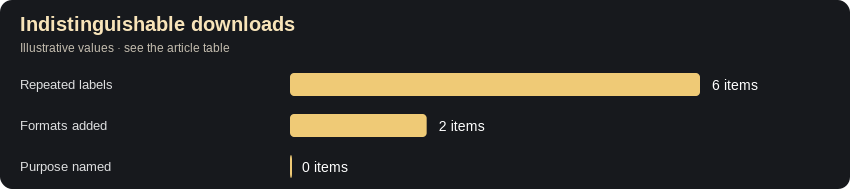
| Category | Value (items) |
|---|---|
| Repeated labels | 6 |
| Formats added | 2 |
| Purpose named | 0 |
Constructed checklist scenario for this brief, not measurements, ratings, or results from cited sources. Each displayed count represents checked items in the named example.
A researcher finds a report about a creek restoration. Beneath the introduction are six adjacent links. Each says “Download.” The first leads to a print copy of the report. The second contains the observations used in a chart. The third has a diagram that the researcher does not need. All three links work perfectly. The reader still has to open them in order to choose. Later, the downloads folder contains names such as report-final.pdf and export.csv, which help less than the publisher might have expected. The failure began before anybody activated a link: the labels did not describe the choice.
A useful file label answers the question the reader is trying to settle. Is this a print edition to take to a meeting, a spreadsheet for analysis, a machine-readable table, or a technical appendix that establishes a method? Which year or version does it cover? Will it open a web page or hand the reader a file? Not every choice requires a long label. The right few words often prevent trial-and-error navigation, accidental acquisition of a large file, and later confusion about what was saved.
This guide separates three related jobs: helping the reader choose, delivering the object described, and leaving a meaningful local filename after delivery. It uses a six-file fictional example to make the distinction measurable without pretending that a checklist count certifies accessibility. Real users may still have other trouble with a file whose link is labeled perfectly. A proof of good naming is not a proof that the actual document can be opened, understood, or used for the same job as another object.
Name the purpose before the container
A file format is a packaging decision as far as most readers are concerned. “PDF” says something about the software likely to open an object. It does not say whether the object contains the report, instructions for a field protocol, or an index of published corrections. “Spreadsheet” suggests things someone could do with data, but a workbook of monthly chart summaries is not the same as one containing all observation rows. Lead with the thing a reader seeks, then add format information where it helps them make the choice. For instance, “Field observations, spring 2026 (CSV)” gives a shorter and better route than “Download data” followed by three format-specific destinations labeled identically.
A purpose can describe an action or content. “Read the methods online” is appropriate when the link opens the methods page. “Save the field form (PDF)” prepares the user for a file intended for printing or recording observations. Avoid filling a page with assumptions about what readers should prefer. Let users see which option offers a different kind of content and which offers the same content in another medium. This distinction is especially useful where the print document excludes interactive material available on the web, or where the spreadsheet contains additional columns not rendered in an adjacent table.
Scope earns its place in a label when it changes what a person would choose. If both spring and winter CSV packages appear together, put the season near the data description. If one file applies to the east reach of a creek and the other to the west, use those names consistently. A publication with several associated dates should be clear about which date is observation coverage, edition date, or a version marker. A label that says 2026 without explaining whether it is a survey year or a publication year might still be meaningful in context. Where the distinction could lead to a bad decision, supply it directly.
The W3C explanation of Link Purpose in Context discusses determining a link's purpose from its text or from the text combined with programmatically available context, apart from cases whose purpose is generally ambiguous. This is not a rule that every anchor must repeat the complete page title and dataset identifier. It is a reason to avoid making meaning depend on visual alignment or nearby words whose association is unclear in the rendered document. A label that remains informative on its own often works particularly well in saved links, skimming, and lists of links separated from the original layout.
A good label leaves out things that do not help. Internal folder codes, brand slogans, and long descriptions of the publishing team can bury the meaningful noun. Put durable identifiers and exact provenance in an accompanying row, note, or landing record where they can be located. Keep the first words useful so a reader who only sees the start or listens to it among many options can make sense of the choice. A concise label is not a short generic label; it is a short specific one.
Distinguish a link's visible words from the object's saved name
The text a reader activates and the filename shown by a device serve different moments. The link label should be readable in a sentence or list. A filename should remain useful when it sits next to other files without the nearby explanatory copy. A resource link can point to a URL with an opaque identifier while still presenting an accurate descriptive label. Conversely, a descriptive URL does not repair a set of indistinguishable visible labels. Give each layer a deliberate job.
A local filename generally benefits from a short stable subject, purpose and distinguishing scope, followed by an accurate extension. A fictional example is creek-restoration-field-observations-spring-2026.csv. It is longer than data.csv but much easier to identify after several downloads. If every filename begins with an institution and a multipiece program code, key differences may disappear beyond the visible segment of a compact device list. Keep the most meaningful distinguishing terms available, and choose a naming convention the team can repeat without inventing new syntax at every release.
The WHATWG HTML Standard's links chapter distinguishes the hyperlink text from its destination and documents the download attribute and suggested filenames. The attribute can express the publisher's intended download behavior and propose a local filename. The behavior and resulting filename do not depend only on the attribute: the response, relevant origin rules, the user agent, and user choices can affect the result. Do not promise a literal local filename on every system simply because one appears in the template. Check what readers get from the actual deployed URL in representative environments.
An HTTP response can present filename information as part of the content disposition. For example, the public path could be an unhelpful internal object identifier while the response suggests a meaningful filename. That is useful when the resource must remain addressable through stable infrastructure. It also creates another place for mismatch: an English label says “Field observations (CSV)” while a file response offers “download.pdf.” Before rewriting the visible words, find out whether the underlying file, its metadata, or the label is wrong. Do not tune only the text that is easiest to edit.
File extensions communicate something that should be true. An HTML error page with a csv extension is not a functioning CSV download. Nor is a table renamed with an xlsx extension automatically a workbook. Test the content and its expected parsers rather than relying on an object key or extension. The person who gets the correct label but the wrong bytes still did not obtain the material the link promised, and they may not discover the mismatch until they need it without a connection.
Work the six-download comparison without treating it as evidence
The chart in this article is illustrative. It describes one fictional release with six alternatives: the full print report, the methods appendix, individual field observations, summarized comparison values, the field mapping package, and supporting original photographs. In that order the proposed formats are PDF, PDF, CSV, XLSX, GeoPackage, and ZIP. For this exercise all six files are distinct, and the labels are judged in an isolated compact list without any additional context. No user study, accessibility audit of a real site, or W3C measurement produced the numbers.
In the first rendition all six labels read “Download.” Every item belongs to an indistinguishable group. In the next rendition the editor appends formats. The CSV, XLSX, GeoPackage and ZIP labels are syntactically distinguishable from one another. The two PDFs still read identically, so only those two remain indistinguishable under the example's exact comparison rule. In the final rendition the editor names each purpose and includes format as appropriate. The two PDF links now distinguish the print report from the methods appendix, and the four other links identify what they contain rather than asking the reader to infer it from distinct file types.
| Illustrative rendition | Files with indistinguishable labels | Files in the comparison |
|---|---|---|
| Repeated labels | 6 | 6 |
| Formats added | 2 | 6 |
| Purpose named | 0 | 6 |
Count members of indistinguishable groups, not the number of repeated strings. In the first rendition there is one group with six members, so the count is six, not one. In the format rendition there is one group with two members, so the count is two. At the final stage each label belongs only to itself, so no item is in an indistinguishable group. That explicit counting rule makes six, two, zero reproducible from the same six alternatives. If you prefer to count groups, the values would differ and would need a different chart label.
The second rendition is only an intermediate stage. A count of two does not mean the reader can determine the purpose of the other four links merely because their formats differ. Someone looking for observation data could still be uncertain whether it lives in the workbook, the CSV, or the mapping package. The chart measures exact indistinguishability under a prescribed toy rule. It does not measure task completion, conformance, readability for unfamiliar audiences, or whether the files actually open. A real review should check those questions separately.
The last rendition can present concrete labels. “Full report, print edition (PDF)” and “Sampling methods appendix (PDF)” distinguish the repeated format. “Field observations, individual rows (CSV)” and “Comparison tables and plots (XLSX)” distinguish analytic roles. “Site boundaries and routes (GeoPackage)” and “Original field photographs (ZIP)” identify package contents. These examples assume the objects really contain what the labels promise. If they do not, revise the inventory before publishing. Strong nouns can make a false promise sound unusually convincing.
Use accessible context, then test its limits
A prominent heading can make a group of downloads easy to understand visually, but the group still needs structure that makes its identity clear. A link that says “Data” under a heading about the spring survey might be legible in the full page. When the same page repeats that link in three neighboring sections, a keyboard or assistive-technology user may encounter the terms in a different way. Verify that the context the design relies on is available programmatically and that it remains at the place a user actually chooses. The W3C explanation includes examples of helpful known context; it does not make any visually near text sufficient in every layout.
Compare the actual reader paths. One person tabs through a small set of links. One person skims headings and opens a row based on its surrounding description. One searches the browser for the season. Another may use a list that flattens links out of their surrounding text. These modes do not expose every context in the same way. A self-explanatory core label is a robust baseline, while supplementary detail can remain in a nearby structured description. Do not build a giant combined name containing every compatibility note merely to solve every possible reading mode.
Images and buttons can conceal generic names. A card may show a title and a separate clickable icon whose accessible description is “Download.” A browser may expose them as two links, or the title might not be part of the link at all. Inspect the rendered outcome rather than trusting the layout mock-up. Where the same meaningful title appears both in a label and beside it, check that the result is not unnecessarily repetitive. Keep simple semantic text as the starting point. Styling should communicate useful emphasis without carrying the entire meaning of the action.
Do not make distinctions solely with file icons, colors or logos. A spreadsheet icon might be recognizable to a regular user but can fail to communicate purpose to a newcomer. Color is still less useful if somebody cannot see it or if it changes in a different theme. Meaningful text survives a feed, copy or archive far better. Where a file type is unfamiliar, spell out a short explanation such as spatial data package and give its actual format next to it, rather than assuming everyone understands an extension and knows what tooling they need.
Explain what will happen before a file opens
Use language that reflects the interaction readers actually get. If a link opens an HTML landing record, say so even if the record offers a download on the next step. If it opens a browser PDF viewer rather than saving automatically, “View the print report (PDF)” might set a better expectation than “Save.” If a resource can appear as navigation in one browser and as download in another due to policy or preference, choose wording that names the resource reliably without promising an exact browser response. Standard attributes express intent; reader environment still matters.
Consider a file locked to signed-in members. Naming it accurately does not make access conditions obvious. A person who wants to share a working link should be able to tell whether the destination requires an account or a particular role. Where relevant, identify that limitation close to the control. Do not describe a private file as a public download based on a preview tested only by an administrator. Likewise, public files behind expiring links may behave as though they are broken after the link is copied. Use a stable landing record or durable route when appropriate, and distinguish that enduring address from a temporary delivery URL.
Some materials need supporting software or substantial bandwidth. A GIS package can be perfectly usable to its intended audience and bewildering to somebody who opens it on a small device with no compatible software. Balanced labels can state the type while nearby text provides a short compatibility explanation or points to an alternative for viewing. If the file is large enough to influence choice, give a checked size or responsibly rounded estimate. Do not promise a size copied from an old build if the attachment can change. Where costs matter, testing the download should include whether the interface begins it on a deliberate activation rather than unexpectedly.
Use a short inventory to coordinate the user-facing text and the response. For each file record the intended activity, subject and scope, file format, user-visible name, destination, response naming rule and restrictions. Add a current size measurement when needed and specify the conditions under which the value is supplied. Validation goes beyond reading the spreadsheet. Follow the link from the page the public will use, observe whether it navigates or saves, verify what happens in an ordinary browser, and compare the actual delivered bytes to the described edition.
Cross-origin downloads deserve specific attention when the site uses a separate host for files. The WHATWG standard documents how origin and response disposition matter to download handling and suggested names. If a publication page and storage service give conflicting cues, resolve the conflict in the supported deployment rather than layering scripted behavior on top without checking. A script that forces another window or rewrites a response may make other interactions less predictable. Keep the standard hyperlink usable when optional scripting is unavailable, and do not claim support for device environments that were not tested.
Keep versions legible without appending a novel to every label
The public copy of a workbook may replace an older copy on a stable resource page, while a historical archive preserves every issued edition. A label has to make sense in that policy. If it always points to the latest valid workbook, wording can state that and put the current date and edition in nearby structured text. If the webpage lists several fixed editions, put the distinguishing coverage or release date directly in the repeated options. Clear language makes it less likely someone will cite an old file just because it had the simplest name in their folder.
Avoid vague finality markers. Names such as final, really-final and final-revised tell a reader there was a production process but do not tell which edition was approved. Use a documented revision identifier when a change warrants it and distinguish issue date from data coverage. A February release may correct figures from a survey last spring; the filename and landing page can convey both where meaningful. If readers only need to choose between years, keep maintenance details nearby rather than cluttering the first few words of every link.
An archive can intentionally support two kinds of reference. A stable page can explain the collection and point to the current materials. A release-specific file or record can provide a reproducible target for citation. These are different endpoints, and callers should be able to tell which one they selected from its description. Changing a visible title for clarity does not require breaking an old stable URL. Conversely, a new stable path should not be described as the old edition merely because the link text was copied. Separate naming, object identity and revision policy.
When repairing labels on an existing site, preserve links that need to survive if appropriate, but verify that redirects lead to the correct edition. A file called “Methods appendix v2” should not redirect to a new file silently if people depend on version two. If the older file is withdrawn under policy, explain what a valid reader will find and avoid labeling a replacement as the same bytes. The download panel is often the only point where a casual reader learns why a file and its earlier citation differ.
Consider translations and localized catalogs too. A visitor in one language might receive an interface label in that language that points to an original document in another. Describe the language of the file when it changes the decision. Do not silently translate a title in a way that creates a nonexistent file edition or implies that only the interface language determines its content. On shared archives these details can be localized for people, while stable identifiers and reference records still connect the different descriptions of the same underlying object.
Test a choice somebody actually needs to make
Draft a small task test for the next publication. Ask one reviewer to find a dataset of individual observations without opening the other items. Ask another to locate the print version and distinguish it from the methods appendix. Give the reviewer the interface as delivered rather than a list that includes internal hints. Note whether the reviewer chooses correctly, which visible information made the difference, and whether a failed choice arose from an unhelpful label, unclear grouping or unexpected endpoint. A success claim should be as narrow as the exercise that supports it.
Run the test from the actual viewing contexts you support. Verify the displayed words and, where relevant, the accessible name and programmatic context. Check a narrow-screen layout, keyboard navigation, and what a text-based link list exposes. Use the save behavior and locally suggested filenames on relevant platforms. An accessible label that reads correctly in a navigation list still does not show that the downloaded PDF is accessible or that a spreadsheet opens. Test those things separately with readers or suitable tools if they are part of the acceptance criteria.
A negative test is just as valuable. Intentionally duplicate two labels in a private fixture and see whether the review catches it without relying on familiarity with the destinations. Try a different file with the same format so the test cannot be passed by reporting that extensions differ. In another private fixture, make the words accurate but return the wrong bytes from a controlled test route. A good workflow finds that as a delivery error rather than a copyediting success. These controlled checks teach the team what its tests actually detect before they are used on a release.
Name review categories separately. “Same visible label, distinct purpose,” “wrong file delivered,” “correct object but opaque saved name,” and “requires undeclared access” are different failures even if one reader experiences them all as confusion. Resolving them might involve an editor, a metadata maintainer or a delivery engineer. A useful ticket says which evidence established the problem and what should be true on retest. Avoid setting a goal only for unique strings, because appending arbitrary numbers to repeated links can satisfy that metric without helping a person choose.
Build a download panel that can be maintained
Start with the release list, not with the current page layout. For each possible download, ask who would intentionally want it, how they would recognize it, and whether another item would be an easy mistake. A report's appendix may be meaningful to a methods reviewer but irrelevant to a reader looking for a print copy of the main conclusions. If the appendix is already included in the main report, explain whether its separate download changes the content or just extracts a useful section. Otherwise the availability of two links can make people wonder whether one is obsolete.
Arrange related outcomes into a predictable sequence. For a research report you might list the read-online version first, then print, results data, methods, and supporting assets. That order is not universal. A dataset catalog might place the full data package first and treat the report as explanatory context. Do not bury an unusually important compatibility note after a long row of optional formats. Give the decision-making information where it is useful, and carry the core name into any alternate layout, including an accordion, footnote, or compact mobile list.
Avoid unnecessary duplication when a panel appears in multiple parts of a page. Two links to the same target may be legitimate if they help people in different reading contexts. Use consistent names where they perform the same purpose so a reader does not assume the differently labeled copies contain different versions. For separate targets with genuinely different purposes, distinguish them. Uniqueness across a whole site is not the goal: two instances of “Methods appendix (PDF)” for one article may be reasonable, but six same-labeled choices that refer to six materials need more help.
Structured metadata makes those decisions easier to repeat. A tiny release schema can store the title, role, coverage, format, language if relevant, visibility, with an optional current size and notes. Derive visible fields from the known object where appropriate, then allow editors to refine the meaning. Do not automatically promote a storage name to the public label. If a file was uploaded as export-2, a friendly display name should help readers, not canonize the accidental production filename. The release checklist can compare all layers without demanding that they use identical syntax.
A panel change may affect external links, internal citations, email announcements, and archived exports. Decide which identities are stable before replacing paths. If a link is intended to address the current edition, verify the update and keep a way to find prior fixed editions where the project's policy permits. If it is intended to address a specific immutable edition, verify that it does not quietly shift underneath earlier citations. Good naming is a maintenance discipline when readers depend on the objects after the launch announcement is forgotten.
Match what is inside the package to what the panel promises
A package often contains more than one object. A ZIP might bundle the original photographs, thumbnails and a small reuse note. A GIS package can contain several tables or layers. Telling people that the target is a ZIP says nothing about those differences. An accurate short package description helps the intended reader decide whether to open it, and a manifest inside the archive can preserve the inventory once they do. Where appropriate, name the components, formats, restrictions and edition in plain language before asking readers to fetch a large file.
Describe coverage precisely when exports intentionally omit some information. A public observation file might contain time and survey results but not restricted coordinates. A well-named link should not hint that the omitted details are included. Give the reason or a brief scope note appropriate to the audience without disclosing information that was meant to stay private. Different scopes deserve distinguishable titles: “Public field observations (CSV)” and “Methods with location generalization notes (PDF)” help people get the information that is actually available, without a generic file label sending them on a search for unavailable data.
A maintenance review can catch seemingly small mismatches. A preview uses the completed report while the printable attachment still has draft figures. A data export's filename has the correct edition, but its rows include an older set. A methods attachment opens and displays a clear title referring to a completely different project. None of these mistakes is fixed by extending the visible label. Check object identity and scope against a release manifest, and name which part of that validation was done in the test report. If only a few samples were read, do not claim the whole dataset was recalculated or validated.
For numerical data, offer a suitable description of the structure if the user needs it. A table can state whether rows represent individual observations or summaries, and where field definitions are found. A data dictionary may deserve its own clearly named link if it is a distinct object. A CSV could be the most convenient for a script and unsatisfactory for someone expecting a formatted report. Neither audience is wrong. Naming the intended contents and offering complementary formats where available lets readers choose based on their actual purpose rather than an assumed preference.
Verify the wording after the release has flowed through the pipeline
Designs are often verified in a single controlled template before real content arrives. Once editors use the system, a card can truncate the label, an attachment can be routed through a different delivery host, or a cached landing page can point at a previous file. Repeat a few representative tests on the actual reader-facing paths. Capture the visible label, the selected endpoint and the identity and format of what came back. Where a reviewer has privileged access, include a check under the access level of the audience so the result reflects their experience.
Do not let a screenshot of a successful click replace the relationship test. Opening a document is evidence that something responded. It is not evidence that the chosen link delivered the material it described. If the file name differs from the publisher's suggestion, inspect what still helps the reader identify it and what your environment can actually control. A warning, sign-in gate, redirect or browser preference can present a real and expected difference. The verification note should say what you observed instead of pretending the standard guarantees an outcome in all devices and policies.
When there is an issue, direct the correction at the right layer. An inaccurate label needs editorial action. A mislabeled storage object may need a different file before the release should proceed. A missing content disposition or a lookup that points to an outdated record may require delivery changes. After repairing it, recheck both the words and the actual result. Other objects next to the affected one may share configuration, so include a small control case in the retest. The aim is not to change titles endlessly; the aim is to preserve the connection between clear names and trustworthy destinations.
Give the saved file a second chance to explain itself
Readers rarely leave a download forever in the same folder and context in which it arrived. They may forward it through an approved channel, move it into a working collection, or open it months later. A descriptive title inside the file can help them recognize it even when the operating system appends a duplicate suffix or a collaborator renames the file. Where applicable, include the subject, scope and edition within the document or its accompanying readme. The filename and metadata can support one another without being identical.
This redundancy need not make the publication awkward. The link says “Individual creek observations, spring 2026 (CSV).” The name contains the same idea in file-friendly form. A companion description identifies what constitutes an observation row and which release contains it. If the movement of the file removes one layer, the others can still carry enough identity for honest use. This principle is especially valuable when two outwardly similar files must be used together, rather than when a reader will only ever view a single file once.
The closing check is simple enough to rehearse without a browser: read the link names aloud in an isolated list, then read just the suggested local filenames in an unrelated folder. Can someone find the print edition, methods or observations without already knowing the answer? Can they tell whether the result artifact is meant for reading, analyzing or opening a package? Then perform the real technical checks to confirm that the words correspond to the delivered material. A good download label saves people from opening the wrong thing, and a good release makes the right thing verifiably available.
Specify the record when a downstream reader arrives first
Imagine an archived file turns up in a directory of evidence three years after it was downloaded. Nobody has the publishing page open, but the filename suggests a field observation dataset and the study season. That is a helpful beginning, not a complete chain of provenance. A readme or machine-readable manifest can identify the originating collection, describe the observed interval, and distinguish this release from a corrected one. Where files are often shared independently, preserve a durable source reference that does not rely on a transient storage URL or the name of a local folder.
Consider a replicated dataset released as both a convenient spreadsheet and a delimited table. One file might contain a formatted chart sheet while the other contains only the observation rows. If you write “same data in two formats,” test the claim at the level readers care about. The numeric records might agree while the presentation and supporting instructions do not, and a spreadsheet may carry formula outputs not included elsewhere. Describe the relationship rather than promising identical functionality. Someone choosing an analytic input and someone trying to reproduce a printed figure can legitimately favor different objects from one release.
Finally, consider notice when the package generation fails. If the anticipated appendix is unavailable, an accurate unavailable state and a useful route to the remaining materials are preferable to an active attachment label that delivers an unrelated placeholder. Do not silently route everyone to the full report and continue to call it the appendix. If the full report contains the relevant chapter, explain that as an alternative rather than disguising the change. Trust grows when a release preserves the meaning of a link even when the expected object cannot currently be supplied.
A compact record of the naming review can note which reader task was exercised and which destination was verified, along with when the check happened. If you did not test the saved file under every browser policy, specify the observed behaviors rather than extrapolating. This keeps future maintenance focused: a changed name, new format, corrected edition or different response each gives you a specific reason to retest a particular link and object.
References
- W3C WAI: Understanding Link Purpose in Context, for the purpose criterion and programmatically determined context.
- WHATWG HTML Standard: Links, for hyperlink semantics, download intent and suggested filenames. The worked chart values are fictional and do not come from either source.