
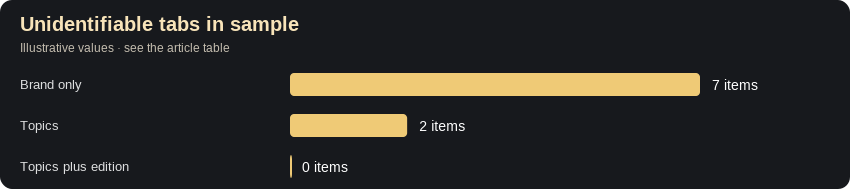
| Category | Value (items) |
|---|---|
| Brand only | 7 |
| Topics | 2 |
| Topics plus edition | 0 |
Constructed checklist scenario for this brief, not measurements, ratings, or results from cited sources. Each displayed count represents checked items in the named example.
A reader opens seven articles from an archive. By the time the first one loads, every tab says “River Desk.” That is the name of the publisher, but it does not tell the reader which tab has the flood map, which contains the field methods, or which one was a corrected edition saved for comparison. The actual articles can be excellent. The trouble is that the little label people use to return to a document never got an identity of its own.
Another site does better at first glance. Every title begins with its topic, but two separate editions of the same article still have identical titles. Those tabs are only distinguishable through the address, page content or memory. A reader switching among references should not have to use any of those as the first line of defense. An editorial title can do the work of a compact index card. It tells people what they opened, and if two otherwise identical subjects really have distinct purposes or editions, it gives them the distinguishing fact.
This guide presents a seven-tab exercise and a practical review for an editorial site. It does not promise that browsers show the complete string at every width, that bookmarks always update, or that a search service must display the text verbatim. The goal is narrower: assign a meaningful document title, verify that it describes the page people actually reached, and test whether a reader can choose among a realistic set of nearby alternatives.
Identify the title that travels with the document
A page often has more than one meaningful label. The visible article heading may be expressive because the lead image, section eyebrow, and body are close by. A link in a story may describe a destination in the grammar of its sentence. A share card may use separate editorial text. The HTML document title has a different job: it can represent the document when the surrounding page is not visible. Rather than making every label literally identical, keep their meanings aligned and give each enough specificity for the context in which it appears.
The W3C Understanding Page Titled guidance explains the accessibility objective of titles that describe topic or purpose. It points out that user agents may expose titles in places such as tabs and window labels and that distinct dynamic views may need updated titles. The WHATWG description of the HTML title element describes the element in document metadata and its use even out of the page's surrounding context. These references do not require one publisher's exact punctuation or title template. They establish why the metadata needs to describe the document rather than merely repeat branding.
A visible heading is not automatically the document title, even when a site usually populates them from the same editorial field. A developer can update the body heading without replacing the title on a page rendered from a generic shell. A site owner can update metadata without revising a body heading that implies a different edition. Verify both in the actual output. If they intentionally differ, check that a person following a link can recognize they reached the expected document rather than a different article with a similar topic.
The title is also not a substitute for a proper heading structure or other accessibility work. A perfectly named tab does not help a reader jump among the sections if the article has no useful headings. Conversely, excellent headings do not fix a blank or misleading document title. Split these into separate verification items. A clear acceptance note can say that the document title and its relation to the article were checked without making broader claims about the template's conformance.
Think about the exact label users retain. A title shown in one router state may be recorded in a history entry even after the page changes. A bookmark created before a title correction may still display the name it saved then. That does not excuse a stale title in the current document, nor establish that a correct current title should rewrite every old label. Test what the product actually controls and describe what was observed. Readers may maintain their own labels outside the publisher's reach.
Make the first words do the most work
Start with the concrete topic or purpose. “Field methods for reed-bed surveys” is a more useful tab label than “Documentation” if a reader has several methodologies open. “Download the 2025 observation tables” describes a landing page for a specific action better than “Resources.” A distinct topic is often short. A generic title can be both shorter and less informative, forcing readers to spend their attention on context the application could have supplied in the first place.
Brand information can remain useful. A reader juggling several publishers may use a trailing brand to recognize the source. But a long identical prefix can hide the actual topic in a compact tab strip. A publisher may choose a compact suffix, omit the brand in a tightly scoped reading application, or retain it on collection pages where the purpose is otherwise clear. The design rule is not that a brand must never appear first. It is that a person should be able to identify the item without wading through the same uninformative words on every competing tab.
Test the first visible words under constrained displays, then inspect the full string too. Tabs may truncate differently depending on device, browser, zoom, reading mode and number of open tabs. Browser width in pixels is not a universal character count, especially across languages and scripts. A simple fixed maximum can be an internal reminder to keep names compact, but cannot prove that all distinctive words will survive every display. Prefer ordering that remains sensible when some are cut off and provide other ways to see the full title where the application naturally supports them.
An expressive on-page headline can coexist with a more literal document title. For example a heading called “The Water We Didn't See” might be appropriate within a well-introduced feature, while the document title adds “Mapping missed rain-gauge intervals.” The second wording identifies the same work rather than advertising another. Do not take that liberty to rewrite what the page is about. The closer a title is to the navigational task, the less room there is for a clever but unsupported promise. A title that says “Dataset” for an opinion piece can be unique and still wrong.
Decide whether any disambiguator belongs close to the beginning. Two articles beginning “Creek crossing notes” may require a year, area or version before a long subtitle. There is no advantage in making the reader hear fifteen identical words before revealing that one is the corrected edition. On the other hand, prefixing an opaque archive accession number to every title makes ordinary article boundaries harder to identify. Human-readable distinctions and stable machine identifiers can coexist without forcing each to serve the other's purpose.
Reserve edition labels for distinctions readers can act on
An edition identifier is useful when users genuinely choose among separate objects. A corrected article and its archived original may both remain available for transparent citation. A summary for the public and a technical edition may share a broad topic while serving different purposes. Distinguish those choices in the title and in the document itself. An archive title that says “Archived original” tells people they have not reached the live revision. A correction title should not imply that a particular difference exists if the underlying change was only a style update in a single canonical item.
Version language needs a policy. A working draft, a release edition, a translation and a dated snapshot are different ideas. Calling all of them “v2” may hide the relationship a reader cares about. If a history page quotes a prior edition, its title describes a history page unless it is itself that edition. A revision label should match what is actually served at the location. Keep the visible status, title, and persistent records consistent enough to support reuse even if they each use a slightly different level of detail.
A title can include a date without resolving ambiguity about what that date means. A field survey conducted in 2025, an article published in 2026 and a correction issued in 2027 can share one entry. If there is only one public article, the context often makes extra dates unnecessary in the tab. If two archived copies are a real choice, include the distinguishing publication or edition date and ensure an on-page note makes its meaning clear. Do not let a crossed year in a static title override what the actual article says.
Check locale and translation labels separately. A translated page may deserve a title in the language it delivers, with a distinction useful to readers selecting among editions if that is part of the design. An interface locale is not necessarily the content language. Putting “English” on a translated-title draft based on a developer setting does not confirm which text the public actually receives. If two pages deliver the same research in different language versions, the title, language metadata and available navigation should describe that relationship rather than expecting the reader to infer it from a hostname.
Where multiple URLs intentionally show the same logical document, a repeated meaningful title is not automatically a defect. A tracking query may not deliver a distinct edition. A share link might land at a chapter within the same article. The relevant review question is whether a meaningful difference in what the reader reached requires a useful difference in its title. Automatic uniqueness across every URL is not the goal. It can create pointless labels for duplicate access paths while leaving genuinely distinct documents poorly named.
Build the seven-tab fixture so its count can be checked
Imagine a private mock reading session with seven distinct pages: an original Creek crossing notes article; a corrected copy of Creek crossing notes; Sediment sampling methods; Gauge placement sketch; Field observations workbook; Riparian planting log; and Rainfall station index. The names are supplied illustration premises, not editorial material taken from either source. Keep the same seven pages in the same comparison set throughout the three renditions. Nothing about their content changes while we compare labels.
Define unidentifiable narrowly for this chart. An item is unidentifiable if its complete title string, considered in an isolated list under the toy setup, is shared by a different page in that same list, or supplies only the repeated common brand in the first rendition. Count affected items, not collision groups. This rule is deliberately simpler than measuring whether actual readers can distinguish every tab at every width. It is useful because a reviewer can reproduce each count without needing to assume anything about the kinds of authors or devices involved.
The first rendition gives all seven pages the title “River Desk.” All seven share the same label, so seven are unidentifiable by that rule. The second rendition gives the two Creek crossing notes editions that same topic title and the other five pages their distinct topic titles. Five are now identifiable within the toy list and two remain collided. The third rendition adds “archived original” and “corrected edition” to the appropriate Creek crossing notes pages. No two titles in the seven-page list now identify separate articles with the same complete string, and none is brand-only. The count is zero.
| Illustrative rendition | Unidentifiable tabs | Tabs in the comparison |
|---|---|---|
| Brand only | 7 | 7 |
| Topics | 2 | 7 |
| Topics plus edition | 0 | 7 |
The chart and table are constructed, not observations, participant outcomes or conformance measurements from W3C or WHATWG. The arithmetic is seven repeated items initially, five items removed from collision by topic labels, then the remaining two distinguished by edition. If the only question were how many sets of repeated text existed, the sequence would instead be one, one and zero. The plotted quantity is the number of affected tabs. Keep the definition near the numbers whenever the graphic is repurposed.
The complete titles can be unique while a narrow tab strip still clips the two edition distinctions at the right edge. That would be an important result of a separate display test. Moving the word corrected nearer the subject or revising the opening may improve identification in that environment. The example's zero applies to the complete titles in the fixed list, not to all renderings or reading contexts. Do not read the bar values as proof that a person selected the right tab without errors or delay.
Verify actual output, not a title in a spreadsheet
Start with an inventory of pages readers can reasonably open together. Include adjacent related topics, translated or archived editions where important, a collection or search result page, and relevant error or intermediary states where the application presents them as pages. For each record, note the URL or view, what it should show, visible headline, expected document title and distinguishing details if needed. Use an explicit identity rule so aliases are not confused with distinct documents. The expected title is a test input, not proof of what the internet presently delivers.
Open direct links and navigate normally between the selected views. Inspect the actual document's title as well as what the browser presents in the chosen environment. A correct template string can get replaced later by shared code, fail to appear on a cached rendering, or remain unchanged when a user navigates backward. An early header can reflect the intended document while the final settled page has a generic default. Compare the delivered heading and title after the content you intend to evaluate is present. If intermediate text is prominent or persists, consider whether it also misleads readers and capture that behavior separately.
For scripted routes, look at first load, internal navigation, reload, and the browser's back and forward actions. Test at least one transition between same-topic editions and one between unrelated pages so stale data cannot escape by being accidentally plausible. This approach follows the importance W3C gives to maintaining titles for browser views whose content changes dynamically. It does not imply that every tab switch, modal opening, expandable panel or animation must receive a new full page title. Determine what part of the product constitutes the current substantive view.
Check restoration of older routes specifically. If a user goes from the corrected edition to an archive index and then back, the title should not still describe the index when the edition content is displayed. If a nonexistent version redirects to the current one, ensure that both the response and visible wording make the destination understandable. A title cannot independently establish that a redirect is the right one; it should reflect the actual document people have been given. Capture what happened at each step so a maintainer can distinguish a misdirected route from a correct route with stale metadata.
Review direct links received outside the site. A URL shared in a note can lack the meaning that was apparent from the original link text. The title and visible status help someone orient themselves when they arrive alone. Where a saved URL is supposed to identify a stable edition, test whether it still resolves to that edition. Where a standard share URL always resolves to the current version, communicate that if it matters. Title correctness works best with a predictable destination rather than an unannounced version change.
Handle provisional and unavailable views with care
Some applications briefly display a generic loading title before data arrives. A placeholder can be useful if a view genuinely has not loaded, but it should not remain after the reader can see and use the page. A quick conversion of the address does not excuse a long interval displaying the previous article's title. If loading fails, identify the error state in a way that does not make it seem like the requested article appeared. Whether the product should expose an intermediate title depends on the reading context and duration; test the user-visible behavior rather than treating an implementation convention as universally harmless.
A sign-in or access screen can create another mismatch. A browser tab may say “Field observations workbook” while the body asks visitors to request permission. If the access screen is itself the displayed page, its purpose should be clear and not masquerade as proof the workbook is accessible. Carefully consider sensitive titles where disclosing the identity of the requested material to an unauthorized person would be inappropriate. The correct label communicates what is available to that audience without leaking details. A public demonstration of title patterns should not use protected document names.
An archive can retain a record for a withdrawn item. A title can identify that status without silently redirecting anyone to a different resource. Replace prominent signals responsibly if policy requires different handling, and test what the intended audience can see. If the withdrawal or access note changes over time, maintain consistency between the page identity and the handling message. Meaningful titles support informed choices; they are not a reason to expose content the reader should not get or to promise that an unavailable item can still be read.
Some pages intentionally share words at the beginning. A results application might title its main views “Search field reports” and “Search results: reed beds” as two distinct purposes. A long exact query may be unnecessary or even inappropriate in title text, especially when it includes confidential or personal information. A title should identify the view without leaking data the product should protect. The right distinction can be a public category or purpose rather than a mirror of all the user's input. Consider the file of browser history or another surface on which that string may later be visible.
Chase a collision through the publication chain
The root cause of a repeated title might be editorial, technical or simply a disagreement about what counts as a separate document. Start at the observed output and work back. If a row in the content system contains only a brand name, the renderer may be returning exactly what it was told. If the editorial record has a good title but all pages share the same output, inspect the mapping from that field to the final template. If the direct page is correct but internal navigation leaves an earlier title, the fault is in the runtime state rather than the source copy. Writing better titles will not fix a pipeline that ignores them.
Use a small set of controlled fixtures to detect the likely layers. Take two existing distinct articles with exactly the same brand prefix and verify that an article-specific title appears before and after navigating between them. Take two tightly related editions that share a topic and verify that both receive their matching qualifier. Then create a draft with a deliberately blank title field in a private fixture, not on the public site. Watch whether the build refuses it, chooses a meaningful fallback, or silently publishes the brand as an apparent success. This reveals where the workflow treats omissions as valid output.
If there are separate server and client renderings, make the test distinguish them without turning an implementation detail into a universal preference. A direct page can serve useful metadata immediately, and an interactive router may still need to update it. Racing title updates are possible when old data arrives after the new view has loaded. A reliable design anchors the title to the active document identity instead of treating it as an occasional side effect of unrelated display events. A human can test the symptoms even without access to the original software: rapidly navigate among labels with known expected values and note the actual order of updates and settled output.
Some repeats originate in an import rather than a template. A folder of articles might carry identical print headers, while distinguishing years or edition status live in a separate catalog. Flattening both into one title field loses the relationship. Preserve the subject title and usable disambiguator as independent data where appropriate. Then render an accurate document title from them under a known rule. This is preferable to manually inserting a long number everywhere after every migration. A new export can recombine the fields sensibly rather than inheriting a patch nobody remembers.
Not every collision warrants the same priority. Two highly related archive editions likely to be open at the same time are a good target. Two indistinguishable inactive error pages may matter more if errors are common and users need a route to recover. Duplicate access aliases for one document may not warrant change at all. Define who is likely to encounter the collision and what choice it obstructs. A review that prioritizes only the largest table of duplicate strings can spend time creating trivial differences while leaving the reader's hardest retrieval task unresolved.
Try the same material in several reading contexts
A compact manual run can begin by opening the seven illustrative articles, letting them settle, then asking someone to return to the original creek notes after inspecting the corrected edition. In a second task, ask them to locate the observation workbook without opening the planting log. These are different tests: one exposes edition confusion, the other tests meaningful subject labels across unrelated pages. Name the environment and setup so the results do not get confused with the article's fictional counts. Actual participants or observations are not part of the chart.
Look at full title strings in an isolated list as well as the visible tab strip. If the full original and corrected titles differ but the strip truncates them to the same visible words, name that as a visual discoverability issue. If the full strings are the same on both, solve the title identity problem first. Trying to fix the latter with larger type or a contrasting accent color leaves the underlying labels unchanged. Manual and automated checks are most useful when they are designed to reveal which of these distinct failures occurred.
A reader may use an accessibility feature that announces the selected document, or a system that displays recently visited pages in a condensed list. Inspect the contexts relevant to your supported browsers and audiences. Keep the results tied to their actual environment; not all tools announce every update at the same time or present the same text. Correct metadata helps, but an unobserved mode should not be called tested merely because the metadata appeared correctly elsewhere. Conversely, a limitation in one announcement mode does not make it acceptable to leave titles wrong in the document.
Notice what happens with a brand suffix. It may improve identification in a list of sources from widely different organizations, yet add nothing inside a collection where every tab already bears the same recognizable identity. A small test can show which information people use without assuming that consistency demands a single title format for all page types. Provide enough visual and textual context to support different reading paths. If a label needs distinct words from an archive brand and a topic, choose an arrangement that works in the actual compact spaces readers face.
Handle language coverage intentionally. Reading order, tab width and names of concepts can work differently when a translated article is tested. A rule based on trimming English after a fixed number of characters might cut an important part of another language's phrasing or leave no space for an edition status. Ask whether the most useful distinguishing information is surfaced clearly in the actual language. Do not test translated titles only by counting their length. A shorter title that misstates the article is worse than an accurate title one can read in a full display.
Treat automation as a way to find candidates, not to certify meaning
A script can find blank or obviously duplicate document titles among a selected set, surface unexpectedly long examples, and compare final title text to an expected record for a fixed route. It cannot know whether “Overview” is an accurate isolated description of a page without more context about what readers need. Plan a human review for subject and purpose and an implementation check for rendered metadata. Combining those findings is more informative than replacing either with a score for the whole site.
Normalize titles cautiously for collision detection. Tidying trivial whitespace can help spot two rows that look identical. Treating every punctuation variation as meaningful can hide errors the reader still experiences. Removing all accent marks, digits or language distinctions can incorrectly conflate titles. Explain what comparison rule the automation uses and preserve the original values so reviewers can disagree when appropriate. The article's toy chart compares full strings in one fixed list; it does not establish a universal normalization algorithm.
A test report can list grouped results by logical document identity. For two different URLs intentionally representing exactly the same content, mark why the repeat is expected. For two editions with separate roles, record both expected titles and verify that they remain distinct in the served output. If one failed in a scripted view but not on direct load, include that relationship in the issue. If the browser tab omitted the final words only under a named compact display, identify that context. Good reports lead directly to a repair rather than treating success as a disappearing duplicate count.
Use a negative fixture that teaches the team what the automation cannot see. Correct the topic title for the wrong article so seven strings are unique but one mislabels a page. The duplicate detector should pass and a topic-to-content review should fail. Next make a title generic but technically nonempty, such as “Documents home,” on a specific article. A nonempty assertion alone cannot establish adequacy. Finally make a full title correct and show an inconvenient display truncation. This exercise identifies where format, meaning and practical usability require separate evidence.
Write a durable style and correction note
Include a few accepted patterns: title topic first where helpful, necessary edition or purpose distinction, compact publisher identification when useful. Include counterexamples for generic brand labels, opaque version prefixes, and sensitive details in titles. A sample must say which label was the document title and which was merely visible text. This gives future editors something better than a blanket rule to match every heading mechanically. It also helps the next theme migration preserve title meaning rather than inheriting unexplained punctuation from one template.
When the publication changes an edition status, review ordinary entry paths and archival copies. If a corrected record gains a different title but a public index still links to it with misleading wording, readers may think they reached an unexpected object even though the metadata is correct. A good release test traces the relationship from representative link to display to document title. That does not require making all text identical. It requires checking that no part of the handoff contradicts the purpose, edition or access the reader was promised.
Document what was changed and what was not confirmed. For example, a review can state that seven stand-alone titles were inspected in a named environment and that the original and corrected notes expose their intended edition labels. It can separately report that no broad search-result test was performed and that cached bookmarks were not updated. Do not imply a particular search engine will show your chosen title unless you can verify its observed display at the relevant time. Title work improves the information a site supplies; outside services can present it differently.
An ordinary checklist might use a few direct questions. Is the title present in the delivered document? Does its first useful phrase identify the topic or function? Can closely related options be distinguished where the product exposes them as separate views? Are edition qualifiers accurate and appropriate to publish? Does the label follow navigation to the correct content rather than lag? Publish any numeric indicator with its defined scope. Meeting those checks still does not settle broader accessibility or user experience questions, but it makes a major orientation aid more reliable.
Keep the reader's return trip in view
A useful test is to ask what the title will mean tomorrow when the user sees it without the introduction. “River Desk” may identify the right institution but not the reference. “Creek crossing notes” may identify the intended topic but not the archived copy. A compact accurate label with a meaningful edition distinction lets the user return to the object they intended instead of testing several tabs. The smallest space in the interface can carry one of the most important parts of the publication's identity.
If you can only make one improvement first, choose a representative working set and repair the exact labels that are keeping people from finding the right documents. Verify them after the changes have passed through the real publication pipeline. Then record why the names work, so a fresh template does not undo them. Seven separate articles need not all start with the same brand, and two comparable editions need not make readers guess which they opened. That is the promise of the title field, not a guarantee about every other part of the page.
Review lists that readers see outside the site
A title copied into an annotated bibliography can end up beside other publications with similar topics. A title displayed on a browser history page may be grouped by date or host. A title offered in a sharing dialogue may follow separate metadata conventions. These are good reasons to write a descriptive document title, but different surfaces need separate tests. Do not attribute a feed's title to the HTML title element without checking what produced it. Editors often discover that they have been fixing the wrong field because a preview deliberately draws from another source.
Build a comparison with a reader who has no context at all. Give them two correctly titled entries, one for a series index and another for a particular installment. If the titles both begin with a broad series name, ask which words tell them where they will land. A subject descriptor can be more useful than a sequence number to a first-time reader, while a sequence number can be valuable to somebody reading in order. If both matter, determine a compact order that keeps the right part near the beginning. The site can also expose a series relationship structurally without packing every detail into a title.
Persistent labels deserve practical language when a page is corrected. In one archive design the original version and latest corrected version are both addressable, while a third stable link redirects to whichever edition is current. The first two should accurately identify the versions they deliver, and the generic redirect should ultimately show the target edition's appropriate title. A note can explain the difference between the citeable snapshot and the pointer to the current copy. Without that distinction, a reader with a meaningful title can still save an address that quietly changes from under a bibliography.
If a technical review is requested, capture a compact evidence table for each sampled document. Include the state the visitor requested, the eventual route they reached, the purpose expressed by the heading, the actual full document title and any compact presentation tested. Those facts often reveal that a title problem was really an unintended redirect, or that a title was correct despite an unexpected crop in one display. Record the real defect before asking a maintainer to change it.
Finally, keep the role of the chart modest when presenting the review to someone outside the publishing team. The seven mock tabs show why topic and edition can both be needed. They do not show the proportion of all pages that lack an adequate title, or that a title correction will solve every retrieval problem. The result is an example of one constrained choice. What readers encounter in the actual publication needs its own verified evidence, which the same review structure can collect without inheriting the toy's numbers.
References
- W3C: Understanding Page Titled, for the title criterion and intent, including dynamic views.
- WHATWG HTML: The title element, for the document title's semantics. Neither reference supplies observations for the fictional seven-tab chart.