
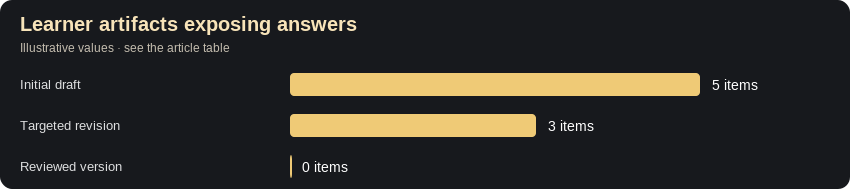
| Category | Value (items) |
|---|---|
| Initial draft | 5 |
| Targeted revision | 3 |
| Reviewed version | 0 |
Constructed audit of 5 fixed, distinct cases. First review resolves 2; second resolves the remaining 3. Not observed performance or a conformance score.
A teacher gives a class a PDF with a puzzle on the first page and a lined workspace on the second. The answer key used to be on the third page. The print dialog excluded that page, so the paper packet looked right. Later a learner who received the digital file opens the attachments pane and finds the old solution sheet. Another learner hears an answer when navigating an illustration with a screen reader because the teacher version's description was left in place. Neither learner used the paper packet incorrectly. The publisher sent them a different artifact from the one it thought it had reviewed.
The safest distinction is simple: build a learner edition whose contents are appropriate for learners, and build a teacher edition that contains the key. A page break is a layout instruction, not a distribution boundary. So are hiding a section, choosing a page range in a viewer or deciding not to print comments. They can change which parts an ordinary viewer sees while leaving other material in an output. When answers are intentionally withheld until an exercise is complete, remove them at the source of the learner render rather than asking every consumer of the file to overlook them.
This article concerns ordinary instructional publishing, such as discussion worksheets and self-paced practice. It is not a promise that any particular package secures a high-stakes test. The examples distinguish accidental disclosure from planned feedback, and show how an editor can verify a release across visible pages, text representations, previews and included files. Everyone involved should be able to tell which artifact was reviewed and what it did or did not contain.
Define the two reader jobs before assembling their files
A learner needs the prompt, the materials required to attempt it, instructions for recording work, and any clues that are intentionally part of the task. A teacher may need all of that plus answers, explanations, common misconceptions and suggestions for when to offer hints. Give those reader groups different artifacts because their immediate jobs differ. The Digital.gov plain-language guide is relevant to selecting and organizing material for a particular audience. It is not a technical specification for preventing disclosure or a test of any particular exercise file.
This distinction does not imply that the learner edition should be sparse. A student using a screen reader may need the full equivalent of a diagram and clear labels for editable fields. Someone using a phone may need readable instructions where the printed version uses a margin note. Retain that content. Remove or revise a description only when it includes a solution that the corresponding learning experience does not intend to supply. An accessible substitute should expose the same information as the learner's visual exercise, not less and not accidentally more.
Write a release definition in everyday terms. A learner edition can contain an unanswered prompt, an explicitly permitted hint, and data needed to perform the task. It cannot contain the solution key, its underlying explanations, or a preview displaying them, unless the design intentionally treats such material as immediate feedback. Give obvious names to the intended variants. “Exercise, learner edition” and “Facilitator edition with solutions” are clearer than final, final two and final handout.
An answer can be more than a numeric result. A completed diagram, a marked multiple choice option, a shaded category, an ordered list, a model explanation or an attachment title might reveal part or all of the solution. A common answer for the teacher may also appear as a sample value in an input field. Identify the information the exercise asks the learner to discover. This is more useful than building a deny list limited to one word such as solution. It also helps distinguish intended clues from accidentally copied labels.
Some courses do want the learner to check an answer on the last page at their own pace. That is a legitimate design if the package is clearly described as practice with solutions. It is not a learner-without-answers edition. Another course might release answers after discussion, through a separate article or scheduled action. That is a deliberate distribution decision, not something a slide animation or disclosure control can enforce on an already delivered file. The appropriate artifact depends on the lesson plan, and the label should communicate which plan it serves.
Select content upstream of formatting
A shared source can work well if it marks content by audience before export. Keep prompts, source data, permitted hints and neutral graphics in common sections. Make solutions, answer-bearing images, teacher notes and ancillary key files separate inputs for the teacher edition. A generator can use an explicit list of sections and assets allowed into the learner render. Doing this before pagination helps prevent an instructor's content from reaching a stage where it can be hidden on the page but remain in the file.
You do not need one sophisticated build pipeline to get this distinction right. A small team can maintain two intentionally scoped documents, with references to shared approved prompts. The important part is the cross-check: when an exercise is revised, compare the question in both editions and check that the teacher's answer corresponds to the current prompt. A team producing many variants might instead use one structured source and separate output recipes. Both can work if the artifact boundaries and review procedures are clear.
Do not let reusable objects conceal their content role. A graphic used as the background for a blank chart might share its filename with a completed chart in another folder. A slide could use one master containing fields for the prompt and the answer with the answer laid outside the visible page. A preview tool might choose a graphic from the shared folder rather than from the subset used in the learner build. List intended assets by actual role and verify which bytes are included when it matters. Trusting a neutral-sounding filename is not enough.
A better course source might contain distinct illustrated assets: an empty sequence diagram for the learner, a completed sequence for the teacher, and separate accessible descriptions for each. Both can follow the same layout and visual style. The learner description identifies the shapes, positions and variables the learner needs to solve the problem. The teacher description explains the completed relationships. A single generic description copied across both would be easier to maintain for a day and easier to misapply over a year.
Separate files at the distribution layer as well as in markup. If a learner download is generated as part of a ZIP, the package should include only the appropriate files. A correctly rendered PDF is not an adequate review of the ZIP containing it. If a platform stores teacher and learner downloads in the same administrative workspace, verify permissions and presentation from the learner's published path. A file visible to an administrator during preview may not be visible to a learner, and the converse can occur through a public share that the administrator did not inspect.
Avoid relying on a control intended for organization as though it provided confidentiality. A folded section, tab, visible layer or unprinted region can legitimately let a teacher switch views. If the entire teacher edition has already been shared with a learner, such a control does not make its hidden portion a different file. Where the intent is withholding, the learner artifact should not carry the answer-bearing content. Where the intent is only delayed discovery in a low-stakes exercise, describe the interaction as a hint or reveal, not as prevention of access.
Treat previews and file contents as separate release surfaces
A preview may be produced by the publishing service rather than by the application used to export the exercise. It may select the first page, generate thumbnails for all pages, or retain a separately uploaded image. A correct PDF can still be paired with an old preview that shows a completed proof. Check the preview as a learner would see it and compare it to the actual learner artifact. If its source cannot be identified, replace or remove the preview rather than assuming the last updated file overwrote it.
The printable area and the digital page can also differ. A print range is a selection for a particular print operation. It is not proof that the original share contains only selected pages, and an exported range is not proof about other embedded material. Review the issued file itself. A page list might show two expected pages while an outline, attachment, or comment pane tells a different story. Treat a mismatch as a reason to inspect the release source and rebuild the artifact.
The Library of Congress Recommended Formats summary distinguishes format preferences for different kinds of retained works, including structured formats and various profiles for page-layout documents. It provides context for maintaining suitable accessible and preservable artifacts. It does not say that a file in one of those formats has no embedded answer key. Format choice and content scope are separate properties. An archival teacher edition may appropriately preserve additional material; that is not a reason to distribute it to learners.
PDF can support several kinds of included material, including embedded and associated files. The PDF Association's technical explanation of files inside PDF describes distinctions among attachments and other file structures. Review tools can expose these differently. If an institution uses an index or validation tool, check that the tool's view matches the document types the team actually publishes. More importantly, ensure that the learner build never received the extra file as an input. Stopping an accidental inclusion at assembly is more dependable than hoping that a particular viewer does not show it.
A copied slide deck can have comparable issues. Speaker notes might contain the answer; a comment from a reviewer might explain how the wrong answer was corrected. Instructions put beyond the visible canvas can remain part of an editable deck. If the learner is intended to receive an editable version, verify the actual editable artifact rather than reviewing a projected preview. If the format instead is PDF, check that the export selected the appropriate pages and content and that the package does not also include the source deck.
Names can disclose information too. A spreadsheet labeled “Answer order B D C” can reveal its role without being opened. A thumbnail for a review page can show which multiple-choice option was marked. An internal PDF title may say “teacher key with solutions” even when the visible filename was changed. A neutral name does not repair answer-bearing contents, but real metadata and labels matter both for preventing mistakes and for enabling the teacher to find the right edition.
Keep the accessible experience equivalent
Do not solve an answer leak by making the learner edition inaccessible. A figure description can tell a learner how axes, categories and graphical elements are arranged without revealing the result they are meant to derive. A table equivalent can contain the same raw data as the visual figure while leaving the student's interpretation open. If a computed relationship is the object of the question, avoid naming it in the learner description solely because the teacher edition used it as a teaching note.
Suppose a worksheet shows three unlabeled shapes and asks which pair matches. The learner description may give the outline and orientation of each shape. The teacher description may explicitly state the match and explain why. The learner's visual version should not omit information needed to make the decision, and the nonvisual version should not be reduced to “three shapes.” Equal access means equivalent evidence for the task. Depending on the task, a textual or tactile alternative may need to preserve relationships that a brief label cannot capture.
Reading order can reveal or obscure material independent of page appearance. Review the learner edition as a sequence of announced headings, instructions, descriptions, form labels and inputs. Confirm that the prompt precedes the entry area and that background instructions are not skipped through a link to a different edition. If an attached key is reachable, fix the package rather than disabling the reader's ability to navigate attachments. If a tagged passage exposes a draft explanation, omit that explanation from the learner source and preserve a proper tag for the intended paragraph.
A simple text search is an aid, not a test of equivalent experience. It might catch a unique phrase from the key, but it cannot reveal an answer encoded only in a diagram or the meaning of cueing text. Conversely, a search may find a term that legitimately appears in the question as well as its solution. Use a search to check distinctive content in the intended context. Follow with reading, viewing and interacting with representative exercises. This yields a more useful conclusion than “no key term found.”
Check form behaviors at realistic sizes and in the expected viewers. An empty exercise field can contain a default value or prompt that actually answers the question. A label can differ from the visual placeholder a builder checked. The correct educational behavior is a neutral cue identifying what should be entered, not suppressing all help. Where the exercise includes automatic feedback, describe when that feedback is intended to appear and build the audience-specific checks around the plan. Deliberate feedback after an answer is not the same as a solution present in a blank worksheet.
Practical verification benefits from more than an author's own voice. A teacher may read a learner prompt and unintentionally add information from memory, making an incomplete description seem adequate. Give a reader only the learner artifact, including its nonvisual path, and ask whether they can attempt the exercise and whether any part provided an answer ahead of the intended point. Repeat with a different kind of exercise if the package uses tables, multiple choice and figures. One simple prompt does not exercise every path.
Reproduce the five-case demonstration
The illustrative chart is titled “Learner artifacts exposing answers.” Its unit is items. Initial draft has five, Targeted revision has three, and Reviewed version has zero. The categories describe stages in a fictional review of five fixed, distinct cases. The first revision resolves two, and the second resolves the remaining three. The counts are not observations from a class, an effectiveness rating, or a conformance score. The table is an exact numerical counterpart to the bar chart.
| Review stage | Learner artifacts exposing answers (items) |
|---|---|
| Initial draft | 5 |
| Targeted revision | 3 |
| Reviewed version | 0 |
In the initial exercise, a visible answer page is included in one learner PDF. A second document includes a solution image as its preview. A third has an answer-bearing figure description. A fourth includes an attached key. A fifth is a downloadable packet containing the teacher sheet as an extra file. The unit is a fixed, distinct artifact case. If one case exposes several answers, it still counts once in this particular chart. That counting rule makes it possible to reproduce the example without treating the number of exposed answers as the number of affected artifacts.
For the fictional targeted revision, rebuild the first PDF without its last page content and replace the second document's preview with a verified learner image. Three cases remain. This shows why correcting what is visible on pages and thumbnails can leave other issues. The reviewed version builds the third document with its appropriate learner description, assembles the fourth without the key and rebuilds the fifth from learner-only files. Zero is limited to the five cases, in this imagined review.
A real team can keep a similar record but should not assign success to cases it did not check. If a fix changes two symptoms on one artifact, describe that without adding a second item unless the scheme counted symptoms. If a new defect appears, document it rather than erasing the fixed basis for the earlier comparison. A serious remaining exposure can block release regardless of whether it is one of five or one of fifty. The point of the chart is to show what the sample audit tracks, not replace an editorial decision.
Keep feedback intentional across the versions
Begin by asking when a learner is meant to receive feedback. Immediate feedback can be a sensible design for independent practice. Delayed feedback can support classroom comparison or give a group time to attempt a task under similar circumstances. A teacher edition can contain more than the final answer so that a facilitator has something useful to say when learners are ready. The decision should be stated in the material's release plan rather than inferred from the presence of a hidden page.
In a fictional graph-reading activity, the learner is supposed to explain how two quantities differ. One optional hint says to look at the units before comparing the heights of the bars. The teacher note names the correct distinction and describes a common mistake. Give the reader the hint in the learner product if it is clearly intended. Do not remove it merely because it sounds related to the answer. Conversely, don't copy the teacher explanation into a diagram description just because it contains accurate words about the picture. The two descriptions serve different moments of learning.
Some teaching packages present several stages of disclosure. The first artifact is unanswered practice. The second provides hints. The third is a worked solution with common errors. If stages are intended to be delivered separately, build and name them separately. If all stages are distributed upfront as an optional sequence, the package cannot truthfully be described as containing no answers. That distinction preserves trust with teachers, learners and reviewers. It also makes the quality criteria easier to apply.
A visible answer sheet is not the only possible form of feedback. There may be a rubric, teacher's marking example or model paragraph. In some subjects seeing the method is revealing even without a final numeric result. In others the rubric is meant to be visible and helps the learner prepare. Identify which reasoning and evidence belong to the prompt versus a worked response. A rule that bans any term used in the solution would often remove the language the learner needs to understand the question.
Review the exact deliverable from the learner's route
Start at the shared link using the same ordinary permissions and path a learner is expected to have. Identify the title, edition, format and attached materials. This catches the common mistake of reviewing a downloaded file from the draft folder rather than opening the published learner copy. A review of the source may prove the default settings but say nothing about a stale render. When a platform uses an internal preview and a public download, compare what each actually serves.
Next read the pages in order at an ordinary size and inspect their thumbnails. Open any file bundle and compare the manifest with what a learner is meant to receive. Review the document's navigation and relevant accessible reading path. Where form fields or interactive hints exist, use them in the intended order. The test should not ask a learner to disregard an earlier leak because the exercise works from page one. Record which surface contradicted the publisher's intended boundary.
Keep the review record specific. “Examined the issued PDF pages, public preview, and package manifest” is useful; “all answers removed” is a much broader claim. If a reviewer did not inspect editable speaker notes because no editable deck was distributed, note that scope. If a feature only works in one viewer, verify the deliverable in the relevant viewers rather than hoping the difference will never matter. A local pass should not be treated as evidence for untested formats.
If the educator will physically print the packet, compare the print output with the distributed digital file instead of selecting one as a stand-in for the other. Page breaks and duplex settings can alter which instructions or continuation marks a student sees. A learner without the last visible page of a problem may receive no answers and no usable exercise either. Separating editions protects the intended content boundary; basic print and navigation checks protect the exercise itself.
A review involving assistive technology should preserve observations rather than making assumptions about software behavior. If a reader reports hearing a worked result, record where the result appeared and how they reached it. Determine whether it came from a description, the underlying reading sequence or an attached item. Rebuild with the appropriate learner material and repeat the affected scenario. A narrow replacement of the answer-bearing string is not automatically sufficient if other portions of the same teacher asset remain in the export.
Handle changes without reviving the old edition
A release revision creates two compatibility problems. The teacher key must correspond to the learner prompt, and the learner artifact must remain free of unplanned solutions. An editor can fix a typo in both editions and still cause one problem if an export job grabs a neighboring teacher asset while looking for a shared illustration. Put a stable edition marker on both artifacts and identify the relationship. For example, “Teacher edition for learner release 3” tells a facilitator which one to combine with the handout.
Review the previews when they are regenerated or reused. If a publishing system holds onto an old thumbnail by a stable title, an updated file may not be enough. Verify from the destination where the learner sees it. Similarly, a link labeled learner could continue serving an older package while the editor has the correct new file open on her machine. The important question is not which artifact she intended to upload but what the shared route currently delivers.
An institution that retains source files or prior editions can keep that archive distinct from the learner release. Appropriate storage and permissions belong to the institution's process. A catalog of previous learner packets can be useful for classes assigned earlier versions; it should not casually expose the teacher edition by sorting filenames together in a public directory. Historical preservation and present-day access are different responsibilities. Clear labeling helps staff perform both without mixing them.
Notice changes that alter the answer without changing most of the prompt. Changing one unit or chart value can make an old key inaccurate even if it is assigned the correct audience. Update and verify the key against the learner edition you actually distribute. Do not use compatibility labels to create false confidence. The purpose of a shared marker is to let somebody reproduce the pairing and spot an incompatible version, not to exempt the contents from review.
If an accidental exposure is found, identify the affected artifact and the channel in which it appeared before describing the remedy. A public preview issue is not necessarily a disclosure in every packet; a scan of only the PDF is not enough to clear a related ZIP. Rebuild the defined learner product from appropriate inputs and verify the surface that failed. Treat communications and any change to learning decisions according to the responsible teacher or institution. Correct the artifact without overstating the evidence about who saw it.
Test across a few realistic lesson designs
Consider a fictional map-reading exercise. The learner needs an unlabeled route schematic, a scale statement and a table of stopping places. The facilitator has a marked route, a worked distance calculation and a rationale for rejecting an alternate route. The two graphics might have identical backgrounds. Packaging the learner worksheet with the marked route as a hidden layer has not separated the materials, even if the visible screen opens with the layer off. Build a graphically neutral learner asset and give its text equivalent the unmarked information needed for solving.
Now consider a discussion exercise, where no one exact sentence is the answer. The facilitator's copy contains three possible arguments and a set of recommended responses. Accidentally exposing that copy at the start might bias the exercise rather than giving students a numeric key. If the learning goal is to surface original arguments, exclude the model responses from the initial learner artifact and make their timing explicit. If students are meant to compare with examples from the beginning, include selected examples visibly and describe the task accordingly. The release criterion depends on whether the content is a prompt, permitted model, or delayed feedback.
A language exercise can offer another kind of ambiguity. A vocabulary table might intentionally present some entries filled in as a worked example. The teacher version fills all of them. Review ought to confirm which cells are meant to be filled in, not reject every completed cell as a leak. A learner using accessible table navigation should get the same worked entries as a sighted reader. This case illustrates why difference is a more useful idea than absence in a comparison between editions: the differences should correspond to the exercise's approved design, not to an editor's guess about where answers belong.
Some lessons use off-page resources such as audio or a separate data sheet. The copied package might point to a teacher folder that exposes additional material, although none of the worksheets contains it. Verify the intended learner path and evaluate any route supplied as a required part of the exercise. Avoid broad claims about anything a determined person might find elsewhere. The goal for ordinary instructional publishing is to deliver a well-defined artifact and its intended resources, not to treat parallel publications as an adversarial challenge.
Choose an artifact boundary that matches distribution
A learner artifact might be one PDF, one editable slide deck, a browser activity, or a folder of resources. The project should define the boundary at the scale the user receives. If a course email attaches a packet with exercises for different days, all those attachments are part of the release even when the first file is the one readers open most often. If one resource is intentionally shared separately later, do not include it prematurely just because the automated delivery tool will be easier to configure that way.
A folder can be harder to verify than a single file. Shared access may expose sibling files, and a facilitator's shortcut may behave differently from a learner link. Review the recipient's ordinary view or obtain an authorized equivalent that can establish what is present. A locally correct packet cannot explain permissions on a remote folder. If the team lacks evidence about who can access a destination, report that limitation instead of asserting that distribution is controlled. The editorial solution might be a distinct learner-only folder, not a permission change on an ambiguous mixed directory.
The same logic applies to web exercises. A text accordion can be an honest low-stakes reveal if all readers are allowed to see it and the design asks them to try first. It is not a separate teacher edition. If the answers are actually withheld, the learner page should be composed without supplying those answers in its content, data or images, including assets fetched by ordinary use. Design the intended release as separate artifacts rather than placing the burden on styling. This is a basic publishing boundary, not a guarantee about high-stakes assessment security.
Record differences that explain future support questions
Write down which materials are shared, which are edition-specific, and how to identify the final release. A maintenance record might say that the diagram's unmarked version is common, its completed version is teacher-only, and there is a neutral description tied to the learner illustration. If a question changes, a colleague can locate all three without searching old sets of notes. A support answer can then distinguish “the diagram is missing” from “the completed diagram was intentionally not included.”
Ask a second person to check completeness alongside withholding. An edition that contains no answers but omits the data source needed to attempt the question fails its audience. Review the visible prompt, required data, fields, permitted examples and route to scheduled feedback. If feedback is not part of the release, do not promise it in a stale footer. Where feedback does exist, label when and where it becomes available. Quality assurance should protect an actual learning opportunity rather than demonstrate that a file is empty in the right places.
A teacher's review has a different success condition. Can the facilitator match answer explanations to the release the class received? Does the key explain what to do if a reasonable alternate response meets the stated criteria? Are the marked diagrams clear and distinguishable from the blank ones? These are quality concerns in the intended teacher artifact. Checking them does not justify placing that artifact alongside learner materials, and keeping it separate does not mean spending less care on its clarity or accessible structure.
Finally, phrase the release result in a way a colleague can act on. A precise note may say the versioned learner download and its visible preview were reviewed, the expected packet entries were present, and the teacher key was not included in those checked surfaces. Name any view or format not assessed. This gives future maintainers a useful starting point instead of a sweeping “secure” label. A good record lets someone correct a subsequent production defect without reopening every decision about the lesson itself.
Give maintainers an example they can repeat
A small sample can include a common table, an illustration with an accessible description and a separate teacher attachment. Give the teacher-only content an unmistakable fictional test phrase and a distinct visual marker so mistaken inclusion is easy to recognize. The learner output should retain the prompt and data with no teacher-only marker. Run the check through the same rendering and packaging process used in ordinary releases. This is a designed verification fixture, not a sample of a class's actual performance.
In a lesson dominated by images, add a case in which the difference appears only in the graphic. A correct heading and text won't detect an answer-bearing thumbnail of a completed figure. In a lesson using editable files, include one case involving presentation notes or another ordinary feature available to recipients. Choose scenarios according to the materials the team actually publishes. There is little value in a broad checklist of features that never appear, while omitting the most-used export path.
Keep conclusions proportional to the tests. A zero count in the constructed chart means no exposure remains among its five named cases, not that a general testing protocol prevents every disclosure. In a real review, say which edition, at which destination, was checked and what each check established. Attach no claim about independent verification by students unless that actually happened. The strongest maintenance record makes it easier to verify the next version, not harder to question the last one.
A good learner edition provides an equivalent, complete chance to attempt the exercise. A good teacher edition supplies the answers and the reasoning needed to use them. The boundary is decided when content enters each artifact and verified when the actual artifact leaves the publisher. A page break can make an exercise look right. The release process is what keeps it right once it is shared.
A final consistency check can compare a single problem identifier between the two editions. If the question appears in a different order, the identifier still tells the facilitator which explanation belongs with it. This avoids making a completed example visible in the learner copy just so that teachers can find their place. The navigation aid and the answer can remain separate.