
| Category | Value (items) |
|---|---|
| Initial draft | 10 |
| Targeted revision | 1 |
| Reviewed version | 0 |
Constructed audit of 10 fixed, distinct cases. First review resolves 9; second resolves the remaining 1. Not observed performance or a conformance score.
A local history group sends a colleague a tab-separated export of a fictional place-name catalogue. The catalogue opened normally on the computer that made it. On another computer, the accented names look garbled, two catalogue numbers have lost their leading zeroes, and one observation has slipped into the next column. A count in the final worksheet still looks plausible. None of these problems necessarily means the source catalogue was wrong. Somewhere between writing the file and turning it into spreadsheet cells, the editor and the software stopped agreeing about the representation.
A good export is a contract between the producer and the reader. Characters have to survive conversion to and from bytes. The fields have to stay in the right rows and columns. Identifiers and notes need to retain their meaning when software guesses what kind of values they are. An editor can test those jobs separately with a small set of harmless examples before asking a volunteer to open a large file. The useful question is not whether a spreadsheet application accepted the file. It is whether the resulting cells still carry the approved information.
This guide uses an invented local catalogue and ten fixed import fixtures. None is drawn from a real archive or contains private information. The figures in its chart summarize a constructed test, not measured software behavior. The method applies to authorized preparation and review of the publisher's own data. Opening or modifying somebody else's live catalogue is not part of the exercise.
Keep the original, the exchange file and the worksheet distinct
The original data might live in a database, an internal spreadsheet or a catalogue service. Different representations can support different tasks. An exchange file can make the approved records portable without preserving every feature of the source application. A worksheet might serve a specific offline editing team but add display choices that are not part of the data. Keep names for the three roles and record which output is authoritative for each use. The spreadsheet that opens automatically when someone double-clicks a file should not inherit authority merely because it is the first view they see.
The Library of Congress summary of digital format preferences is useful context for choosing formats according to purpose and preservation needs. It does not say that every catalogue should publish the same format or that a particular spreadsheet import will preserve all values. An archive can maintain a suitable preservation copy and supply an exchange format for a particular workflow. In this example a UTF-8 text export helps with portability when its field rules are clear, while an independently prepared worksheet can give volunteers a convenient review surface. Identify both versions rather than describing the workbook as the original source.
Decide which material belongs in the export. An offline review copy may need a display name, a locality code and a public note but not the original system's internal administrative fields. The selection should be reviewed before serialization. A cleanly formatted export containing the wrong fields is still a publication failure. For the test, assemble a small set of invented values that exercise the published field types. Use it to debug behavior without sharing real catalogue notes or source records. The data definition and the confidentiality boundary are independent of the software choice.
Keep a way to repeat the export without overwriting the approved source. A download opened in a spreadsheet can be changed accidentally when the user attempts to save it. A working copy belongs in a different role from a release artifact. Document whether the recipient is expected to import, edit and return a worksheet, or merely inspect a read-only exchange file. Some problems attributed to export occur when a file has already been imported, silently coerced and saved again. An untouched reference and a small known fixture help locate the stage at which values changed.
Diagnose encoding before editing the names
Encoding is the agreement about how characters are represented by bytes. If a file was written in UTF-8 but interpreted using an incompatible decoder, the character sequence displayed can differ from the intended one. The WHATWG Encoding Standard provides primary definitions for encodings and decoding behavior in the web platform. The HTML Living Standard is relevant when a companion webpage presents the same data. It does not define how every offline spreadsheet imports a downloaded text file. A correct charset declaration on the webpage does not prove that the separately downloaded file will be opened using the same decoder.
Test a representative sample such as the invented name “São Brilhante” and another containing a character from a different writing system where appropriate to the project. Include real structural variety in fictional values instead of choosing only ASCII strings that look the same under many decoders. If the accent looks different, decide whether the characters actually changed or whether the display lacks the needed font. Copying a known fixture into an approved Unicode-aware view and comparing the characters can help distinguish the cases. A fallback glyph is a display concern; misinterpreted bytes are a data concern. Neither calls for stripping every accent from the source catalogue.
When evidence shows the decoder was wrong, keep the original bytes and reopen the unmodified file using the intended settings. Editing garbled names manually in the imported worksheet can hide the cause and introduce inconsistent replacements. Exporting the garbled worksheet again with a correct encoding does not necessarily restore the original text. It may faithfully preserve the incorrect characters. A useful recovery note points back to the correct source and explains how to create a new checked import without borrowing unverified names from a previously damaged version.
Be precise about the optional UTF-8 byte order mark when it is relevant to a supported importer. A marker at the start can influence recognition in some workflows, but not every consumer treats it the same way. A project can specify whether its export includes one and test the exact emitted file with the receiving software. Avoid giving a blanket instruction that all UTF-8 files require it or that removing it is always harmless. If an imported first header seems to contain an unexplained prefix, compare that result with the expected content and documented behavior before renaming the header throughout the pipeline.
Define the row and field rules as their own agreement
The Library of Congress format description for tab-separated values describes the basic idea of fields separated by tab characters and records arranged on lines, and discusses escaping characters that would otherwise interfere with that structure. The simple form does not make raw tabs and newlines inside a field safe. A tab intended as part of a note can look like a field separator; a newline intended as part of a description can look like a new record. A prettier font or a change in encoding cannot repair this distinction. The exporter and importer need to agree what is data and what marks a boundary.
Some toolchains support quoting or other conventions for field content in a tab-delimited file. Others do not recognize those conventions or handle them differently. Do not assume that behavior documented for one format or one application's import dialog applies to all files called TSV. Decide on a supported profile, document it in plain language and verify the target application against a fixture. If the agreed profile uses application-level escapes for tabs, newlines or backslashes in values, both sides have to understand the same reversible rule. An importer that leaves the escapes literally in a cell has not automatically reconstructed the original note.
Think about what should happen if the recipient cannot support that profile. A compatible structured format, a controlled workbook or another documented export might retain the meaning more reliably. A deliberately simplified edition can also work if the intended readers do not need structured line breaks or tab formatting and the normalization is documented. Do not quietly discard distinctions that matter to interpretation. An editor comparing two similar descriptions may depend on a line break to separate the original quote from an editorial note. If the loss is unacceptable, change the exchange contract rather than asking readers to guess.
Check row and column structure before reviewing spelling. Give headings meaningful names and include the expected count of fields per record, including any empty final field. Record which line-ending convention was emitted and whether it differs from a newline embedded in a source value. A parser might present a row with a correct record number but carry a shifted locality or note. Read a few complete records and compare them to the fixture. A plausible total row count does not guarantee that the value underneath each heading is the value intended for that field.
Prevent type guesses from rewriting identifiers
A geographical code can look numeric without representing an amount. An invented code such as 00417 is a sequence of characters people use to locate a record. Displaying it as 417 may be a minor visual change if a later export restores a fixed width, or it may destroy the identity when that width is not known to the recipient. Store identifiers as text in the receiving workflow where possible, and verify that they remain so when the worksheet is saved or exported. An integer-formatted column cannot preserve distinctions between different strings that map to the same integer.
Date-like strings introduce a related issue. A locality label such as “03-04” might be a map-sheet code, while a date field elsewhere contains an actual date. If both are inferred as dates, the import may depend on regional settings and change the code into a formatted calendar entry. Declare which fields are text and which have a date meaning; do not rely on the preview's alignment to tell you what was inferred. A right-aligned value is a presentation choice rather than a reproducible data definition. Conversely, a legitimate observation date may need a structured format and validation rather than storage as arbitrary prose.
Long identifiers can also be displayed differently from their original sequence. A consumer may use a numeric notation unsuitable for codes or truncate significant digits if it stores the value in a numeric type. For a fictional archive, include a long but harmless code in the test and compare the complete value at each supported stage. Show it next to an actual numeric count that still should be interpreted numerically. A fix that turns every value into text might protect identifiers while making the intended sorting or calculation of measurements unusable. Import policy should preserve each field's meaning rather than follow one rule for every column.
Preserve meaningful blanks, too. A catalogue may distinguish “not yet confirmed” from “no associated record,” and perhaps use explicit status fields rather than overloading an empty cell. If a row legitimately ends in an empty note, the parser should still keep the expected field boundary. A report that replaces all blanks with zero or all zeroes with blanks changes data. Write down what absence means before choosing a format convention. If a consumer needs a visible placeholder, explain that the placeholder is a display choice and specify what it corresponds to in the exchange file.
Audit ten fixed import fixtures across three versions
Imagine ten benign records and clearly stated outputs. The first contains a Portuguese-style diacritic; the second uses a non-Latin character sequence; the third includes an apostrophe in the name; the fourth contains a tab in its original note; the fifth contains a semantic line break within a description; the sixth contains a literal backslash; the seventh uses a code with leading zeroes; the eighth uses a code that resembles a date; the ninth has an intentionally empty final field; and the tenth has a long identifier that must remain text. Review each fixture against the intended decoded characters, row, field location and field type that matter for that fixture. One record contributes one outcome, not one outcome per error.
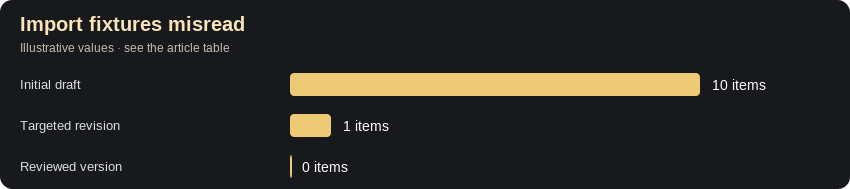
In Initial draft the ten cases are constructed to exercise known mistakes in the mock workflow. The assumed decoder does not preserve the first two names, an importer setting alters the apostrophe-bearing value, the field or record structure is lost in the next three notes, the two short codes are coerced, the empty final field disappears and the long identifier is stored as a number. This is not a description of the default behavior of any named product. It is a test premise with an expected mismatch for each independent fixture. A real review should document the actual importer behavior, not expect these ten outcomes.
In Targeted revision, the team restores decoding and field rules, uses the supported method for preserving text in the first nine cases and verifies those cases individually. The long identifier still changes when a downstream worksheet stage guesses its type. That leaves one item flagged. In Reviewed version, the final path preserves that long identifier as text and the whole fixture set is rerun. The expected values and structure match for all ten cases under the stated test path. These are successive mock releases, not a claim that switching a single setting will repair nine unrelated faults.
Illustrative chart data: Import fixtures misread.
| Prototype | Import fixtures misread | Matching fixtures out of ten |
|---|---|---|
| Initial draft | 10 | 0 |
| Targeted revision | 1 | 9 |
| Reviewed version | 0 | 10 |
The bars give ten, one and zero mismatches. Ten minus the nine fixed cases gives one, and resolving the last case gives zero. The matching column is ten minus the mismatched count in each row. Summing the bars would count the same cases across revisions. The counts are invented, not observed performance, a standard-compliance score or results from WHATWG or the Library of Congress. A zero means only that the known fixtures matched along the demonstrated route. It cannot establish that all languages, delimiters, records and tools behave correctly.
Give each case a permanent expected result in the test notes. For example, the long identifier should have exactly the original character sequence, while the note should occupy one intended field with its meaningful break preserved by the agreed representation. A character-level comparison can help with the former; a row and column review helps with the latter. Do not award a pass because the data merely look similar at the worksheet's default zoom. A high-level result is useful only if the team can identify which fixture failed and at which representation.
Use imports to review data, not to create new source facts
Open a known sample using the actual workflow planned for the recipient. If the team is authorized to guide the person through an import dialog or a prepared template, test that path rather than testing only a convenient double click. Review the import preview with expected columns and types, and recheck the saved result if saving is part of the task. A legacy tool can handle one configured path correctly while applying defaults to a different path. Describe the route that was verified, and do not imply support for another route that was not tested.
If a preview reports all fields in one column, it may be using an unexpected separator. If one particular row gains an extra field, a source value may contain a delimiter that was not correctly represented. If the headings and row boundaries are fine but the names are garbled, look at decoding. If everything looks correct until a workbook is exported again, the loss may be in the last conversion instead of the first one. Giving each symptom a provisional category helps the team avoid indiscriminate changes. The same inspection should confirm when the original hypothesis was wrong.
When a correction is needed, start from the authorized source and controlled fixture. If an editor receives a worksheet with lost leading zeroes, restoration is a lookup problem, not a typographical adjustment by default. There might be no defensible way to tell whether 417 previously meant 00417, 0417 or another legitimate identifier from the damaged view alone. If the original layout is unknown, label the field uncertain rather than padding every value by a guessed amount. Once the source is identified, re-export or explicitly restore the original characters through a reviewable process.
A change downstream can be a legitimate editorial decision if it is approved and disclosed. A public edition might omit a historical alias or normalize how whitespace is displayed for one reading interface. Keep the original authorized value and the display form separate. The data source should not be silently translated or renamed because the receiving browser truncates it. Report which changes are intentional and which are defects. A reliable import workflow is not an excuse to overwrite local knowledge, and a faithful original does not mean every derivative display must reproduce every visual accident of the source.
Treat text normalization as a choice, not a decoder repair
Two visually similar forms of an accented letter can have different underlying character sequences. One representation may use a single character and another may combine a base letter and a mark. For this task, decide whether the exchange contract preserves the original sequence or uses a documented normalization to establish a common form. That is different from fixing corrupted bytes. Normalizing a name with the correct characters can be useful for a defined matching process, but a normalized match does not by itself authorize replacing the displayed form. Preserve the meaning and identity of the record under the rules the responsible catalogue team actually uses.
A search index might deliberately treat a range of variants as equivalent in order to return useful results. The printed or downloadable source might instead keep the exact form of a verified place name. These are different jobs. A person reading “São Brilhante” does not need to see every alias or the technical code sequence every time the name appears. A reviewer trying to verify an export can use expected strings and matching rules. Do not blur these layers by naming the result of a search normalization “the correct name” unless that is supported by the source.
A report might note that most values display as expected but a single name uses an unfamiliar glyph. Resist simplifying all the names as a first solution. Check the authorized reference, the intended display language and the viewing environment. If the source is already uncertain or the editor needs help distinguishing local usage, record that question independently from the encoding question. A system can faithfully reproduce a source that has not yet been verified. Faithful transfer is a successful representation task, not a guarantee that the underlying record is complete or correct.
For a handoff, record whether character-level equality is required for each field rather than applying a single normalization policy to everything. An authority identifier may require exact matching even if it contains characters that look nearly identical. A search hint might reasonably be compared by a more forgiving rule. A note's line breaks may matter even when the display substitutes a different wrapping width. If the testing policy considers two values equivalent, explain why and which properties still need exact preservation. A well-defined difference can be acceptable. An unexplained difference should not be silently ignored because a spreadsheet appears readable.
Make line breaks and delimiters easy to reason about
The line ending between records and the line break inside a note do different jobs. A file viewer might make them both look like ordinary new lines, even when one is represented by a documented escape in the data. Put a couple of sample records and their expected field values in the documentation. Explain the supported encoding, separator, treatment of reserved characters and whether headers are included. If the importer is unable to reconstruct a structured note, provide an alternate route rather than making people guess whether the visible backslash sequence is a typo.
Round trips deserve careful definition. Exporting and importing the same approved records can legitimately change the exact bytes if the output adopts a documented line-ending convention. That need not be a data loss. The check can instead compare the structured records, types and exact text values where relevant. A version identifier or file hash can establish whether a handoff uses the same artifact, but it cannot tell you whether two different formats express the same records. Decide whether the comparison is byte-for-byte, character-for-character or field-for-field before making a change claim.
Sometimes the end of the final line is the only thing a reviewer notices. An apparent extra blank row can be a display interpretation, or a parser may actually treat it as another record. A missing final column can be far more important even when it looks like irrelevant empty space. Test fixtures should cover the exact boundary behavior the contract promises. Include a known record with an empty final note and a second one with a meaningful value in the same position. The comparison makes it easier to distinguish a parser dropping empty field structure from an entire column missing.
A real note can include punctuation that is safe in one format and meaningful in another. An ordinary comma is not generally a separator in a tab-delimited profile simply because it would matter in comma-separated data. An apostrophe can be part of a name without being a structural marker. Check the interpretation used by the exact export and importer. Where the rules escape one character by adding another special character, agree how literal occurrences are represented so their original content is not lost. The goal is a reversible contract, not a clever output that only one staff member knows how to read.
Provide two clearly described deliverables when one cannot meet both needs
A preservation-oriented exchange file may be a good fit for a data manager with a tested importer. The person preparing a walking-tour label might only need a readable table of approved names and locations. An organization can offer a clean, independently checked workbook or an accessible webpage beside the text export when doing so makes the workflow clearer. Describe what each version keeps and which one should be used for edits or returns. Multiple formats are useful only when their relationship is clear and they do not silently diverge.
When the team supplies a workbook, review the relevant column types, visible names and actually stored values. The workbook should not merely open with better colors while inheriting coerced data from a failed import. Prepare it from the controlled source or the known-good exchange route. If the workbook is a convenience preview that does not include all fields, mark that limit. A volunteer returning corrections should know whether notes and identifiers outside their visible sheet must be preserved. Give them a route that does not ask them to reconstruct the archive's record structure manually.
The website can help too. Give each download a meaningful label and a short explanation of its encoding and intended use, and link to a maintained description of the supported import settings. A known fixture with no sensitive content can help a new reader check their setup before opening the real authorized export. Keep any statement about compatibility limited to environments that were tested. A webpage's own display can be excellent while its downloaded file uses a separate and untested data path. Inspect both if the publication promises parity.
If there is no compatible legacy route for the full data, communicate it before the recipient relies on approximations. A supported read-only view, a smaller approved dataset or a different documented exchange format could be more useful than a file that opens inconsistently. Be clear about which distinctions, if any, do not survive that route. Do not promise a full-fidelity offline export when tests show notes or identifiers cannot be preserved. A bounded alternative respects the actual work more than leaving the recipient to infer what may have changed.
Write a review note that identifies the first changed representation
A reproducible failure report can state that a particular fixture value was correct in the controlled text view, but became different after an import path or saved workbook stage. Identify the sample's intended field type and the expected result. This gives maintainers a place to investigate. “The names look wrong” might refer to decoding, display, accidental edit or disagreement with the archive's spelling. “The leading-zero code matches the original in the exchange file, but loses its leading zeroes in the saved worksheet” identifies a narrower problem without exposing any real records.
Limit evidence in support tickets or review notes to authorized samples. A screenshot of garbled private data may still disclose the data or reveal details that were not part of the problem. With a harmless fixture, the same behaviors can be recorded safely. Describe the application and settings relevant to the observed result and do not overstate what you checked. A file that passes one locally installed program's import wizard is not thereby verified on every device or opening route. If an outside team offers support, share only approved synthetic material and follow the publisher's communication process.
Add a clean known-good path to the note when one exists. Keep the unmodified release file, state how the expected import was selected and document the relevant results. This helps recipients recover without editing already damaged values. If a route remains unsupported, say what does not work and give the approved alternative. A user can make a better decision when the boundary is explicit. The goal is not to win an argument about which application should have guessed correctly. It is to provide a reliable way to work with the data.
Exercise the return path without making the volunteer reconstruct the schema
Suppose two volunteers compare the fictional names against an authorized reference and submit corrections. The first changes the spelling in the display field, leaving the record identifier alone. The second moves a note to a more readable line in the workbook and assumes that is only a visual edit. The team receiving their work needs to distinguish actual proposed changes from formatting and from mistakes introduced by another import. Preserve identifiers and expected structure in the returned document. Ask contributors to record the proposal in a clearly named column instead of overwriting the only copy of the existing value. This gives the reviewer both versions and a direct means to verify the intended record.
Check an edited return separately from an unchanged one. A no-change return should have the same substantive records and types, even if an independently defined version or presentation setting changed. A return with one approved proposed edit should differ in the expected field only. Add a return containing a multiline note when the exchange contract supports it. Check that the proposed edit remains attached to the same record and that existing text did not lose a distinction when a cell was edited. If the return path is supported only in a workbook rather than the plain-text format, say so in the initial instructions and prevent the two routes from looking interchangeable.
Treat edits as evidence to review, not as authorization to replace a public name automatically. A volunteer may correctly identify a display error but not have all the documentation for changing the source record. Keep the submitted form, the existing record and the eventual reviewed decision identifiable. An edit log that says “fixed spelling” may be insufficient when a later user wonders why a recognizable diacritic changed. Reporting the checked source and the approved display where appropriate makes the data trustworthy without overburdening the handoff with the whole editing history.
Maintain a compatibility note that describes observable outcomes
An opening instruction can start with a simple question: are people expected to read the data or to preserve it for a later import? For reading, a quick website or maintained workbook may be enough. For transfer, the information about encoding, delimiters, headers and declared text fields should be available before anyone alters the file. A note that says “opens in spreadsheets” does not answer either question. Make it clear what outcome was verified, what limitations apply and how the intended user can detect a failed import before continuing.
A spare example makes a compatibility note more useful. Show a short expected output with one accented invented name, a text code beginning with a zero and a note containing a meaningful line break. This is not meant to be an exhaustive application manual. It provides enough context for the reader to recognize common mismatches and return to the correct source. If their first header contains extra material, or the note splits into a neighboring field, advise them to stop and use the verified route rather than repairing the values by hand. The response is easier to follow when it names the problem in the language of the reader's table.
Keep the layouts of the reference and convenience copies clearly separated. A recipient may have saved both from a browser with filenames that differ only by extension. Labeling them by purpose prevents them from uploading a read-only preview as though it were a full data return. If one version intentionally omits notes, the omission should be visible before anyone compares totals. If another has been superseded, keep the version in its visible title or metadata and provide a route to the current copy. Release advice should not require guessing which artifact a former staff member happened to send.
Retest after a change to either side of the exchange
Small changes to an editor's export settings, a browser's download behavior or a spreadsheet's import defaults can disturb a workflow that previously worked. Preserve the fixture and the expected results alongside the release specifications. Re-run them when the data shape, export tool, importer version or supported opening route changes. It is useful to inspect the exact published file rather than a copy generated in a different environment from the same source. Changes should be verified where the reader actually receives the artifact.
When a new field is added, decide whether it needs its own structure and type tests. A free-text observation may introduce different characters from a locality code. A field that permits multi-paragraph notes raises questions about the agreement that never arose in a one-line description. A supplementary measurements column, on the other hand, may legitimately be numeric and require separate rules for units or decimals. Expand the fixture set deliberately and document any changed denominator. Do not compare a new count of mismatches to the original ten-case audit as though the tested cases were unchanged.
Recheck the authorized output when removing a column, too. Removing a sensitive field should not cause remaining headings and values to shift out of alignment. A release can be safely scoped yet not useful if its relationships are broken. Verify both the expected set of fields and a few complete records. If the workbook adds display formulas or filters, review whether they communicate the intended source values and do not turn codes into values that can be misread. Keep the source and derived representations distinguishable in any follow-up.
The next time the local history group opens the catalogue, a good result is not merely a file without an error dialog. The place names should still be the names the source supplied, identifiers should retain the characters that identify them and notes should belong to the correct records. Any intentional simplification should be explained rather than left to convention. The same discipline that preserves a diacritic also preserves the reliability of the table: define the exchange, keep the original and test the copy that somebody will actually use.