
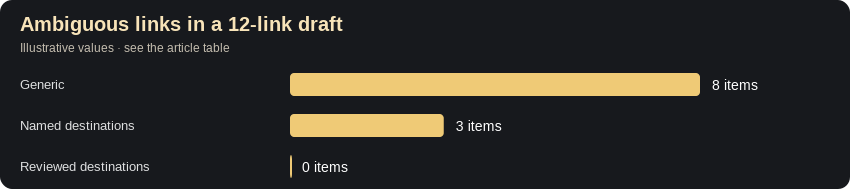
| Category | Value (items) |
|---|---|
| Generic | 8 |
| Named destinations | 3 |
| Reviewed destinations | 0 |
Constructed checklist scenario for this brief, not measurements, ratings, or results from cited sources. Each displayed count represents checked items in the named example.
A garden report has two links called “Read more.” One opens a field protocol explaining what counts as a visit. The other opens a retrospective about the project. Both destinations are good. Both links work. Neither link tells readers which they are about to get. Now put yourself at the gate with the form open and an insect already in view. You need the counting rule, not the project history. The cost of a vague label is not necessarily a lost website visitor or a formal failure. It is an avoidable trip to the wrong place at the moment someone needs an answer.
Copy the links into a separate list and the distinction disappears entirely. A person using a screen reader might choose to navigate by links; another person may go from link to link with a keyboard or use a voice interface. Plenty of people simply skim underlined phrases in a long article. The list test borrows that constraint. It does not require everybody to read that way. It shows what useful meaning survives when the surrounding description is not immediately available.
The first fix is usually plain: call one link “Field protocol for counting flower visits” and the other “How the garden survey began.” But there is a second mistake that appears after an editor learns this lesson. The same protocol linked in the methods and again in the references becomes “Field protocol,” “Observation rules,” “Nectar activity documentation,” and “Method implementation notes.” Now an alert reader reasonably believes there are four different resources. The useful question is not “How many unique labels did we write?” It is “Does each link communicate what happens if I follow it, and do meaningful differences have meaningful names?”
Separate a strong editing test from a standards claim
The W3C explanation of Link Purpose in Context describes Success Criterion 2.4.4 at Level A. It allows the link's purpose to come from its text alone or from its text plus programmatically determined context, with an exception when the purpose is ambiguous to users in general. Mere visual proximity is not enough to assume a context is programmatically determinable. A sentence, paragraph, list item, or well-associated table context can support a link in ways that a neighboring box positioned by layout alone may not. The explanation encourages making a link meaningful on its own where possible, but that is not identical to the wording of the Level A requirement.
The W3C explanation of Link Purpose, Link Only covers a separate Level AAA criterion, 2.4.9. It calls for a mechanism allowing link purpose to be identified from link text alone, with an exception for purpose ambiguous to users in general. This distinction matters when reviewing an actual report. Failing an optional stand-alone editorial test is not by itself proof that the Level A criterion is unmet. Passing the stand-alone test on a dozen sampled links is not proof that a page or site meets WCAG. Say which test you performed, which links it covered, and what the results establish.
An example makes the distinction practical. A guide says, “For the field worksheet, choose the format you can use: HTML or PDF,” where the last two words are links. If the sentence supplies suitable programmatically determined context, a reader may be able to understand the links in context without guessing what the files contain. Presented together with dozens of other links named “PDF” in an extracted list, though, the meaning is gone. Making the links “Field worksheet, HTML” and “Field worksheet, PDF” is a practical improvement on this page. In a library page with a hundred titles and five formats per title, repeating everything can become cumbersome, and the W3C examples discuss a mechanism to offer both concise and explicit presentations as appropriate. Design from actual information and reading tasks rather than promoting one wording pattern to a universal ban.
The test in this article is purposely stricter than a quick compliance check in one narrow respect: it discards paragraph context. Use it as a writing diagnostic. Then return to the real page and inspect which text actually reaches readers, which names are announced, and what the destination does. If you report the result without those distinctions, a practical technique will become another opaque grade people debate without fixing the letters they see on a screen.
Describe the destination by the decision it serves
Before revising, follow each link as an ordinary reader. Read the top of the destination, find what it offers, and note whether it navigates to a document, opens a file, jumps to a location, or starts a different kind of interaction. The WHATWG HTML sections on links explain the native hyperlink model and describe how a linked resource can be followed or downloaded. A short label does not need to restate all of HTML. It does need to match the reader-facing effect. “Download the April field worksheet” is wrong if the destination is actually an account setup page that may eventually provide a worksheet.
A useful description may draw on a title, a precise subsection, or the purpose of a task. An article title such as “How the garden survey began” needs little rewriting if the linked page presents the same title and purpose. “Resources” is a poor heading to borrow as an isolated label if the destination is the separate observation definitions. A practical name can add a distinguishing phrase without reproducing an entire formal report title. For a long report, use the scope the reader needs: “Garden survey methods, 2025 season” may be better than a full title stuffed with a subtitle and institutional series number. Keep enough continuity with the destination that the reader recognizes arrival.
Sometimes the point of the link is not the destination title but the level of access. A page called “Observation data” may offer a plot only. Another page with the same title may lead to raw observations. A third link may send readers to a guide for reporting a mistake. A reader searching for the underlying table benefits from an explicit name such as “Download observation records for April to June (CSV).” Do not make every source name start with “Download” unless downloading really occurs. If the link opens a readable data catalog record from which multiple files can be chosen, name that record or say “Data files and documentation.” Good wording is concrete rather than falsely decisive.
Watch for links that promise a different article than the one they deliver. A plain “What counts as a visit?” can be a good label for a self-contained definition. It is misleading if it leads to a partner's homepage, where the reader must sift through navigation and locate a protocol unaided. Where no nearer destination is available, say “Project protocol collection” and explain in the prose how to locate the relevant document. Where a stable anchored location is supported, link directly to it and confirm the anchor still exists. A descriptive label reduces uncertainty; it cannot repair an unavailable or mismatched target.
Link text is also not a substitute for evaluating the evidence. “Findings show more bees” may imply a conclusion the source does not support, especially if the source counts visits or describes an association rather than a causal effect. State the conclusion, with necessary qualifiers, in ordinary prose and label the link for the evidence it actually supplies. A link called “Survey counts and method notes” leaves readers room to verify what was counted. A phrase such as “this proves the garden worked” embeds interpretation inside the navigation label and may amplify the claim each time it appears in a list.
Audit twelve links, not twelve kinds of readers
For the companion figure, imagine a long article with twelve link occurrences. Treat an occurrence as one selectable link in the review surface. The same resource can appear twice in that total. Review each item against a known destination and its purpose, using the same list-only question for each version: can someone select the correct link for the given reading task without needing its original paragraph? A wrong promise counts as ambiguous for this exercise because the wording cannot be relied on to distinguish the actual destination. This is a defined editorial rubric, not an error rate for a population of readers.
Begin with four links already clear: “Observation results by month,” “Garden access map,” “How to credit photographs,” and “About the survey team.” Those names do not have to change when revising the other eight. The eight unresolved occurrences are two links named “Read more,” two named “PDF,” two named “Data,” one named “Here,” and one named “Notes.” The sheet of actual targets shows that the two “Read more” links lead to the counting protocol and the project retrospective. The two PDFs are a blank worksheet and a filled example, which serve different tasks. One “Data” opens a preview, and the other downloads the underlying rows. “Here” repeats the counting protocol in a reference list. “Notes” links to a dated correction log.
In the named-destinations pass, revise both “Read more” links, both “PDF” links, and “Here.” Use a consistent “Field protocol for counting flower visits” for the two genuine repeats. Distinguish the two forms as “Blank field worksheet (PDF)” and “Filled worksheet example (PDF).” Call the retrospective “How the garden survey began.” Five occurrences are now resolved relative to the generic version. Three remain: the two data links and the correction log. Count the two same-purpose protocol links separately as occurrences, but do not expect or require different wording. Clear repetition is not the failure this rubric is designed to catch.
In the reviewed-destinations pass, inspect the destination in each of the last three cases. Call the preview “View the observation summary table.” Call the download “Download complete observation rows (CSV),” provided it really contains the full scope implied by complete; if it does not, name the subset instead. Call the third “Correction log for the garden survey article” after verifying that it actually records article corrections. Confirm that the previously renamed destinations still match their new labels, including the distinction between a blank sheet and a worked example. The count now reaches zero for this invented twelve-link list.
The companion chart “Ambiguous links in a 12-link draft” shows eight generic, three after named destinations, and zero after reviewed destinations. That is a decline from eight unresolved occurrences to three, followed by three additional resolved occurrences. It is not a finding that real users click less often, need a set number fewer seconds, or all understand the final labels equally well. The fixed denominator is twelve link occurrences throughout; neither the list size nor the rubric changes between versions. Other pages with tables, controls, multilingual labels, or nested cards can raise questions not captured by this toy set.
To apply the test to a different article, keep a record of the task, the available label, the requested target, and the reason a label failed. “Source A and Source B both called Methods, with no way to distinguish field collection from the statistical model” is actionable. “Label insufficient” is not. If you compare two versions, avoid quietly swapping a hard test question for an easy one. A revised piece may have fewer or more links; disclose that change and compare matched occurrences or report separate counts with denominators. A drop in ambiguous labels because all source links were removed is not evidence that the underlying research became easier to verify.
Repeat language strategically
Readers learn what stable labels mean across a site. If “Series index” consistently goes to an index, people can recognize it when it appears on five different article pages. Turning it into “All episodes,” “Complete sequence,” and “Choose a chapter” from page to page does not make the destinations clearer when they are the same index. It creates unnecessary decisions. The W3C guidance on link purpose points to consistency as useful and discusses the separate consistent-identification criterion for components with the same functionality within a set of pages. Use repetition to make dependable routes easy to recognize.
Yet not every repeated label is a problem, and not every identical URL necessarily has the same practical role. First ask which choices a reader needs to distinguish. Two “References” entries that jump to reference sections of different articles on different pages can both be sensible within their own article context. If you place those choices together in a compilation, qualifying each by article may become helpful. “Next” in a pagination control and “Next” in a neighboring slide display are especially different: one changes pages, the other manipulates a display. A single label across unrelated contexts should not be used as evidence that the interactions are equivalent.
Compare a document and a section within it. “Garden visit protocol” and “Repeat landings in the garden visit protocol” may point to the same HTML file but distinct landing positions and levels of detail. Wording should identify the difference. Conversely, two links can have different URL spellings, for example one with a referral parameter, and arrive at the exact same resource and action. Changing the public label just because the stored string differs will not help someone navigate. Apply consistency to what readers perceive and need, and verify updates such as redirects in practice.
Keep repeated references only when they have a function. The introduction may link the protocol for readers deciding whether to participate, while a final reference list makes the source easy to recover later. That is a reasonable duplication. A photo, title, and “Read more” in a tiny card might all be separate adjacent links to the same place. That could be three tab stops for one choice with no corresponding benefit. Consider one appropriately named link rather than requiring people to step through duplicates. If an image within the card adds purely decorative content, avoid making its decoration a separate competing action. Review the actual semantics and behavior rather than mechanically deleting every duplicate occurrence.
When a link has a stable repeated label and a nearby passage needs richer context, write the context in the passage. “For how an interrupted watch is logged, see the section on early stops in the Field protocol for counting flower visits” can make the reason explicit without renaming the entire protocol. If the link navigates directly to the early-stop section, use the narrower label, because the practical destination changed. This approach preserves both the consistency of the whole resource and the clarity of a specific doorway into it.
Look at the link that users actually receive
What you type in an editing field is not always what the browser exposes. A card may display a readable headline and place a distinct link called “Open” beneath it. A custom component might assign an accessible name that overrides the visible label. An image-only link may depend on text supplied for the image or on a separate accessible-name mechanism. A heading might look underlined even though it is not an anchor. If the real object cannot be recognized, selecting well-written text in the content management system is not enough.
Inspect the rendered HTML or accessibility tree during development and check interaction as well. Native hyperlinks are the default choice for following a resource. Buttons are generally appropriate for actions in the current interface, such as expanding a filter or toggling a menu. The distinction affects what people expect, how browser controls work, and what enters a links list. When a page uses a navigation-styled button for a state change, name the actual action. Do not use “Download data” for a control that merely reveals three download options unless the wording makes that intermediate step clear.
Avoid relying on a tooltip to carry the only useful distinction. Tooltips may not appear in all forms of interaction or may be awkward to reach. The short visible label should communicate as much as it reasonably can. Where a concise label needs supporting detail, place it in an appropriate context and make sure that context is actually available to the intended readers. If an icon signals a file, site change, or other consequence that matters to a decision, use words as well as the icon. A long file size may be optional; knowing which file contains the raw data is not.
Check the relationship between visible and programmatic names before inventing an alternate label. If the screen shows “Open field worksheet,” an entirely different name delivered to assistive technology can make their interaction harder to coordinate. Someone might need to say the visible wording to a voice-control interface or describe it to another person. When extra accessible wording is appropriate, preserve the recognizable visible label and test how the name is exposed. Do not add generic terms such as “link” everywhere merely to compensate for uncertainty about semantics. Supporting tools can already announce the role of a native link.
The order and spacing matter because the link is an object a person has to reach. Two adjacent links may have excellent names but still be easily confused if presented as one unbroken run of text with no visible boundary. Conversely, a card with many visual borders might expose its choices as an unexpected sequence. Test at phone widths and through keyboard navigation to check for clipped names, wrong targets, duplicate tab stops, or a reading order that is not the same as the page's logical order. Those checks extend the language audit rather than replacing it.
When a link opens an unexpected context, think about whether a reader benefits from advance notice. An outside document may open a browser tab or a different viewer. A link labeled only “Background” provides no cue that it goes to a campus repository. An explicit organization or format can help when it affects the choice. Do not force a new tab simply because a resource is external, and avoid promising a specific behavior that the browser, device, or user preferences can change. Explain the consequence you control, and let readers retain their own navigation choices where possible.
Keep citations readable without turning prose into a directory
Research articles often need citations near particular claims. Replacing every generic anchor with a full formal title can make the paragraphs hard to read, especially if the full title contains the agency, project, edition, and a long subtitle. Use a short descriptive link connected to a readable sentence and provide the full reference or identifying details nearby or in the references. For example, “The observation protocol defines weather-related interruptions” can link the short phrase “observation protocol,” while the references give the formal title and date. If two protocols appear in the same paragraph, qualify their names before readers have to choose.
A reference number by itself is a compact pointer, not a description of the publication. In a document with citations marked by numbered notes, the marker can still work when the context and reference system are clear and returning from a note is straightforward. Apply the stand-alone test honestly: a list of numbered citation links may not tell readers which paper they want. A separate references list with full named destinations can provide another route. Where formal publication style requires particular citation markers, design for both the inline scholarly convention and independent access to meaningful names rather than silently rewriting the style.
In a sentence linking multiple sources, clarify why each is there. “See this, this, and this” might offer three reliable references but gives no clue how to select among them. Label a site protocol, an observational dataset, and a methodological note differently. State in the prose which source supplies a count and which one explains what qualifies as a visit. A reader should not have to interpret every source before discovering which supported the number in question. This is about traceability, not merely accessible labeling: a beautifully named link to the wrong kind of evidence is still a bad citation.
For translated versions, preserve distinctions that matter to selection. A link called “Raw garden observations (CSV)” in one language should not become simply “data” when paired with a summary link in another version. Link labels can naturally vary across languages without changing purpose. When the destination is not in the same language as the article, a short language cue can save a reader from opening the wrong thing. Keep translated titles recognizable where practical and check whether the destination title matches the name people see after following it.
Some details belong in the source context rather than the anchor itself. Readers may need to know that an archive contains one season, that files are revised annually, or that the published apparatus changed between editions. An entire methodology paragraph as a link name is difficult to skim. Keep the anchor specific enough to choose, then put explanatory constraints in nearby prose or the source description. Do not hide a critical discriminator there if several choices would otherwise sound identical. The balance comes from knowing what readers are trying to decide before activating the link.
A review pass you can repeat
Start with an inventory. Capture the visible label, programmatic name where relevant, intended destination, actual destination, and scope. Do not clean up the labels as you copy them; the inventory should reveal the defects present in the draft. Where content is assembled by a template, sample each surface that can change the result: an inline citation, a sidebar, a download list, a card, and a responsive menu. The same original text may become distinct interactions after rendering. Record whether you counted rendered occurrences rather than unique URLs or titles.
Next make an out-of-context list and look for choice collisions. A collision occurs when two labels are alike enough to hide a meaningful difference. Also look for labels that stand alone but are wrong, because the link goes somewhere else. Mark which same-purpose repeats are useful and which simply add duplicate stops. Keep the requested reading tasks concrete: find the blank form, get the example, identify the rule for repeat landings, locate the raw file, or check when a correction was made. Vague tasks invite vague test conclusions.
Then return to the page. Some ambiguity will be reduced by a necessary, programmatically available context. Others will persist. Review each link in sequence, in a link list if your assistive technology offers one, and by its actual target behavior. Verify the intended and observed destinations for a few ordinary reader paths, including any steps after leaving the article. If a resource redirects to a new landing page, check that it still delivers the claimed content. If a download unexpectedly requires registration, correct either the wording, the route, or both.
A repair should be proportional. A vague label can often be replaced with a few words and no design overhaul. An old template with one generic label for several cards might need a better component-level label rule. A process that sometimes records article names and sometimes fields named only “link” may need an authoring instruction or a validation prompt. Do not rely entirely on an automatic rule banning a set of phrases. Such a check can identify good review targets, but cannot judge whether “Read more in the methods annex” or “Dataset” is sufficient in real context. It also cannot tell whether the correct file is waiting at the end.
Finally, repeat the same tasks after revision and write a precise result. “We can now distinguish the blank worksheet and completed example from the exported list, and both links were followed successfully from the current layout” is more useful than “links fixed.” Record what was not verified, such as how a particular device exposes a custom card or whether an offsite file is accessible internally. The goal is to prevent reporting a broader success than the work supports.
The next time a report contains two “Read more” links, resist both extremes. Do not leave readers to find differences by trial and error, but do not manufacture variation merely to hit a uniqueness target. Follow the links, name the choices by what each offers, and repeat a stable name when the purpose repeats. Then read the names without their paragraphs. You should be able to predict where the useful link leads before you click it.
Use comparison sets that make bad labels visible
A label test works best when the choices are plausible together. If “How to credit photographs” sits alone on a photography page, most readers may infer more than the wording actually says. In a graduate project guide, the same page might have separate links to credit a specimen photo, cite the dataset, find contact details for a public archive, check publication permissions, and license a derived chart. Generic words such as “credit” and “source” may now hide distinctions. Test the options as people actually encounter them, not solely as separate strings examined one at a time. A failing label often has a successful neighbor with which it competes.
Consider a three-item reading list for a small study. The first report describes a pilot, the second summarizes the full season, and the third reassesses the statistical method. All three titles begin “Garden Pollinators.” An editor shortening the labels to the first two words has preserved the topic and lost every important difference. A better collection might label them “Garden pollinators: spring pilot,” “Garden pollinators: full-season results,” and “Garden pollinators: follow-up methods review.” Now a reader can decide whether they want early observations, the later results, or a methodological critique. Each label keeps a shared recognizable subject without treating the subject as enough.
The same principle helps when guides exist in multiple versions. Imagine an article that still links an old checklist because those were the instructions during the trial. Another link goes to the new public list for readers conducting the trial today. If both are called “Current checklist,” one label is factually wrong, and even an explicit date alone might not reveal which one a prospective participant should use. “Checklist used in the 2024 trial” and “Current field checklist” distinguish historical evidence from actionable instructions. If the latter takes readers to a maintained page rather than a particular archived file, the stable name may remain right when the underlying edition changes. The historical claim needs a versioned destination.
When a page contains different links to the same resource at different levels, describe the practical landing point. A summary of a survey could link a paper's title in an acknowledgments note and also link directly to its appendix from a sentence about incomplete watches. Readers want different things and have more than one way in. Make the full paper recognizable and direct the narrower link to the appendix if the publisher supports a stable target. If the appendix is accessed only through a disclosure on the paper's page, let the prose explain where to find it rather than implying that the link skips straight to the cited table.
This is also a way to make a resource list useful beyond a single article. If a team copies the list into a public archive, it can preserve names that already carry content, source type, and scope. Do not assume an upstream content system will preserve explanatory notes that live outside the link. A shorter label that worked within the article may need review when it becomes one of twenty otherwise identical prompts in a new collection. That does not mean the original page failed. It means the set of comparison choices and the available context changed.
Make a second pass for exceptions rather than expanding every label
Some links deliberately leave part of the destination uncertain. A “Browse a random entry” control does not promise a specific article, but it sets an honest expectation about how the choice is made. A teaser for a knowledge quiz might use “Open the answer explanation” rather than giving the answer away in the name. This is not permission to hide a known destination with a generic phrase. It is a reason to describe the available purpose as fully as the interaction permits. A random article, a secret answer, and a predictably downloadable handout are not interchangeable cases.
A link can also carry a convention that a community knows. In a bibliography, record identifiers can be meaningful for researchers who are locating one exact record. A long identifier alone may be harder to recognize than a short title for people who are reading a guide before they know any of the records. Aim for both functions when appropriate: give a human-readable label and present the identifier in the reference details. If the public article is for newcomers, don't use a contributor's familiarity with the system as evidence that a reader can infer the same thing from six unfamiliar characters.
Be specific about actions whose cost differs. “Results table” and “Request the full study files” are not alternative spellings for the same outcome. The second might open a request form and require someone to wait or give contact information. A person should be able to distinguish that cost before choosing. There is no need to make an accurate link label alarming; simply say whether it opens a form or delivers a resource. Don't promise that an institution will provide a file if all you verified is a request page.
A useful final review question is whether the link can stand in for a route in conversation. If you were helping someone over the phone, could you say “choose the blank worksheet, not the filled example” and expect them to find those choices? If the page says “PDF” twice, you would have to resort to coordinates or order: second one from the top, under the green picture. That direction is fragile when the layout or sorting changes. Practical names make it possible for people to help each other without describing an exact screen arrangement.
Keep the next edit from undoing the result
Make the label part of the reference record where an editorial tool allows it. A stable resource name, a short scope note, and a verified target can be reviewed together. When the agency changes a landing page or a source file becomes outdated, the review should ask whether the label's promise still holds. It may be enough to update the destination if the resource is equivalent. If the source now offers only a description of the study, change both the link and the claim it was meant to support. A successful HTTP response is not a guarantee of editorial equivalence.
A release note can use a plain description of what was changed: “Named the three source files by purpose, checked all three destinations, and retained the matching protocol name in the introduction and references.” That is a record another editor can act on. If a later design replaces the links with icon-only cards, the team has concrete behaviors to retest. The title of the destination, rather than the color or location of its card, remains the thing people should be able to identify.
Sources and further reading
- W3C WAI: Understanding Link Purpose in Context. The Level A criterion, appropriate programmatically determined context, and practical examples.
- W3C WAI: Understanding Link Purpose, Link Only. The distinct Level AAA criterion and examples of link-only reading.
- WHATWG HTML: Links. Native hyperlink semantics, navigation, and linked resources.