
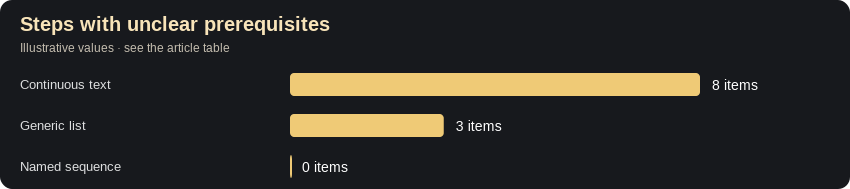
| Category | Value (items) |
|---|---|
| Continuous text | 8 |
| Generic list | 3 |
| Named sequence | 0 |
Constructed checklist scenario for this brief, not measurements, ratings, or results from cited sources. Each displayed count represents checked items in the named example.
The first volunteer to open the spring inspection page reads it from the top. The second volunteer opens a link that somebody sent last September, directly to the instruction about the equipment cabinet. The third person has a printed copy with handwritten notes beside the old step numbers. All three people might be trying to perform the same piece of work. If a new paragraph was inserted in April and the page now uses different numbers, they might not discover that they are talking about different steps until the cabinet is already open and the inspection record is wrong.
A long checklist does not become reliable merely because it has numbers. Numbers show position in a particular edition. They cannot tell you whether opening the cabinet follows an authorization check, what to do if the right person is not present, or whether a handoff from another team still counts for this inspection. The next reader needs to find the right destination, recognize it after a revision, and know which facts must be established before beginning. Those are three distinct jobs: navigation, identity, and readiness. They can support each other, but they do not come free with the same piece of formatting.
Consider a fictional maintenance group responsible for a small community field station. Its seasonal review includes confirming access, retrieving the last condition record, walking a route permitted for the day, noting changes, and sending evidence to the person who owns any follow-up. The example is about structuring information, not a technical inspection protocol. An actual procedure has to come from the organization responsible for the property and equipment. There is no magic list structure that establishes whether a person is qualified, makes a closed area safe, or replaces a responsible decision about what to do.
Find the work hiding in the prose
A first draft often sounds like someone narrating an inspection they already know how to do. “Before going out, make sure everything is prepared and bring the right record. Check the western door first if needed. Mark the panel and pass it on.” A trusted person may be able to perform that paragraph because of five implicit conversations. A new person has to infer what prepared means, whether the western door is part of a required sequence, what gets marked, and who is expected to receive what. Breaking the paragraph into four bullets preserves its ambiguity in a better-looking shape.
Start by walking through the prose with someone who actually knows the work. Ask what they would need to see to perform the first action. If they would expect to see an authorization, learn who issues it and what makes it valid for this run. If they need information from an earlier task, give that output a recognizable name. If an action can occur any time before closeout, note that rather than force a predecessor for stylistic symmetry. If a failure means that no one should proceed, ask whose job it is to decide what happens next. Write down the answer beside the affected action, not solely in an introductory note that a deep link skips.
An action is generally easier to recognize when it begins with a specific verb and refers to a named thing. “Verify route availability for this visit” makes a better start than “Route details.” The body can give the authorized source of that status or point to the applicable procedure. The action and the requested evidence should not work against each other. If the instruction says “verify,” the evidence should be something stronger than a blank box someone can tick just for reading. If the step is to “record,” the reader needs to know where the record belongs and how to distinguish an observation from an assumption.
Do not confuse a prerequisite with a piece of advice. An inspection might require current permission before a person opens a restricted record. It might merely recommend checking the weather forecast before choosing a time to review a publicly accessible display. Both facts are useful; only one is a gate in the example. Conversely, do not describe mandatory work as optional because someone reading it might be unable to complete it. “Stop here and route this to the coordinator if permission is missing” communicates the condition and the safe next action without implying that the requirement can be ignored.
A useful long list usually contains several kinds of content. There are required steps, unordered inventory items, warnings that apply to a phase, references to procedures owned somewhere else, and forms for recording what happened. Find these types before cutting anything. An inventory of supplies does not have to be reworded as a sequence of tasks. A closure message belongs at the point where it changes what the worker can do. A paragraph about the history of the station may make the work more understandable, but if it distracts from the immediate checks it can be moved into a bounded background section. The resulting checklist will be shorter in use even if the total number of words in the document does not shrink.
Read the heading as a destination
The W3C Web Accessibility Initiative tutorial on headings explains how headings identify and organize the sections of a page. The WHATWG HTML Standard on sections defines the native elements that represent headings and related document structure. In an inspection guide, these are not just ways to get a larger font. They allow a worker to navigate to the phase that matters and recognize where it sits in the larger procedure. A browser, assistive technology, and the printable version need not present the page identically for the underlying structure to remain useful.
One helpful top-level organization for the fictional station is “Prepare the visit,” “Record conditions,” and “Close the record.” Those names describe different parts of work, not three growing sizes of decoration. A subsection under the first phase might deal with access exceptions, while a subsection under the second explains the evidence fields. Use real ranked heading elements in the delivered HTML and choose their ranks to represent that hierarchy. Do not skip from a phase heading straight to a very deep heading simply because a theme assigned it the desired font size. Likewise, returning from a subsection to the next sibling phase is not a skipped level; it is the end of the nested section.
A heading must make sense when heard alone. “More” is a poor label in a list of headings; it might refer to more preparation notes, more sites or more completed records. “When the route is unavailable” gives a worker a clear destination. Repeated headings are sometimes natural, especially on pages with many comparable records, but use enough context to distinguish them when navigating by a list. Three identical headings called “Next steps” in a short procedure probably indicate that the content needs better names rather than extra typography. A clear document title and descriptive phase names supply most of the navigation without making each sentence a heading.
Not every step needs its own heading. When a phase contains several short actions with closely attached notes, a semantic ordered list under one phase heading can be easier to navigate. When one step includes multiple outcomes, a small evidence table, and instructions that several other pages reference directly, a named subsection can be justified. Ask whether navigating by heading helps a person select a meaningful unit. Giving every verb its own heading can make a navigator's structural view noisier than the original paragraph. Hiding all headings in favor of one immense numbered list has the opposite problem: the worker cannot skip to the right part without already knowing its position.
Decide which order has meaning
The WHATWG standard on grouped content describes an ordered list as one whose sequence matters to the document's meaning. This gives an editor a practical test: if moving the first item after the third changes what the worker should do or understand, encode the meaningful order. If the list is simply a collection of supplies that can be assembled in any order, use an unordered list. Do not choose based on whether the design wants a round badge. Style can reflect the underlying structure rather than establish it.
An ordered list can still contain items that return to an earlier decision or refer to work done elsewhere. Avoid implying a stricter chain than the process requires. In the fictional procedure, having a current base map and having the latest condition record are both useful before the walk. There may be no dependency between getting the map and finding the record. A grouped readiness step can show two unordered conditions that must both be met before the next action. That is clearer than numbering both conditions as if doing them in the displayed order were a requirement. On the other hand, evidence cannot be validated before its collection, and a closeout receipt cannot confirm an upload no one attempted. Keep genuinely sequential steps sequential.
Use nested lists to express composition, not merely indented paragraphs. If “prepare the record” has two constituent checks, place both under that list item so their association is clear. A warning that applies to the entire phase should not be buried as a bullet under the first task just because it visually fits there. The indentation may make the warning look local even to someone reading with ordinary vision; a screen reader or print conversion might preserve that wrong association with unusual clarity. The W3C explanation of WCAG 2.2's Info and Relationships criterion provides the broader reason for encoding these relationships rather than leaving them to appearance.
Avoid typing numbers as ordinary text at the beginning of paragraphs and treating the result as sufficient semantics. In a publishing system, a text block can happen to resemble a list under one stylesheet and still be unavailable as a list to users navigating by structure. Let the authored ordered-list markup produce the visual numbers. If a workflow needs a visible permanent identifier, add it as actual text, not as a decorative counter generated only by CSS. The same goes for prerequisites or exception cues. Display color, icons and badges may help people scan a page, but they should reinforce language that already tells the reader what the requirement is.
Let a step keep its name when its position changes
A durable identifier should not depend on whether the designer put a task second or seventh. Name the checkpoint that verifies permission something like “Access decision” and give it a short stable reference such as ACCESS. A visible label can say “Step 2: Confirm access for this visit,” while the destination remains associated with ACCESS after a new introductory step is added. A later instruction can refer to “ACCESS: Confirm access for this visit” instead of “the item above.” This gives a printed reader a search term and an online reader a meaningful link. Times, order and labels can change without automatically erasing references.
Distinguish the identifier from the heading and from the link mechanism. The heading is for human recognition. An HTML fragment target connects a link to one specific element on a page, often by a unique identifier. An editorial identifier connects the step to records and outside references even if software or format changes. These can share a readable name where that works. If a publishing system generates fragments from heading text, changing a heading may change the generated address even though the action remains the same. Where cross-references matter, choose a system that preserves explicit targets or maintains aliases. Verify that the delivered page, rather than just the manuscript, exposes the intended destination.
A step may deserve a new identifier if its underlying meaning changes. Correcting the spelling of a form name does not create a new action. Moving a background explanation above a step does not usually create a new action either. If an old step told people to receive approval from one owner and the replacement introduces two independent signoffs with different prerequisites, the procedure has materially changed. Retain enough version information to tell whether a previous signoff is valid under the new procedure. Do not recycle an old identifier for an unrelated task just because it looks tidier in the contents list.
Printed copies deserve the same care. Page numbers are convenient as a secondary cue when the edition is fixed. Durable step names and a printed edition identifier are more helpful when pages are reordered or copied independently. A supervisor receiving a call can ask which named action and which edition the caller sees before recommending where to look. A small footer with revision date or edition can prevent a printed decision from being silently treated as current after the procedure has changed. Its job is recognition, not to make old instructions valid.
An old link presents a special case. If a destination simply moved, preserve a working route or point the reader to the revised location with clear context. If the old instruction was retired, tell a visitor that it is retired instead of quietly sending them to a different action. Do not leave two identical IDs on one page as a superficial way to retain compatibility. A release check can visit the known old destinations and confirm what a reader will see. Someone arriving through a message or a bookmark will not necessarily see the notice put beside a new table of contents.
Steps with unclear prerequisites
The table is an illustrative editorial exercise. It is not research from W3C, WHATWG, an inspection agency or a group of actual users. In this constructed example, an editor starts with eight target steps and counts a step once whenever its before-start condition is unclear or the text fails to state that no prerequisite is needed. The exercise assigns eight unclear steps to the original prose, three after conversion to a generic list, and none after adding named actions and explicit conditions. These counts describe the invented checklist only.
| Illustrative chart label | Interpretation in the example | Steps with unclear prerequisites |
|---|---|---|
| Continuous text | Eight candidate actions are present but their entry conditions are implicit | 8 |
| Generic list | Five conditions are made clear while three are still ambiguous | 3 |
| Named sequence | Every entry condition is stated or deliberately marked not required | 0 |
The improvement does not come from naming alone. A named section that says “prepare correctly” can still fail. In the final constructed example, names make it possible to attach each condition to a stable action and refer to it elsewhere; the text has to state the actual conditions. Also, zero on this narrow checklist is not a perfect score for usability, legal compliance or safe work. It would not reveal that a referenced authorization form was missing or that a link could not be operated by keyboard. Treat the chart as a model for finding omissions, not an argument that all ordered lists can be certified by three numbers.
Put the exit condition beside the action
An instruction deserves an entry condition, an action and an output when the distinction matters. Suppose the preparation phase includes “Find the previous condition record.” The entry condition might be permission to access the archive. The action names the location and selection rule. The output is the record identifier, or a documented decision from the coordinator about how to proceed when none exists. The related field step then names that output as its prerequisite. A worker who arrives at the field step through a deep link can see which evidence the page expects without deducing it from the previous heading.
Write the missing-evidence behavior with the same care as the happy path. “If the previous record cannot be found, enter missing and notify the review owner; do not mark the comparison complete” makes explicit what the worker may and may not conclude. In this fictional procedure a previously authorized route could have changed without the printed document changing. An unavailable or uncertain route is not evidence that nothing needs review on that route. It means the current inspection cannot supply that observation. A later summary should preserve the distinction between no issue found, not inspected, and awaiting a decision.
A step can have more than one legitimate exit. A coordinator may mark a check complete after acceptable evidence, deferred after a documented dependency fails, or not applicable after a stated criterion is met. That is different from presenting three stages that every worker must traverse. Put those outcomes under the action or use clearly labeled branches with a return point, not an ordered sequence whose formatting implies that a person needs to mark something deferred after completing it. If the only allowed continuation is to wait for someone else, say what event permits restarting instead of framing the next step as an immediate instruction.
Break long branches at the moment a different person must act. A seasonal guide can assign evidence collection to field staff and review to the person responsible for receiving it. A reference that says “go to Close the record” needs to specify whether the worker is still the actor or whether it is a handoff. Distinguish “record sent” from “record accepted.” Without a receipt or another defined acknowledgment, the sender may have performed their step while the overall job remains open. One checkbox called complete cannot represent both states without losing information. A short text status beside the reference does more to prevent confusion than another colored badge.
A realistic sequence without a poster-sized list
Picture a station guide rewritten into three phases. In Prepare, the first action establishes who owns the visit and which edition applies. The second verifies access against the current status and records the authorization decision. The third collects the previous observation record and lists the exact identifiers the worker will use outside. The fourth asks the worker to review unresolved issues, including any instructions not to enter particular areas. If the result of any gate is not established, the remainder of the phase is not presented as ready by default. The worker can still read future steps for context, but the language distinguishes previewing from beginning.
In Record, the first action confirms that the route matches the authorized plan issued for this visit. The next action records observations in the agreed locations and order where the order has meaning. Evidence requirements are placed beside the relevant observation and refer to the named edition of the form. If the route changes or a location cannot be inspected, that gap is documented rather than filled by analogy with the previous visit. The worker is not asked to remember which three abbreviations were defined twenty paragraphs earlier. Each action makes the relevant entry expected at that point identifiable.
In Close, the first action checks whether all required records are present or explicitly accounted for. The second transmits them using the method the team approved. The third logs where any open item went and whether the designated reviewer has accepted the record. This can be a two-actor phase even if the other two phases are usually completed by one person. A handoff from Record to Close is a change in responsibility, not just a new heading. When someone reports progress, the guide allows them to say who has the next action without claiming a closure that has not happened.
In a real writing session, mentally try to swap two of those actions. Could a field worker read the previous observation report before the coordinator named the route? Perhaps, provided archive access was established under the correct authorization. Could the worker mark the inspection reviewed before the review owner accepts it? No. Those two responses help distinguish policy from sequence convention. The editor can use ordered steps for the genuine progression, attach unordered readiness checks where order is immaterial, and identify gates whenever entering a later phase requires a confirmed result from an earlier one.
Action labels should constrain what can be done without burying unfamiliar readers in local jargon. If the group normally says “green packet,” an outsider cannot know whether that denotes authorization or the final report. Pair the local term with its function: “Record the current access authorization (the green packet).” Name forms consistently so that a deep link or printed cross-reference remains meaningful on its own. If a label names a status that appears in another system, use its actual visible wording where that supports a reliable lookup. A near synonym can cause someone to choose a different entry without realizing the form has distinct purposes.
Separate a working record from the reference guide
A static inspection guide describes what to do. A record describes what happened in one visit. A checklist can combine them in a form, but their identities still differ. The guide may say “retrieve the previous condition report,” whereas the record needs the actual identifier read or the reason none could be retrieved. Saving a checked box locally may be a suitable convenience for a reader studying the guide; it does not, by itself, constitute the official evidence. Say where state is stored, who can read it, and whether state follows the worker if they switch devices.
If the organization publishes an interactive form, start with native labels and controls suitable to that purpose. A visual rectangle beside each row is not an accessible checkbox. Give controls programmatically associated names, and distinguish multiple controls that would otherwise sound identical in an assistive technology's list. The page may use a list to communicate the order of the actions and real form controls to capture completion, but those jobs should not be substituted for each other. Avoid inventing a clickable document heading whose appearance is the only indication that it controls anything. A person should be able to read the document's structure even when not completing a form.
The displayed order, source order and focus order should tell a coherent story. A two-column design that appears to read across rows on a desktop may be received as an entire left column followed by an entire right column on a narrow screen or in a converted file. If a right-hand entry is a prerequisite or warning for its matching left-hand step, changing visual order alone is risky. Keep dependent instructions physically close in the document source and confirm the layout under change. In cases where there is no meaningful order, avoid inventing one in the reference just because a grid must be read linearly in one representation.
Per-step URLs are helpful when someone returns to a form, but a link to a downstream step should not silently bypass an actual workflow gate. In a guidance document, keep the required condition visible at the linked destination. In a workflow application, enforcement belongs to the authorized process and not to the order of clickable navigation or a hidden client label. Also make it possible to revisit the earlier decision that blocks completion. The reader can learn why the final action is unavailable without attempting to force it and without losing already-entered information they are permitted to keep.
Information from another source can be important enough not to duplicate casually. If a separate responsible team maintains the active access requirements, a stable link and concise explanation can steer reviewers to the right authority. If a printed guide needs enough content to operate offline in permitted settings, specify how the current version of that information is attached or verified. An excerpt copied into the checklist and left undated can be more dangerous than a broken link because it looks authoritative. A good guide makes clear which facts it owns and which must be confirmed elsewhere.
Test the revision you did not expect
Suppose the checklist started with a phase about reviewing the prior record and now needs a new step asking whether a coordinator closed the station for repairs. Insert the step and inspect every instruction that used a position rather than a name to refer to readiness. An article from last season might link directly to the old second step. A printed handoff card might say to begin on a page whose position has changed. A saved form may associate its locally stored progress with an ordinal. Verify whether the release can preserve references or whether an explicit change notice is needed. The purpose is to see the break before a worker is standing outside with an outdated handoff.
The safest way to identify critical references is to use realistic examples. Give a reviewer only a link to the field phase and ask what evidence permits starting it. Give another a clean printed copy and an older email referring to a named action. Give a third reviewer an already-open form while you test a new edition elsewhere and ask how the form communicates its version. These are proposed checks, not results from an actual deployment. Each tests a different part of the checklist's promise: the deep link must orient someone, printed labels must be stable enough to find, and opened copies must not pretend to update themselves automatically.
Check when titles, routes or forms move between pages. A section passed unchanged to a new platform may lose its explicit anchors because that platform sanitizes embedded HTML, or a table of contents plugin may automatically create fragment identifiers that conflict with reserved names. Use real verified mechanisms on the chosen platform rather than assuming your draft syntax survives conversion. Verify exact target IDs, absence of duplicate IDs, and successful navigation when a fragment is opened directly. Confirm the destination describes the expected action and edition; merely observing a scroll does not prove the right instruction was reached.
Use the accessibility tools you and your review process actually have. A heading list should communicate the phases, and a list announced in a tested combination should represent the steps as intended. Keyboard focus should reach real controls and links without requiring a pointer; clear focus and descriptive text should make navigation understandable. Narrow layouts and print output should preserve warnings and references closely enough to remain useful. None of these quick checks is a claim of universal accessibility or proof of conformance. They are enough to identify specific editorial or implementation problems for correction and retesting.
Make the publication gate specific
An editor preparing the final version can scan the whole document for instructions phrased as “before continuing” and test whether the scope of continuing is obvious. The phrase sometimes means finish this list item before starting its sibling; sometimes it means stop all field work pending authorization. The same vocabulary need not encode those different operational consequences. An explicit action such as “Do not begin Record until the coordinator confirms ACCESS for this visit” names both sides of the relationship. An instruction like “Complete this entry before submitting the form” may be sufficient when the only affected action is form submission. Let the wording reflect the actual consequence rather than use a generic gate label everywhere.
Review decisions that span multiple pages for stale references. For example, a separate volunteer handbook might describe a handoff as ready when a photo is uploaded. The new checklist may require the worker to record the related observation number too. Fixing the prose on one page will not necessarily fix the dependency in the other. Maintain an ordinary register for cross-document references when consequences justify it, or use a consistent way to identify inbound links and named steps. A revision record can state which downstream pages, printouts and forms were checked before the change was accepted. It can also identify other versions still in circulation without implying that the editor controls copies already downloaded.
A reliable check sequence does not turn every edit into an enormous release. A spelling fix to an explanatory paragraph can often pass with a simple editorial review. A change to a prerequisite, actor, stop condition or evidence requirement calls for a broader check with the procedure owner and the people who carry it out. Ask what existing records mean under the new definition before changing the guide. If acceptance used to mean receiving a form and now means reviewing attachments as well, historical cases marked accepted do not automatically satisfy the new test. Preserve the definition or edition they were evaluated against.
Try testing claims with a counterexample. The page says that every site in scope is inspected. Ask what it says when a site is inaccessible for the entire season. The checklist says that all open items go to the coordinator. Ask what happens when the coordinator delegated one issue to another designated owner. If the intended answer exists but the only person who knows it is standing beside the draft, the material is not yet ready to travel. These tests do not require a complicated scoring system. Keep a small set of difficult examples with the editorial handoff so future changes can be checked against something more realistic than a clean successful run.
There is value in a set of step identifiers being boring. People make fewer mistakes when they can match a known record to a known action without deciphering project history. Keep the visible words descriptive and the permanent reference short. Put an explanation beside a retired target when needed, and change the identifier when the replacement actually does a different job. Where one ID can be found in a printed booklet, a mobile page, and a report export, someone checking a revised guide can see whether all three refer to the same thing without being told they have to think like a developer.
The field station's volunteers can now talk about the same task even if they arrived by different routes. One of them can share the named access decision rather than a position in a long list. Another can tell from the printed version which evidence is still missing. The person taking the handoff can distinguish a sent record from an accepted one. None of that depends on a clever animation, a large body of text above the first action, or a perfect memory of last season. The checklist succeeds because each step stays recognizable, its required evidence stays visible, and the order means what readers think it means.
Give recurring checks a clock as well as an order
Seasonal procedures can go wrong when a check that was valid for one visit is accepted for the next. A checklist can identify those checks by the event that limits them. For example, current access might need confirmation for each authorized visit, while a staff role can remain established until the organization changes its assignment. A permanent action identifier is not a permanent approval. If a report imported from last season shows ACCESS as complete, the next form should associate that evidence with the earlier visit rather than treating a familiar name as readiness for today.
Spell out when work can resume after an interruption. Imagine a worker who completes the preparation phase, saves the record, and returns after a closure notice was issued. The restart instruction should tell the worker whether to repeat the relevant checks, who can authorize a new route, and how to document the earlier work without copying its conclusions into the new visit. A system that displays a date beside the filed evidence or shows visibly that the prior decision belongs to a different visit can make this exception easier to catch. The text must still state what the worker is responsible for doing.
These distinctions also help someone reviewing completed records later. A seasonal report can say which checks were performed once for the program, which were performed for each visit, and which were required only when conditions changed. That is more informative than a completion percentage that treats every box as interchangeable. Preserve identifiers in the output, along with the date or event that gave the evidence meaning.