
| Category | Value (items) |
|---|---|
| Forced top | 5 |
| Partial restore | 2 |
| Verified returns | 0 |
Constructed checklist scenario for this brief, not measurements, ratings, or results from cited sources. Each displayed count represents checked items in the named example.
Halfway through a long article about a restored footbridge, a reader follows the link for a survey mentioned in the text. They check a date, press their browser's Back button, and see the article's headline instead of the paragraph they left. The page is technically open. The reading task is not restored. The reader now has to remember a phrase, search for it, and hope the page's figures and footnotes have finished loading before trying again. A minor trip to a source has turned into a reason not to follow the next citation.
A useful return has more than one part. It brings back the right document or route, the part of it that mattered, and enough context to resume. When the reader left a filtered article index, the useful destination may be their original list position and selection rather than an article paragraph. When they followed an in-page footnote link, a labeled link back to the citation may suit them better than relying on session history. When they open a shared link for the first time, the destination encoded in that link should take priority over a place stored from some earlier visit. Treat these as distinct journeys with distinct rules.
The examples use a fictional archive with a long footbridge article, a topic index, citations and methods notes. The chart counts failures in five synthetic journeys across three hypothetical implementations. It is not browser telemetry or an accessibility score. The purpose is to test the reading experience rather than assume that a valid link, a restored coordinate or a polished entrance animation proves the reader can find their place again.
Separate a fresh opening from a return
A reader clicking an article in an index for the first time should normally get the opening, unless the clicked link names a particular section or another clearly signaled entry point. A reader traversing back to an article they already read has a different goal. Replaying a new-visit rule on every appearance of the page is a common way to put both people at the headline. An interface can be consistent without treating these situations alike. Define the expected position by asking what action got the reader there.
Start with three ordinary actions. Directly opening the article URL is a fresh entry. Following a link to its methods section is a targeted entry. Leaving that section and then pressing Back is a return to a history entry. A refresh is yet another case. It is not a silent instruction to reset progress everywhere, but it also is not necessarily the same as a return through history. Write down the behavior the team intends for each action rather than deriving the meaning from what happens to appear on the screen.
The WHATWG HTML navigation and session history section describes session history entries, their stored state and automatic or manual scroll restoration modes. In automatic mode the browser is responsible for attempting restoration of persisted positions under its rules; manual mode leaves that work to the page. These definitions clarify responsibility, not how a particular web application will behave under every condition. A forced scroll after a mount or a route update can undo the position that the browser just restored. Test the actual application rather than assuming native behavior or a framework setting worked.
If the archive introduces an explicit “Resume reading” feature, treat it as a new option rather than as an override for all openings. A person opening a link to share a particular graph should land at the graph, not at somebody's earlier reading point on the same device. A saved previous visit can be a convenience when offered with a clear choice. It is not equivalent to browser Back, where the reader has just left a particular place. Separate these experiences before you choose what information needs to be saved.
Decide what “your place” means for each journey
The simplest definition is a vertical coordinate, but that coordinate is only meaningful in a particular layout. A paragraph moves when the viewport narrows, fonts change or a large figure above it finishes loading. Returning to the same pixel might show a different section. A more durable definition uses a stable section or passage and, where needed, an offset relative to it. Another project might rely on native restoration and use stable landmarks as a recovery aid rather than adding a software-managed restore. In each case, test what the reader actually sees. The number describing a position is a tool, not the goal.
Consider the long article's three example locations. Near the opening, the reader follows a link to the report date. In the middle, they compare a table to a field note. Near the end, they inspect a source that helps explain a correction. Restoring the correct reading position is more demanding in the second and third cases because the reader may have passed many similar headings and links. A visit to the top of the page can therefore look satisfactory in a test that never leaves the introduction. Mark the relevant sentence or section in the test notes before following the link.
On a filtered index, the reader's place may depend on more than scrolling. The selected topic, search terms, sort order and page of results can all affect what appears at an offset. Restoring a coordinate in the default index does not restore the item the person was considering. If the index uses paged or incremental loading, the row may need to exist before it can be reached. Choose which parts of the state should be part of the address and which should be retained only for the relevant session. Do not ask readers to reconstruct a filter they expect Back to preserve.
In a footnote, “your place” may be a specific citation, not any point in the paragraph. A note cited twice from different parts of the article needs more care than one cited only once. A single return link cannot always know which occurrence the reader followed unless that relationship is tracked, and a link hard-wired to the first occurrence can send the second reader to the wrong section. Explicit separately labeled backlinks or a reliable contextual return can help. Where there is no exact target, use a meaningful section return and say what it does rather than implying the tool can reconstruct an origin it has not recorded.
Give the reader landmarks that remain useful after the layout changes
The W3C WAI tutorial on headings explains that headings communicate organization and can help readers navigate. The WHATWG HTML sectioning specification defines article, section, navigation and heading elements, among others. Appropriate markup helps give a long article a useful structure. It does not by itself restore a browser's scroll position. The two concerns reinforce each other when authentic headings also make suitable anchor targets and a reader can find the relevant passage again without precise coordinates.
Use meaningful headings such as “Why the bridge deck was replaced” instead of repeated generic headings such as “Overview” scattered through a long feature. A linked contents list can name the actual section the reader wants. Section identifiers should be individually distinguishable and stable where possible. If a later editor renames a heading for clarity, preserve the enduring link target when practical. Someone may have copied the old section address into a note, and a revision of title text need not make their navigation fail.
Choose the anchor close to what the action describes. A link labeled “View repair cost table” should not jump to a broad section with six paragraphs before the table. A backlink labeled “Return to the construction date citation” should bring the reader near that citation. In a sticky header layout, check that the destination is not hidden beneath the bar. Many apparent failures are not errors in finding the right target but errors in where that target lands relative to the visible region. Inspect the published layout with enlarged text and other realistic settings, not only a screenshot from the design tool.
A good label names the intended return without misusing browser language. “Back to article index” is a site link to a known destination. It may not traverse the reader's previous history entry and should not promise to reconstruct filters unless it knows how. “Return to citation in the methods section” similarly names an in-page target, not a browser operation. Leave native Back usable. Site-provided, clearly named destinations are complementary options, especially for someone who arrived directly at a note and has no prior article position in their current history.
Score five journeys rather than five screenshots
For the example, select five specific journeys and fix the expected return target in each. In the first, the reader follows an external source from near the beginning of the article and returns with browser Back. In the second, the reader does the same from the middle after reviewing the cost table. In the third, the reader returns from a source followed near the end after a correction note. In the fourth, an in-page link goes to a footnote and the explicit citation return should recover its specific reference. In the fifth, an article opened from a filtered index is closed by traversing back to the index with its list state intact. Each case contributes one result, successful or lost.
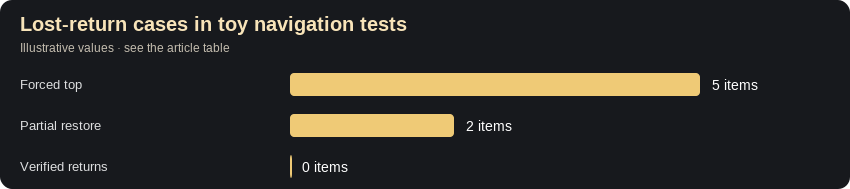
In the Forced top version, every return resets to the opening of the current route, even if the browser or in-page link already positioned the reader. None meets its fixed success condition, so there are five losses. A design like this often looks fine when demonstrated from the first screen, especially if the reset is wrapped in an entrance animation. The failure in this example is not the lack of dramatic visual change. It is that readers returning from real detours have to rediscover context and in one case rebuild the index view.
In Partial restore, the first three source detours recover the article positions. That leaves two failed cases: the note's return loses the targeted reference, and the filtered index comes back without enough list state. In Verified returns, the two remaining behaviors are fixed in the mock implementation, and the team repeats and passes all five specified journeys. The label does not suggest universal behavior across browsers or sites. It says only that the five cases have been checked in the constructed exercise and correspond to a usable place by the stated standard.
Illustrative chart data: Lost-return cases in toy navigation tests.
| Prototype | Lost-return cases | Successful returns out of five |
|---|---|---|
| Forced top | 5 | 0 |
| Partial restore | 2 | 3 |
| Verified returns | 0 | 5 |
The bars count five, two and zero lost returns. Five minus the first three repaired journeys gives two; fixing those final two gives zero. The successful column is five minus the lost count for each row. These are repeated checks of the same five synthetic scenarios, not separate samples; summing the bars would count the same failures in different versions. The mock results are not measured from W3C, WHATWG or actual users. A production audit should separately document the environment and actual outcome of each journey. The diagram and example count help structure that work, not replace it.
A pass needs more definition than “did not land at the very top.” For the article cases say which paragraph or heading should be immediately recognizable and whether a small positional change is acceptable. For the note, state which citation instance applies. For the index, verify the selected topic, order and the original row or position. If a screenshot at the apparent correct moment is followed by a late jump after an image loads, the journey has not passed. Give reviewers enough time to see the stable state and observe whether they can continue.
Let browser and application behavior support each other
A traditional multi-page site and a client-side route transition need different checks even if their links look identical. A browser can keep a representation of a page in history or recreate it when the reader returns. A router can reuse the existing document while replacing only the visible content and storing route state. In either design, evaluate where the restoration responsibility lies. A custom rule that moves every new route to the top may be useful for fresh openings and destructive for history traversals. Write a condition that reflects the difference rather than removing all top-of-page behavior indiscriminately.
The WHATWG HTML navigation and history APIs section distinguishes session history traversal from operations that push or replace state. Changes to the address and history should represent something a reader would recognize as a navigable action. If the contents menu records a new history entry whenever a heading happens to cross the viewport, browser Back may walk through a long trail of minor scroll events. If every action silently replaces state, Back can instead skip meaningful steps. Observe the path the reader would expect before choosing a mechanism. This is not a recommendation to make minor visual events into navigable pages.
Avoid writing a site-specific “Back” control that blindly traverses whatever came before when the label promises a known destination. Someone opening an article from an external search or bookmark may not have visited the site's index at all. Browser Back belongs to the person and can legitimately lead outside the archive. The site's “Article index” link should reliably address the index. It may also carry appropriate state explicitly if the origin is available and that behavior is promised. Keep the label and action in agreement. Duplicate browser chrome dressed as site navigation can increase confusion rather than reduce it.
If both browser and script attempt to restore position, review which effect wins and when. A bug can look intermittent because the sequence differs with connection speed, caching and component timing. A previous coordinate might be restored first, then overwritten by a focus instruction or a scroll-to-top call. An application performing its own restoration should do so when the material can support the intended position and should avoid continuing to pull the page after someone starts scrolling. Do not switch to manual restoration just to make one normal opening work. That change takes responsibility for the traversals that formerly worked without it.
Fix unstable layout before promising an exact return
Places change during loading. A large image without reserved layout space may push all later content down when it arrives. A late advertisement or embedded figure may do the same. A return that appears correct while those pieces are absent can become wrong moments later. Start by making the reading layout predictable. Reserve space where dimensions are known, avoid unexpected insertions before the target and test with data loading delayed. If an article deliberately includes blocks that can collapse, decide whether their previous state must be restored along with the reading position.
An index with incremental rendering can create a similar problem from the opposite direction. The content a reader expects may not exist yet even if the correct filter is set. Jumping to a coordinate beyond the loaded list will not produce the desired row reliably. Restore a sufficient extent of the result set, or use a meaningful item anchor and load the surrounding results before trying to show it. If the item no longer exists, keep the search and visible filters and offer a clear nearby landmark. Landing on a blank screen with an address that looks correct is not a usable return.
Be careful when the viewport itself has changed. Someone may open a source while holding a phone in landscape, then return after rotating it. At different widths, a paragraph may occupy more lines and appear hundreds of pixels away from the stored coordinate. Test device rotation or a comparable resize around specific passages. You need not guarantee exact line positions across every display, but the return should preserve a recognizable section when plausible. A good contents list or a stable citation identifier gives readers a useful recovery method even in cases where pixel-perfect restoration is impractical.
Check sticky navigation at the resumed location. A correctly targeted anchor can sit just below the origin of the viewport while the page header visually covers its heading. The reader sees the second paragraph and wonders where they landed. Reserve an appropriate offset or change placement so the title is visible at the target. Test with long headings, wrapping labels and enlarged controls, not only the mode used by someone who laid out the article. “Anchor resolved” and “reader can see the anchor's context” are separate verification results.
Check focus separately from where the screen is scrolled
Returning to a visible paragraph is not necessarily sufficient if the reader navigates with a keyboard or assistive technology. The next tab stop could be the first menu item at the top rather than anything near the passage. Conversely, a script that moves focus may scroll an otherwise well-restored view. Review what receives focus or where sequential navigation resumes, and what the visible and announced context tells a reader. The appropriate focus behavior depends on the action and layout. Avoid forcing focus to the headline on a history return merely because that is a common policy for fresh page openings.
In the footbridge article, verify that the return to a citation is meaningful for a person who activates it from the keyboard. After following the backlink, can they identify the citation or its paragraph, and can they continue to the surrounding content without rediscovering the whole page? Looking only at the screen while a mouse remains at the same coordinate does not answer that question. If the implementation moves focus explicitly, check that the target makes sense and the move does not trigger a second unexpected spatial jump. In other cases, ordinary link and document behavior may suffice once the target and structure are correct.
The index journey has a related issue if the opened article was selected by a visible card link. When the list comes back, the label of the original card should remain discoverable. If incremental rendering or a changed sort inserts other cards before it, be careful not to restore the same numeric row and accidentally place the reader on a different title. A stable item identity is valuable because it connects the context to the thing the person chose. If that item disappeared, make the situation clear, retain the user's scope where reasonable and provide the next meaningful point in the list.
Test understandable names as part of the return behavior. Three links marked “back” in a note panel might all go to different references. Someone reading links without their surrounding layout needs distinctions, such as “Return to materials citation” and “Return to the cost comparison citation.” If the article has many notes, meaningful link text can reduce the dependence on any one restoration mechanism. The markup and state are important, but the return still fails at an editorial level when the reader cannot predict what a control will do.
Include both same-tab and separate-tab source reading
A citation may send a user to a separate website, to a file viewer or to a different page inside the same archive. Test a normal same-tab back journey wherever the default interaction allows it. If an external source opens in a new tab, returning to the article is not the same operation as traversing history. The source tab's Back button will not necessarily lead to the article tab. Opening a second tab can make comparison easier, but it is not a fix for broken Back behavior on the paths that do navigate within a tab. Readers can often choose their own tab strategy when links behave normally.
Make exception cases explicit. A footnote may open in a modal layered on the article. The return should then close the modal in a predictable way and put the reader back at its reasonable origin. If the overlay adds a meaningful history entry, test whether Back steps out of it appropriately. If it does not, test that an obvious control closes it without losing the article's position. Do not leave both a visual close control and a history rule disagreeing about what is open. A modal with no independent destination should not pretend to be a useful page address when the article is shared.
Files make their own cases. A source link may be a PDF that tries to open from a document viewer or downloads without navigating. The attempted action and the observed result can differ by device or user configuration. Write the test notes to identify what happened rather than assuming every source took the same path. If a file type is relevant to the choice, label it clearly. When pressing Back actually returns within an embedded viewer rather than to the article, identify which container owned the navigation. A web publication that supports source visits well usually gives readers options instead of making a specific device behavior mandatory.
Another useful test starts by opening an article from a message link, following a source, and then returning. There is no index state to reconstruct, but the article location still matters. Start a separate test by opening the same article from a filtered topic card. That origin is different and actually provides an index entry to restore. A site link named “Topic index” may work both times, but native Back should follow the reader's actual transitions. Running only the happy path beside a staff member on the main device does not distinguish these cases.
Choose durable targets and plan for the ones that are removed
A public article can outlive its initial development choices. Rearranging headings, updating a phrase or changing a contents menu should not casually break a bookmark used by a teacher or a reference copied from elsewhere. Stable identifiers are easier to maintain when chosen as part of publishing rather than generated from display strings without review. When a heading changes text, check whether old direct links still reach the intended content. A note can have a stable anchor even if its display number changes, provided the relationship between notes and their references is maintained.
Sometimes the relevant passage legitimately disappears. A draft turned into a shorter guide might no longer have the original methods appendix. A silent jump to the header hides what happened. Provide a nearby meaningful destination or an explanation when practical, particularly for commonly linked material. Within a return flow, acknowledge that the exact location is no longer available rather than presenting a guess as exact restoration. A stable section target can be a good fallback, but do not keep an old heading merely to imply the removed content survives.
Build the same care into the filter state. A topic could change names, and a sort option may no longer exist after an index update. A useful fallback preserves what still applies and explains the changed option where it affects the list. Avoid reconstructing an outdated search using a new interpretation without signaling the difference. If a stored state deliberately does not survive between sessions because the visitor's query should remain private, do not represent that as transient unreliability. State what can be restored in the current journey and offer a clear index destination.
Review the scope of storage as carefully as scroll accuracy. A long-lived record of reading position can reveal visits to sensitive documents or recur unexpectedly on a shared device. Keeping temporary navigation state for a current session is a different design choice from storing a reading history in an account or analytics service. Use the narrowest mechanism that supports the feature and respect the product's privacy promises. A link fragment can help one reader intentionally share a section, but it should not embed unrelated filtering or private context just to make every return reproducible across devices.
Run the matrix in a way someone else can replicate
Define the starting conditions before each test. Record the entry path, browser and device, article section, link activated, whether it navigates in the current tab, and any index settings. For the three article tests, mark the intended paragraph or heading in the notes before departure. On return, observe the immediate landing and the final stable position. Note whether the reader can resume without finding a hidden heading or adjusting a drawer. If a screenshot is useful, collect one at departure and one after stabilization rather than selecting the most flattering instant.
Repeat the case with different content timing. A warm test may preserve more of the document than a first or reconstructed load, and a fast machine may hide a race between content visibility and restoration. Where practical, try both a typical load and an intentionally slower test environment. If the failure only occurs with a particular component present, record how that component changes layout. The proof should be that the intended content becomes readable under the tested conditions, not that a numeric scroll instruction happened to execute.
Verify ordinary browser Forward behavior after at least one Back case. A team can accidentally make Back look correct by replacing a history entry or creating a new visit, while leaving Forward directed to an unrelated section. Checking both directions is a straightforward way to see whether the fix respects the journey rather than painting a desirable screen after one scripted action. Also check that using the explicit citation return does not destroy the ability to use the browser normally afterward. The two mechanisms can coexist without each one attempting to manage the other's history.
For the index scenario, check that the row really corresponds to the item previously selected. An index can restore the same filter name while loading a different data page or choosing an altered sort order. The title and visible neighbors are a stronger test than a raw coordinate alone. If the test involves genuine user input, use fictional search terms and avoid collecting more information than needed. For sharing the report, a small title or test identifier can preserve reproducibility without retaining a reader's actual browsing history.
Verify matching paths when the article scrolls inside a panel
A long reading page can use the document's main viewport, but it can also place the article inside its own scrolling panel. A narrow screen may change from one arrangement to the other. A test that looks only at the document's vertical position can then claim nothing moved, even when the reader was actually far into the inner panel. Establish which region scrolls for the relevant device, which elements are inside it, and what the restoration contract covers. If a page has both a scrollable article and a separate topic list, movement in one should not silently be treated as the reader's position in the other.
Consider a comparison layout with a methods note beside the main feature. A pointer user may scroll the note panel while the article stays put; a keyboard user can reach the note by using a normal link or by moving through content in document order. When the note is dismissed or its link is followed, there ought to be a stable origin for the return. Saving only the window offset loses that detail. Conversely, saving every panel location indefinitely may be unnecessary. Mark the parts of the interface that belong to the specific history entry and test a journey in which the main page and panel both have meaningful positions.
Mobile adaptations can effectively change the coordinate system. A layout with a side-by-side methods column may become a single column with that note at the bottom. On return, restoring the prior panel's third hundred pixel would not recover a position in the new structure. A persistent anchor for the methods note or an explicit link back to the citation provides a way to identify the location independent of the layout. A reader who deliberately turns the phone should not have to learn the internal difference between the two scrollers in order to continue reading.
Use the return contract to review a redesigned index
Imagine a later release adds a “Newest” sort to the archive and changes the default. A saved visit to the archive might have been on a topic filter using a different sort. If Back restores the old topic but not the old sort, the index now starts from a different context. Check that the team's contract distinguishes which setting was chosen explicitly and which applied as the default on that visit. When the old order can still be rendered, restore it or provide a well-explained result consistent with the site's navigation policy. Redirecting every index visit to a single canonical list can erase precisely the state a person expected to retain.
If the original item is missing, record the reported fallback rather than marking the route as verified without qualification. A reasonable fallback might retain the topic and sort and expose the index heading and a nearby group of rows. It might explain that the saved article is no longer listed. There is little value in a perfect pixel restore that points to a newly inserted unrelated article. Useful restoration is a contract about recognizable context, not a claim that the live archive has remained unchanged.
Write defects and release notes in terms of the lost reading task
A useful defect report describes an entry path, the departed position, the action, the expected return and the observed result. “From the methods citation near the cost figure, open the linked survey in the same tab. Browser Back opens the correct article but lands at the introduction. On slower load it briefly shows the methods heading before resetting.” A developer can act on that. “Scrolling broken” does not distinguish wrong routing, a forced top rule, an anchor hidden by navigation or new layout arriving above the target. If the original context includes a selected filter, record it beside the starting position.
Avoid writing one release note saying “Back fixed” when only one mode was checked. Say which journeys were verified, such as returns from three source links and the citation backlink, and which device or index behavior remains unverified. A missing reproduction does not prove a user report is wrong. It may show only that the failing combination of timing or navigation was not tested. If the project retains a fallback such as a contents list, describe it as a fallback, not as evidence that native Back is correct. Being precise about the fix makes later regressions easier to recognize.
If a proper fix cannot ship immediately, provide a usable workaround without redefining the issue. A stable source citation or a meaningful contents link may help people get back to a section, but the original Back failure still matters because it is a routine reading action. A temporarily simpler layout can avoid a known late jump without establishing that a more dynamic version works. Record what the workaround covers and which user journey needs a permanent test. A workaround offered transparently is more useful than an unverified claim of completion.
The reader checking the bridge survey does not care which layer owns restoration. They care whether the paragraph is still there when they come back, whether the note returns to the right reference, and whether the index remembers the list they were scanning. Give those journeys explicit meanings and stable landmarks. Then test them from the beginning, middle and end of a real reading sequence. A long article invites readers to look things up. Its navigation should make those detours feel like part of reading rather than starting over.