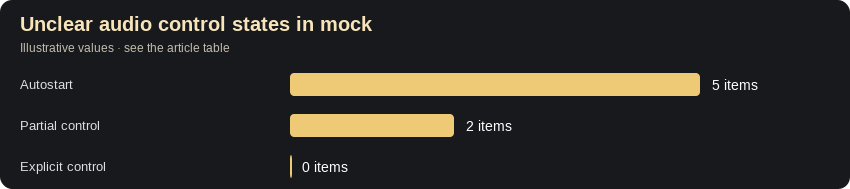
| Category | Value (items) |
|---|---|
| Autostart | 5 |
| Partial control | 2 |
| Explicit control | 0 |
Constructed checklist scenario for this brief, not measurements, ratings, or results from cited sources. Each displayed count represents checked items in the named example.
The first voice a reader hears on a page should not be an interviewee the reader did not choose to hear. Imagine a person opening a report on the evening bus. They intend to read two paragraphs before their stop. Before the headline finishes loading, someone begins talking about rain gauges through their speaker. On another device the browser blocks the clip, and the same page looks peaceful. A design review that uses only the second device might pronounce the page fine. The experience is not fine simply because one browser intervened.
The interruption can be more than embarrassing. A reader may already be listening to the speech produced by assistive technology. The recording and the reading voice can compete for attention, and the control that stops the recording may be part of the speech the user can no longer make out. Somebody else may be reading where sound is prohibited, or carefully managing the time and data available. A small interview can enrich an article without acquiring permission to take over the room. Being able to start the recording in a lab is not evidence that a reader can choose, control, or understand it in a real visit.
Build the publication around two complete paths. On one, the reader knows what the clip contains and how long it is, chooses to play it, can stop or pause it, and can continue reading without losing their place. On the other, the reader can reach the relevant text without making any sound. These paths should meet where it is useful to move between them, but neither one should be a hostage to the other. Then test what happens when playback fails, loads slowly, ends, or competes with a second clip. Those are ordinary states of a real player, not inconveniences to leave out of the mockup.
Describe the clip before offering the control
Consider a fictional feature about a garden caretaker explaining why a narrow overflow was retained near a gate. The interview section could start with “Caretaker Mina Chen on the overflow route, 1 minute 18 seconds.” Under it, a button says “Play interview,” and a separate, clearly named link reaches the transcript. That is enough context for many readers to decide which path they want. If the clip is in another language or starts in heavy background noise, stating relevant information briefly can help too. Do not require a person to press play to learn what they just committed to hearing.
Placement matters as much as the words. A duration added to a graphic may be visible in one layout and absent from the accessible description of the selection. A list of three controls all announced as “Play” can be hard to distinguish when reached directly through keyboard or assistive navigation. Include a clear association between the name of the clip and its controls, using native behavior and appropriate labels. Test the real output rather than inferring it from what text happens to be close on the design canvas. Keep the editorial context concise; a long descriptive name on every button can be another kind of burden when a player already occupies a clearly identified section.
Next decide what the duration represents. The published excerpt may be much shorter than the recording retained in the archive. Silence at the beginning or credits at the end can change the delivered length. Verify the actual encoded file and ensure the public duration matches the clip offered, not the edit plan or source recording. If the duration can only be established once a live source is connected, distinguish unavailable from zero and explain enough for an informed choice. In a short pre-recorded interview the publisher can often provide a reliable duration in the text even before the media loads. An estimate should be labeled if precision matters.
Do not confuse the decision to watch or listen with consent to an unrelated action. A transcript link should not double as play. Opening an article chapter, focusing a button, scrolling past a card or expanding an explanation does not imply a request for sound. A third-party player may perform separate loading or tracking functions even before playback, depending on how it is integrated; review those arrangements under the site's applicable policies and distinguish loading the component from choosing to play it. Editorial control starts with specifying which event actually authorizes audio in the page's own design.
The W3C Web Accessibility Initiative guidance on audio and video describes accessibility as part of planning media, not simply adding a button at the end. The WCAG 2.2 time-based media guideline distinguishes kinds of media and their related success criteria. In addition, the separate WCAG explanation of the Audio Control criterion addresses automatically playing sound. That explanation matters for the threshold and available mechanisms, not because the example here is a conformance determination. Reader-initiated playback is a useful editorial default even where a particular short sound would not trigger the same criterion.
What the autoplay rule does and does not say
For audio that plays automatically for more than three seconds, WCAG 2.2 success criterion 1.4.2 calls for a way to pause or stop it, or to control its volume separately from overall system volume. That is a requirement in a particular case, not a recommendation to add two seconds of surprising speech to a reading page. The goal of the design here is stronger and simpler: keep the interview silent until someone asks to hear it. Meeting the automatic-audio criterion for one clip would not establish that the rest of the page or the media as a whole conforms.
Browser autoplay restrictions are not a reliable substitute. Different clients, settings, histories and embedding arrangements can permit or deny starting audio. A user who previously interacted with a site may not experience the same conditions as a new visitor in a test window. A silent result in one browser might hide an autoplay request that another browser honors. Check the intent in the actual implementation, and test more than one meaningful entry path. The page should not attempt unintended playback and rely on a browser's rejection to spare the reader.
A silent preview can still cause confusion if it starts moving a timeline or presents a pause icon before the user presses play. Someone who does want audio may think it is already running but muted, or that their hearing device is not working. For a plain audio interview, display a truthful idle state. If there is a reason to prefetch metadata, allow the delivered controls to distinguish that from active playback. An apparent spinner is not permission to start sound later after someone leaves the component. Once the reader makes a new choice, such as canceling or selecting a different clip, honor that choice even if an earlier network request finally succeeds.
Keep logic attached to activation. Focusing a button should allow a reader to identify it before acting. Selecting text in the transcript, opening a transcript panel, or loading a URL that names the section should not start the media by side effect. Avoid shortcuts that treat any key press in a component as permission to play. Explicit keyboard activation or a clearly identified tap is different from navigation through the page. A deliberate start is a behavior the team can test, not a promise inferred from having a button somewhere on the screen.
Represent the states the reader can encounter
The basic state contrast is idle versus playing, but even a simple interview has more than two real conditions. After activation the clip might be loading; once started it can buffer; the listener can pause; the whole recording can end; an error can prevent a start. Choose meaningful text and behavior for each condition relevant to the interface. A button that changes to Pause the instant a download begins may suggest sound is already audible and hide the ability to cancel. A permanently unchanged Play button can conceal the fact that it is now possible to pause. The exact treatment depends on the platform, but the names and effects should correspond.
A loading state needs particular care on slow connections. After pressing play, a reader might wait, decide the audio is not worth the time, and move on to the transcript. Provide a way to cancel where changing one's mind matters, and make sure it actually cancels the pending intent to play. If someone taps play on a second clip, the first delayed file should not suddenly start as well. Model the reader's most recent explicit choice. Waiting is not automatic recommitment, and a late completion is not evidence that the older choice is still valid.
An error should identify the problem as far as the page actually knows and preserve useful alternatives. “Interview audio could not load. Read the transcript or retry playback” is clearer than a player that appears to have reached the end of a silent track. A transcript comes from a different representation, so it can still be useful where the media host or format has failed. Avoid forcing a retry automatically after a reader opts out. If a user chooses to retry, make the current state visible without treating several queued clicks as several simultaneous requests.
Tell listeners what happens at the end. An ended excerpt can offer Replay, keep the same position until deliberate activation, or reset with a clear idle state depending on the actual design. Do not unexpectedly start another interview just because the collection has more entries. If a site explicitly offers continuous playback, make that a choice with an intelligible scope and an easy stop. The closing seconds of an excerpt should not introduce a transition that surprises a person who chose exactly one bounded recording.
Unclear audio control states in mock
This chart and matching table are a constructed editorial exercise, not observations from W3C, a usability study, or an actual interview. One item is one reviewed moment in a test scenario where the visitor cannot readily tell whether sound is about to play, what action a control will take, or how to stop playback. The five moments considered are arrival, a pending start, active playback, a pause or stop, and selecting a second clip while one is already playing or waiting. The arithmetic describes the invented review and does not measure the conformance of any product.
| Illustrative chart label | Scenario in the editorial exercise | Unclear audio control states |
|---|---|---|
| Autostart | The fictional review identifies an unclear control state at all five moments | 5 |
| Partial control | Deliberate start and clearer controls resolve three, leaving two unclear | 2 |
| Explicit control | The reviewed simulation supplies clear feedback and control at all five moments | 0 |
Zero applies to this narrow checklist only. It says nothing by itself about whether the text is equivalent, the controls work in every environment, or the player stays accessible when the network is slow. A design could make everything silent by removing useful audio altogether, yet fail the purpose of publishing the interview with reader control. A good rehearsal checks positive and negative paths. Readers should get silence when they have not chosen playback and functioning media when they have.
Let keyboard focus keep its purpose
Moving focus is a consequential interaction even when the page makes no sound. A reader who activates Play in the middle of an article may expect to remain at that location. If the implementation jumps to the top of the page or resets the active button, the reader can lose both position and a direct route to Pause. Keep focus stable where practical after ordinary inline activation. If the design deliberately opens another region or a dialog, use an appropriate focus pattern, provide a reliable close action, and return the reader to a meaningful place. Test the actual mechanism rather than assume scrolling and keyboard focus are the same.
A control that changes its label can still keep a stable role and place. Swapping a Play element for an entirely different control may inadvertently remove the current focus, even if the visible layout scarcely changes. A reviewer should activate the clip with a keyboard, check where focus remains, and then pause without traversing the whole article. Also check whether the control is still identifiable after state changes. If focus is restored when a section opens, ask whether it now goes to an appropriate element rather than whichever graphic happened to be rendered first.
Index labels and section headings can orient the person who switches between text and sound. When the transcript follows a clear heading or opens a named region, users can find it again without depending on where the browser scrolled. If a timestamp in the transcript is interactive, identify what it will do. A selection that seeks in the audio is not the same as selecting plain text, and a seek action need not start sound automatically. Use names that fit the intended action and test behavior while the player is silent as well as while it is running.
Avoid announcing frequent changes at the expense of the actual interview or a person's own reading. A progress indicator can be available for inspection without sending a spoken update every second. Announce significant state changes where they help, such as an error that would otherwise be visible only on screen, and consider how existing browser or assistive announcements behave. The WAI guidance on media players discusses accessible controls and interaction. As with sound itself, the objective is the right information at the moment it is useful, not continuous evidence that the interface is busy.
Give the transcript its own front door
A transcript is not merely emergency text in case the speaker is inaudible. Readers may use it to locate a quote, compare passages, translate material, read in a quiet place, or check a detail that was easy to miss in speech. Make the transcript link or section discoverable before playback and independent of any consent to run the media. A player that reveals its transcript only after sound begins forces one audience through a path intended for another. The surrounding story can summarize the interview; it is not automatically a complete equivalent for an edited excerpt.
The WAI transcript guidance describes ways to supply transcript information and notes what matters according to the type of media. For a prerecorded audio-only clip, the relevant WCAG time-based media requirement ordinarily calls for an alternative giving equivalent information, with an exception when the audio is itself a clearly labeled alternative for text. Check the stated criterion and scope rather than treating all media formats as interchangeable. A video with spoken material can need captions and may need visual information conveyed in another way. A plain transcript does not automatically fulfill every requirement for synchronized video.
For an editorial interview, name the speakers where identification matters and indicate significant non-speech sounds when those sounds convey information. If the caretaker demonstrates water crossing a gate and a long splash is essential to the account, it may deserve a brief notation. Do not turn the transcript into a stream of notes for every cough, unless the editorial purpose requires close sound study. Preserve factual meaning, distinguish uncertain words honestly, and indicate material edits according to the publication's practice. A machine draft can speed transcription but should be reviewed against the published audio, especially for names, technical words and units.
Readers should know whether the text is the transcript of the selected excerpt or of a longer conversation. A complete conversation may be useful as another deliverable, but a timestamp in the full talk will not identify the same moment in the clipped file. If the page carries both, label them distinctly and make clear which one corresponds to the audio. A previous version of a transcript can look excellent while quietly omitting a newly inserted sentence. Version both materials together, and test that the link and heading locate the intended edition.
A transcript can have a reading structure rather than one block of lines. A heading names the subject and speaker, optional sections identify themes, and speaker turns are readable as text rather than as mysterious colored markers. Timestamps can help when people compare the text with the recording, provided they are accurate and do not overwhelm ordinary reading. If the page supports signposts back to the audio, ensure readers understand whether they are being moved to a location, seeking the clip, or starting playback. Silent navigation is the safer assumption absent a clear request for sound.
Decide what happens when there is more than one clip
A long feature may contain a short introduction, a witness excerpt, and a technical explanation. It is reasonable to prevent unrelated clips from playing simultaneously if the expected reading experience is one interview at a time. State the intended behavior and implement it consistently. When a reader starts another clip, the system can pause the prior clip, preserve or reset its position according to the design, and show which one is active. Do not pause one recording visually while leaving its audio in the background, and do not play two delayed starts because both controls were activated before either file loaded.
A designer may want to retain progress when a person moves between clips, but restoring progress is not the same as restoring sound. A reader who returns to the page can be shown where they left off without automatically resuming. Consider whether a shared device or a history restoration should preserve even that record under the site's context. Give the reader a clear next action when none of the media should play. If the experience is instead designed as an explicit playlist, label its scope and the behaviors of Next, Pause and Stop. Connecting those controls to a separate chosen mode avoids imposing it on a person who picked one quotation.
The behavior at page boundaries deserves equivalent care. Test opening the transcript in the same page, leaving the route, returning through browser navigation and reentering the feature through a shared deep link. An inline component removed from the visible view should not leave uncontrolled audio playing unless persistent playback is an explicit and usable design. A persistent player can be appropriate in a listening application, but it needs understandable controls that remain reachable across its stated scope. A low-friction article does not have to imitate music software.
Settings for muting and volume may interact with platform behavior, external devices or the system. Check that the user can pause or stop locally even if a specific kind of volume control belongs to the device. Do not promise that the page can override all audio routes or hardware behavior. If the control appears as muted, test whether the accessible state reflects that and whether it is easy to undo intentionally. An unexpectedly silent interview can be just as confusing for a person who decided to hear it, especially if the interface simultaneously indicates that playback failed.
Let production checks follow the delivered file
Start the media review with a fresh arrival. Load the article directly, load it from a search-like deep link, return to it with ordinary navigation, and open the transcript before pressing play. Verify that nothing audible begins. On a test that observes actual playback, distinguish an absence of sound from the presence of an attempted start blocked by the client. The latter could behave differently elsewhere. Make note of the browser, device or conditions tested and any limitations rather than present one trial as universal proof.
Then activate the correct clip with a keyboard and with the supported touch or pointer interaction. Check that the stated length matches the delivered excerpt, that sound is intentional and controllable, that Pause takes effect, and that the relevant visible and accessible states match. Rehearse activation with a slow connection or deliberate failure in a safe test environment. Cancel while pending, choose a second clip, and return to the transcript. The task is not finished when the player first produces sound. It is finished when readers can also choose not to hear it and recover reliably from a problem.
Have another reviewer check the interview content rather than the mechanics. They can match the speaker identities, excerpt boundaries, material sound notes, and exact transcript against the media that is actually served. A separate language review can ensure accompanying labels and alternate text routes make sense anywhere a localized version is offered. Check whether the introductory paragraph attributes a claim that is missing from the recording, and whether any edits changed its meaning. A technically competent player cannot make an inaccurate interview publication sound more defensible.
Review the promises visible before a play request
A well-designed card makes at least three decisions visible. The person can tell what information the excerpt offers, how disruptive or time-consuming it may be to begin, and what alternative is available if audio is not suitable. The reader does not need a long production history beside every short clip. A few precise details are usually more useful: the subject, speaker if relevant, actual length and an unmistakable text path. If a page offers several similarly titled pieces, consider giving the cards distinct subjects instead of distinguishing them only by their positions. The first person to land on the third item should not have to work out what the second one was.
A label can also prevent a mismatch between story and delivery. Suppose the feature shows “Mina Chen explains the overflow gate” but the selected audio is an earlier introduction by the interviewer. The panel may be fully operable and the transcript may be internally correct for what is served. The editorial choice offered was still inaccurate. Treat the title and duration as claims that require release checking. Do not overwrite a verified transcript merely to match an unrelated file that arrived during a redesign. Identify the intended excerpt and ensure it is paired with its own metadata and equivalent.
Check the information without assuming a fast connection. The introductory context and transcript can be useful even when heavy media is unable to load. A spinner covering the whole article prevents a person reading the text from starting until an unrelated audio service responds. Separate the publication's essential information from optional media work. Where integration limits feedback, adjust the interface claims rather than imply control over states the page cannot observe. A local test can intentionally break the media request and show which parts of the overall experience still have clear jobs.
Consider a temporary unavailable state from an editorial point of view. A published article may retain the transcript after the host removes a file or rights to distribute the audio change. If the audio is intentionally unavailable, do not leave an apparently usable Play button that immediately fails. Explain what remains, and preserve a useful path to it. If the problem is clearly temporary and a retry is supported, state that accurately without forcing people to wait for a service on a page that can otherwise be read. A missing interview and a missing whole publication are different incidents.
Assign owners for both the audio and its controls
A newsroom might divide this work among a reporter, an editor, a producer and someone responsible for the player component. The reporter should not have to invent accessibility control behavior in a transcript field. The player owner cannot verify who is speaking from the button label alone. Give each owner a small number of checks with explicit outputs. The content team confirms the excerpt, context, length and equivalent. The implementation team checks initiation, pause, focus, state and recovery. The release owner verifies that both sets correspond to the same edition on the actual page.
Document the allowed player behavior for templates that will be reused. Is Playback exclusive within an article? Does changing route stop it? What happens when a second clip is requested before the first one finishes loading? A template's answer can be useful even if a producer does not know the technical reason. If a future section needs an explicit continuous-listening mode, treat that intention as a separate design decision rather than make it an invisible default for every interview. Quiet arrival should not be a property editors have to remember to reenable one clip at a time.
Preserve release evidence at a practical scale. A short note can say which combinations were tested, which clip was activated, where focus went, and how a failed playback recovered to text. If a production browser blocks unexpected audio, include whether the page attempted it rather than merely writing “autoplay not observed.” If a transcript was inspected, identify whether it matched the clip or the full interview. These concrete notes help future editors distinguish stale uploads from interface regressions. They do not claim that every possible device and assistive combination was exhaustively tested.
End with the choice the reader actually made
The station interview can be a distinct and useful voice within the article without becoming the page's compulsory soundtrack. The visitor sees who speaks, decides whether they have time, and either plays the bounded excerpt or goes straight to its text. If audio starts, it can be paused without a hunt for the controls. If a request fails or a new clip is chosen, the old request does not seize the room later. The recording can finish without moving the person elsewhere or making them listen to the next item.
That gives the article a surprisingly clear acceptance test. On arrival the person is free to read; after selection they have control; and when sound is unavailable or unwanted the interview is still intelligible in another form. Each part can be checked separately. A clean sound check, a working transcript and a stable keyboard path complement one another, but none proves the others. A voice is most useful in a reading environment when listening to it remains an informed option.
Know what your player does before replacing its controls
A native audio player can be a sensible starting point for a simple excerpt. Familiar controls reduce invention, and browser behavior can provide some of the features a custom tool would otherwise need to implement. This is not a claim that the same controls appear in the same order or operate identically everywhere. Test the part of the delivered experience that matters, including the clip name and transcript outside the player. If supported browsers present controls differently, use nearby context that remains useful rather than write instructions whose only reference is the position and shape of one control.
A custom visual skin can serve a real purpose when a publication needs an accessible feature not available through its current implementation, but it adds responsibilities. Someone must verify that controls have meaningful names, can be reached and operated without a pointer, communicate the states relevant to the interface, and keep focus where a person can continue. The progress display must make sense when sound is off. A slider drawn with custom shapes still needs to work as a control. A visual position expressed with moving decoration is not a text equivalent for a listener deciding where to resume.
When reusing a third-party embed, identify what the host page can and cannot control. A provider may expose commands to pause different clips, or it may behave as an entirely separate frame whose playback the page cannot reliably observe. Do not promise that only one interview can be active if you cannot enforce or verify it. A published transcript and an explicit optional link to listen elsewhere may be preferable to a richly designed but uncontrolled embed. If you change the model, say what the reader will get before activation rather than surprise them with a different site or a download. Good instructions compensate for a bounded limitation; they do not pretend it is absent.
The same judgment applies to a visual sign of playback. A waveform or lively animation can tell a sighted observer that something ought to be happening. It does not prove that audio has started or that a user can pause. Conversely, someone may hear sound after the display has stopped reflecting its state. Test actual media output and progression, not just animation or a toggled icon. Decide which actions handle an actual player state and which are only illustrative. That distinction is particularly important when a design review uses a placeholder recording rather than the interview people will receive.
Rehearse one failure without disturbing the reader
Build a controlled trial around a straightforward example: the chosen recording will not start because its source is not available. First verify that the article and transcript are already usable. Next activate the clip deliberately and observe whether the interface gives meaningful feedback; check that it never falsely presents playback as successful. Then use the transcript without activating any other media. A useful result records exactly which route remained operable. The task is not to prove that all media sources are reliable. It is to keep a single failure from stopping the reader from understanding the content.
Try an ambiguous scenario next. The reader presses Play, presses Cancel while the request is pending, opens the transcript, and then waits long enough to see whether the obsolete request can start audio. That case differs from a permanent error. Everything might subsequently become available; the problem is that the reader has changed their mind. If the system starts the earlier clip, describe that specific failure rather than write “network handling needs improvement.” Give the implementation owner the conditions needed to reproduce it and confirm the repair by observing what happens after the delayed load.
A third test reverses the emphasis: press Play, wait for the beginning, pause in the middle and read the relevant passage. Then resume only if you choose. A person must be able to confirm where the pause happened and whether the text corresponds to that part of the clip. This reveals problems no silent-arrival check can find. The transcript may be tied to a full version instead of the excerpt; the accessible name of the control might still say Play after it starts; the pause could send focus somewhere unrelated. Record each observation under the requirement it actually tests.
Finally, preserve a test for intentional silence. Turn off system audio or use a setting where playback would not be audible, and check which states the interface announces or shows without relying on whether anybody hears speech. In a separate appropriate environment verify no unwanted stream attempts begin at all. The first check tells you whether the controls communicate when listening is unavailable; the second tells you something about the page's own behavior. Neither can substitute for verifying deliberate playback and the transcript. That is why the acceptance record needs separate entries instead of one result called sound passed.
The exercise is complete when someone other than the designer can explain what happened and return from any tested recovery with a predictable next choice. The audience may listen again, read, retry or leave. The most important check is that the interface does not make the choice on its own once a person has withdrawn it.